51
Creating or Changing a Password
CREATING OR CHANGING A PASSWORD
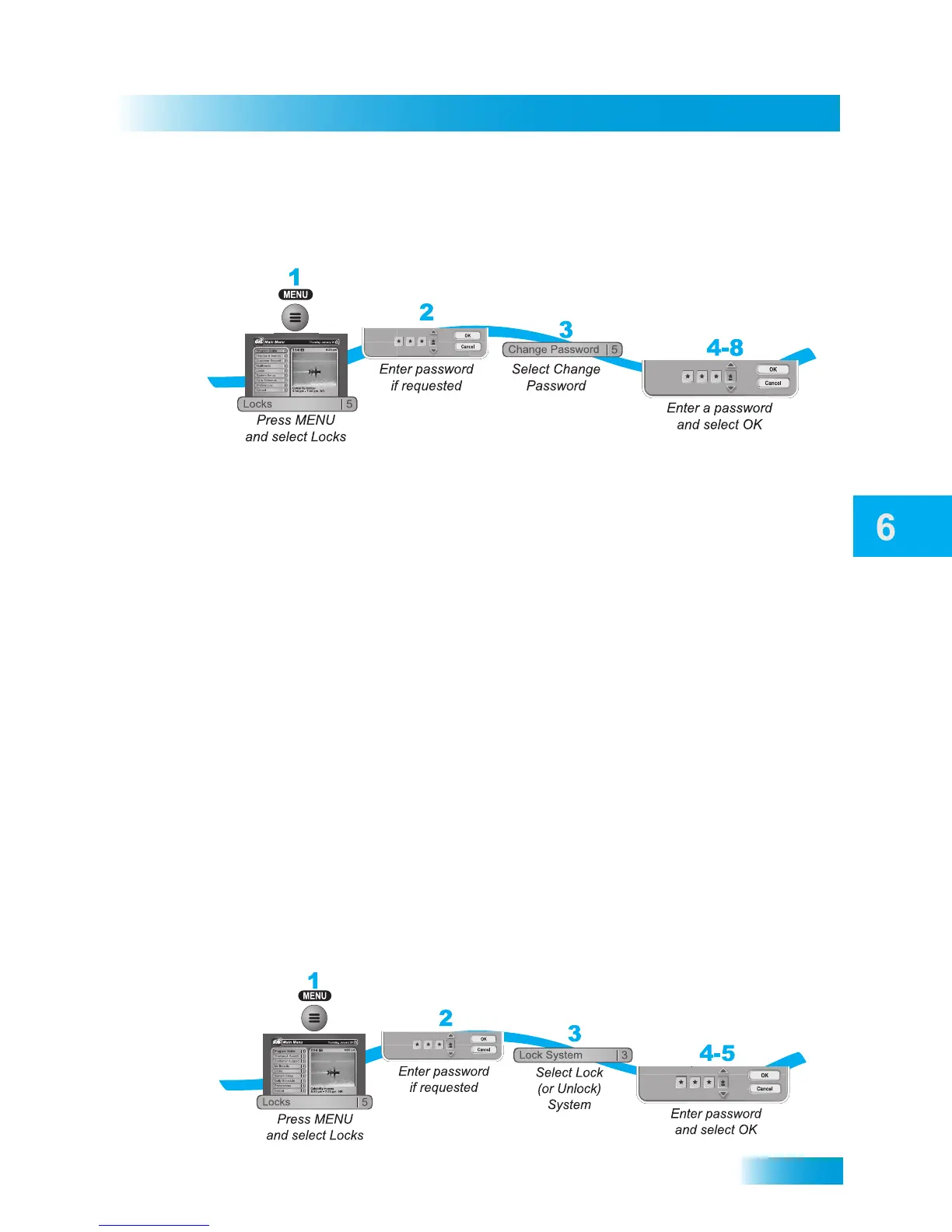
Set up your password before using the receiver locks.
1 Press the MENU button and then select Locks.
2 If the receiver is locked, enter the password using the remote control’s NUMBER PAD.
The receiver displays stars (*) as you enter the digits of your password. Then select OK.
3 If you are changing an existing password, select Change Password. If you are
creating a password for the first time, select Lock System and go to step 6.
4 Enter the current password using the remote control’s NUMBER PAD. Select OK.
5 Press the SELECT button.
6 Enter the new password using the remote control’s NUMBER PAD. Select OK.
7 Enter the new password again for confirmation, also using the NUMBER PAD. The
receiver displays stars (*) as you enter the digits of the password. Then select OK.
8 Memorize your new password. From now on, enter this password to lock or unlock the
receiver. If you forget the password, you will need to contact a DISH Network Customer
Service Representative.
LOCKING AND UNLOCKING YOUR RECEIVER
You must lock the receiver for any parental controls you set to take effect. Locking the
receiver also locks TV1’s modulator output (see page 92). To lock the receiver, you must
first create a password (see Creating or Changing Ratings Locks on page 45). Be sure to
refer to this section whenever you have set any parental-control locks on your receiver.



 To Next Page