87
Controlling Other Components
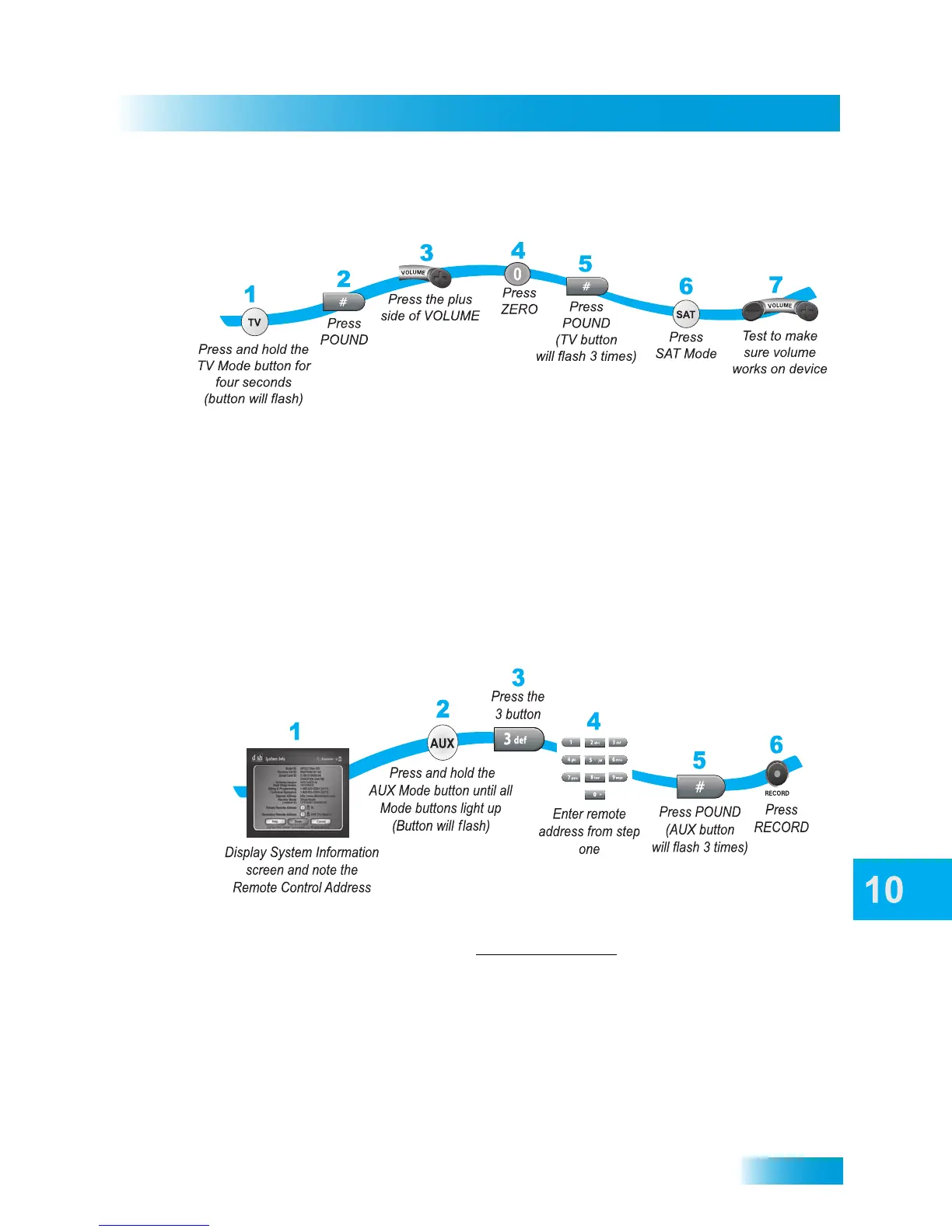
To set the remote back to adjust the TV volume (steps 1-5 set up the remote and steps
6-7 make sure the remote is set up correctly):
Programming to Control a Second Satellite Receiver
If you have another DISH Network satellite receiver installed, you can use this remote in
AUX mode to control it along with your new receiver. When you program the remote to
control this other receiver, the remote will send out IR and UHF (not UHF Pro) signals to
the receiver. You can program the remote to control any other DISH Network satellite
receiver, except for the following:
• You cannot control TV2 programming on a DISH 322, ViP222, ViP222k, ViP622 DVR,
ViP722 DVR,ViP722k DVR, DISH Player-DVR 522, 625, and 942 receivers
• The DishPlayer 7100/7200 receiver cannot be controlled by current-model remotes.
1 Turn on the other receiver and use the front-panel button to display its System Info screen.
Write down the receiver’s address:
2 Using your new DISH Network remote control, press and hold the AUX mode button until
all the other mode buttons light up, and then release AUX. The AUX mode button flashes.
3 Press the 3 button on the remote control’s NUMBER PAD.
4 Continue using the NUMBER PAD on the remote to enter the address you wrote in step 1.
5 Press the remote control’s POUND (#) button. The AUX mode button blinks three times.
6 Press RECORD and ensure the remote control’s address matches the address displayed.



 To Next Page