EasyManua.ls Logo

Dish Network Wally - Wally Receiver

Dish Network Wally
69 pages
Print Icon
To Next Page IconTo Next Page
To Previous Page IconTo Previous Page
Loading...
13
Wally User Guide
3
Wally Receiver and Remote Control
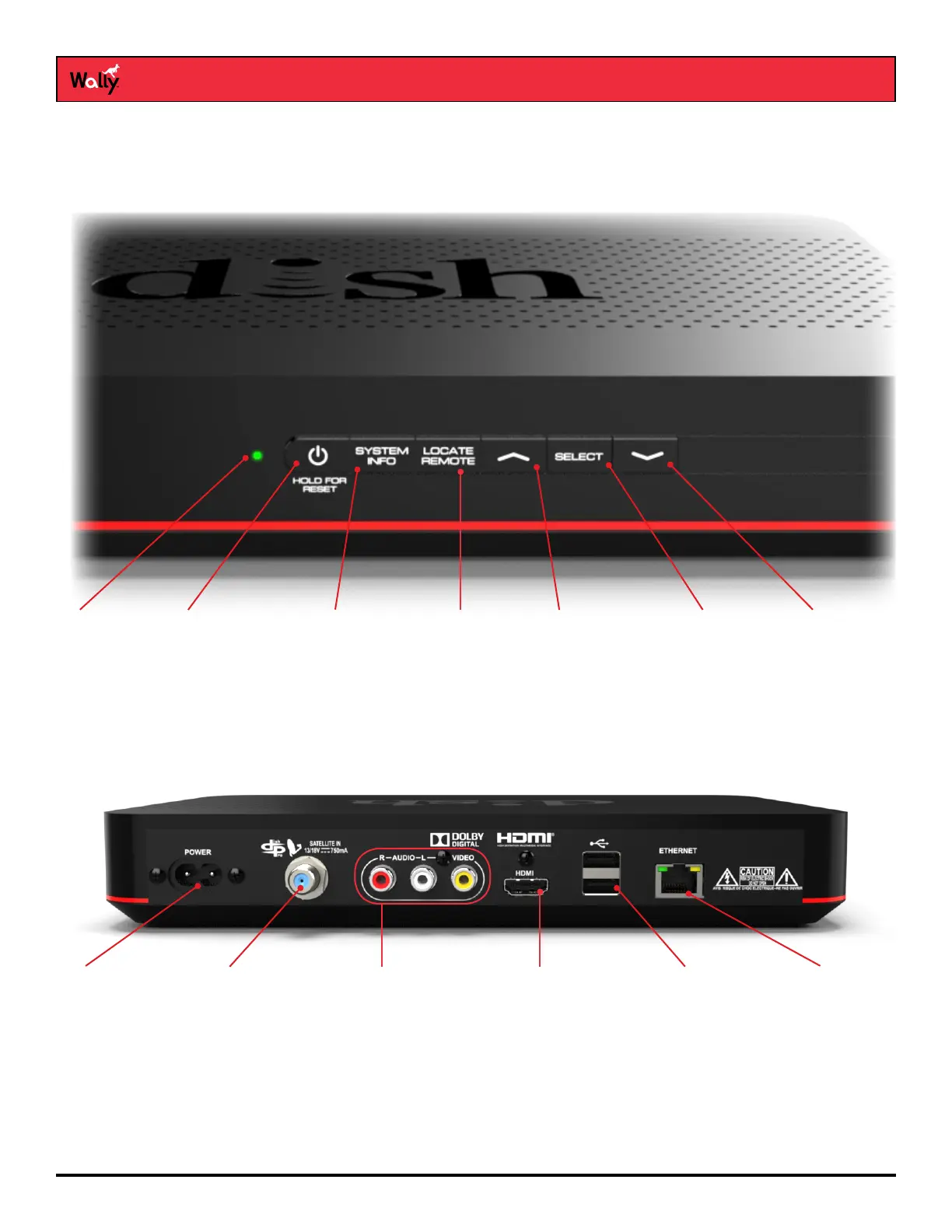
Wally Receiver
Front Panel
Back Panel
System Info
Displays system
information
Power
Hold to reset your
Wally
LED Indicator
Indicates power
status
Up
Navigates
through menus or
channels
Select
Selects an item
or channel
Down
Navigates
through menus
or channels
Locate Remote
Press to locate your
remote control
Power Port
Plugs in to AC
power using the
power cable
Satellite Port
Connects to the
satellite dish
USB Ports
Connects to
multimedia
devices, such as
an external hard
drive or accessory
Ethernet Port
Connects to a
broadband home
network
Audio/Video
Output
Provides a standard-
denition connection
to the TV audio and
video input
HDMI
®
Output
Provides a high-
denition audio and
video connection
to an HDTV or HD
monitor

Other manuals for Dish Network Wally

Related product manuals