14
Wally User Guide
3
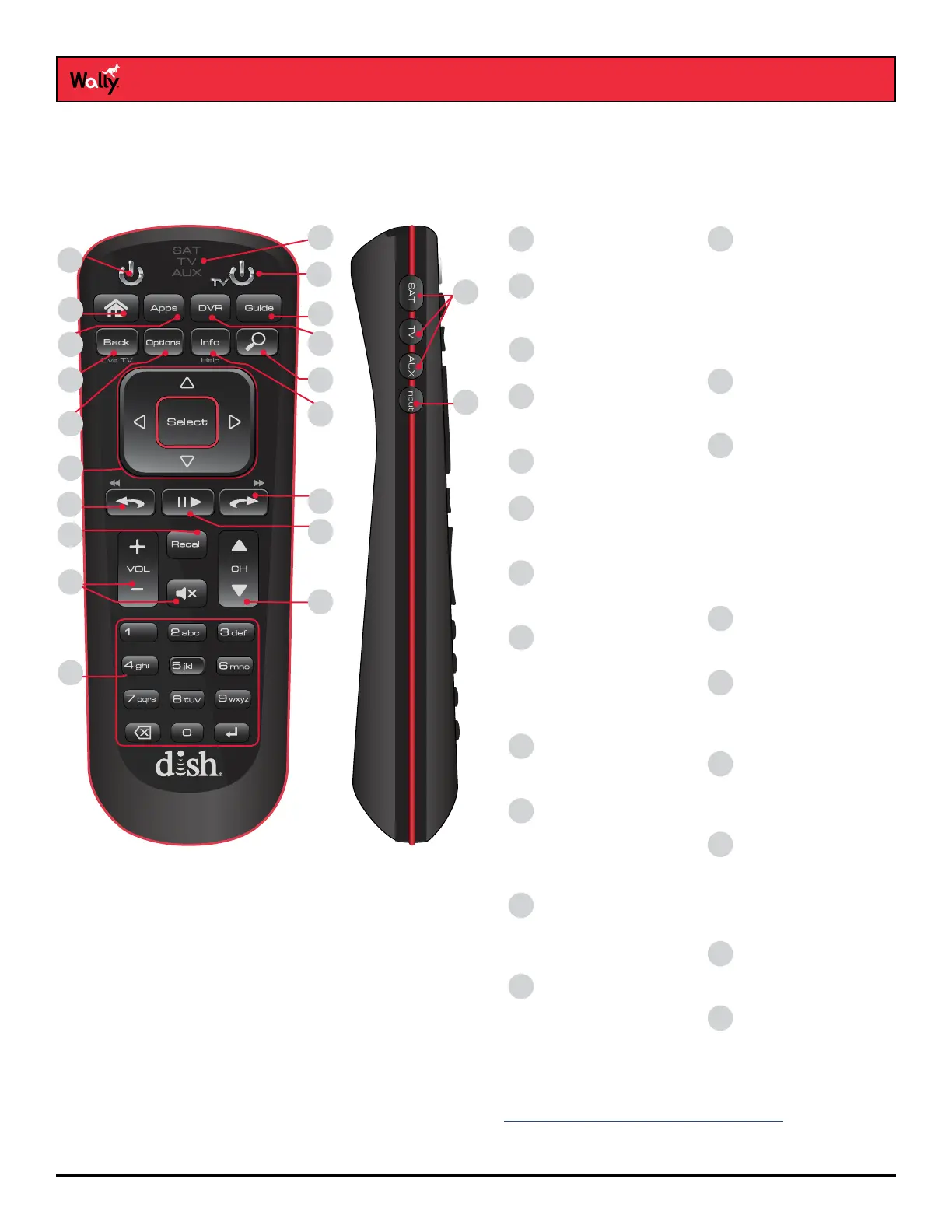
Wally Receiver and Remote Control
Remote Control Buttons
To display your satellite programming and to use the features described below, press the SAT Mode button, located
on the left side of the remote.
*Works only with a connected external hard drive. See the Recording and Watching DVR Programs chapter for
more information.
1
17
13
14
15
8
9
10
11
18
16
12
19
4
3
2
5
6
7
20
21
Receiver Power
Turns the Wally on and off
1
Options
Displays the Options
menu
9
Home
Displays the Home
screen
4
Search
Displays the Search
screen to help nd
programs
11
Arrow Buttons &
Select
Helps you navigate the
Wally user interface
12
Skip Back/Rewind*
• Press to jump back 10
seconds in a program
• Press and hold to
rewind through the
program
• Navigates tabbed
screens
13
Number Buttons
• For entering a
channel number
• Navigates through
menus and the
program guide
19
Pause/Play*
Pauses or plays a live or
recorded program
14
Apps
Displays the Apps bar
5
Skip Forward/
Fast-Forward*
• Press to jump forward
30 seconds in a
program
• Press and hold to
fast-forward through
a program
• Navigates tabbed
screens
15
DVR*
Displays recorded
programs
6
VOL▲, VOL▼,
and Mute
Controls TV and
AUX volume
17
Guide
Displays the program
guide
7
Recall
Returns to previously
viewed channel(s)
16
Back/Live TV
• Returns to the previous
menu
• Press and hold to
return to viewing live
TV
8
CH▲ and CH▼
• Changes the channel
• Pages up and down on
some screens
18
10
Info/Help
• Displays info on a
program
• Press and hold for help
on most screens
Input
Changes the input for
your TV when in TV mode
21
20
SAT / TV / AUX Mode
Changes which device the
remote controls
SAT / TV / AUX
Mode indicator lights up
when in that mode
2
TV Power
Turns the TV on and off
3










 To Next Page