9
IP2251EN
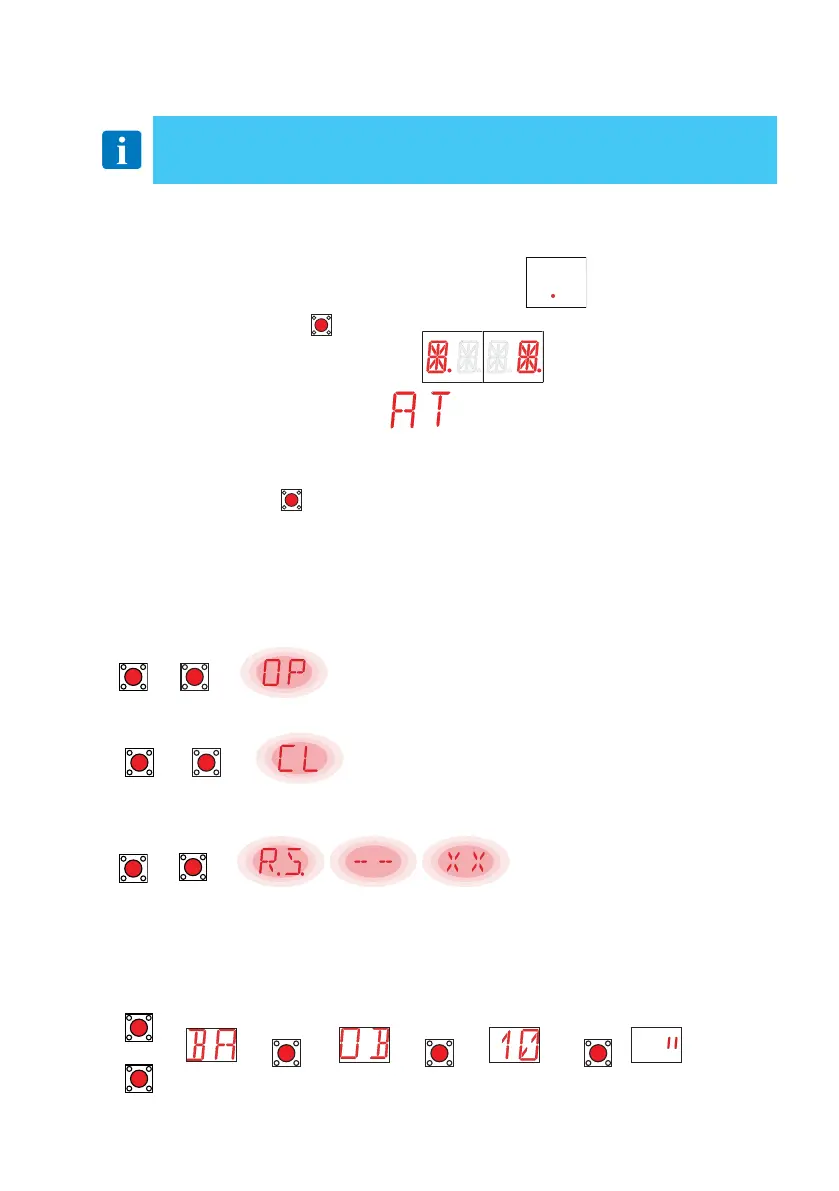
The procedure to switch on the display is as follows:
• press the ENTER key
ENTER
• the display functioning check starts
• the first level menu is displayed
The procedure to switch off the display is as follows:
• press the ESC key
ESC
NOTE: the display switches off automatically after 60 s of inactivity.
• The simultaneous pressing of the ↑and ENTER keys produces an opening command.
UP
+
ENTER
→
• The simultaneous pressing of the ↓and ENTER keys produces a closing command.
DOWN
+
ENTER
→
• The simultaneous pressing of the ↑ and ↓ keys produces a POWER RESET com-
mand (power supply interruption and automation restart).
UP
+
DOWN
→
• Keep the UP ↑ or DOWN ↓ key pressed to begin fast menu scrolling.
• In some menus, the parameter measurement unit can be viewed by pressing the
ENTER key once the value has been displayed.
Example: setting of 10 seconds for parameter OB.
UP
→ →
ENTER
→ →
ENTER
→ →
ENTER
DOWN
5. Programming
5.1 Switching the display ON and OFF
NOTE: pressure on the keys may be quick (less than 2s) or prolonged (longer than 2
s). Unless specified otherwise, quick pressure is intended. To confirm the setting of a
parameter, prolonged pressing is necessary.
5.2 Navigation keys



 To Next Page