8860 Installation and Programming Guide | Digital Monitoring Products 18
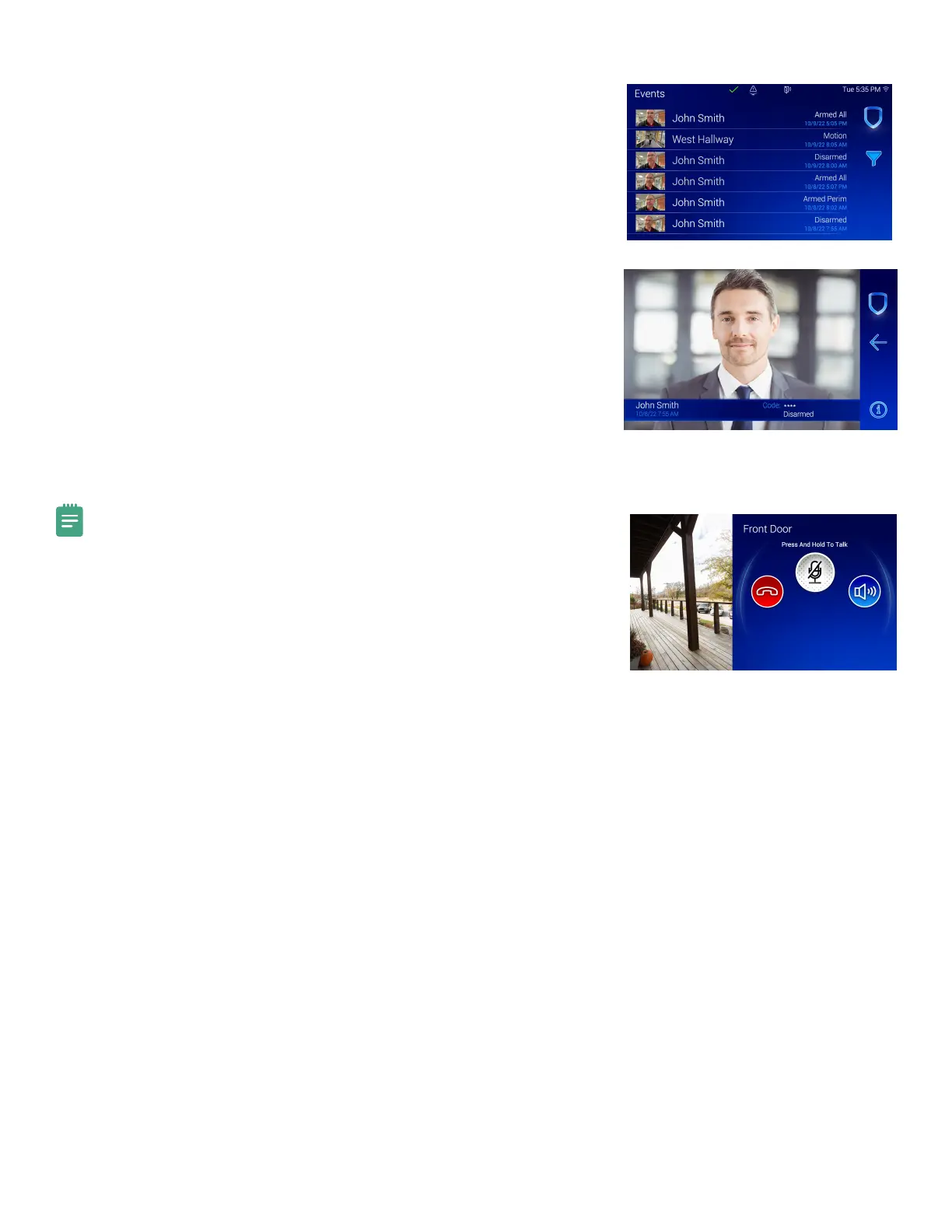
Snapshot Verification Events
This function allows you to see a snapshot from the keypad front facing camera
during an arming or disarming event. You can view snapshot events in Events on
the keypad or through Event History on Virtual Keypad.
1. In the Carousel menu, tap Events.
2. Tap a row to select an event.
3. Swipe the screen left to go to the next event. Swipe the screen right to
go to the previous event. Tap the Info icon to display the Event
Information Banner.
4. Tap the Filter icon to display the Filter Events menu. Use the Filter By
section on the left side of the screen to change how the events are
categorized. The categories include Type, Camera, Users, Dates, and
Areas. Tap Apply to activate the filter in the Events List.
5. After a filter is activated in the Events List, a horizontally scrollable
banner will display the applied filters. To remove an individual filter, press
the X on each filter.
Connect the Video Doorbell
Note: The 8860 supports one doorbell per system. Video doorbell
capabilities are only available for the DMP Model V-4061DB Video Doorbell.
1. In the Carousel menu, tap Video Doorbell.
2. Press and hold the Talk button to talk through the keypad. Tap the Speaker
button to mute and unmute the incoming audio. Tap the End button to
end the video feed and go back to the Home Screen.



 To Next Page