17
Setting Alarm
A. Setting Alarm 1 or Alarm 2
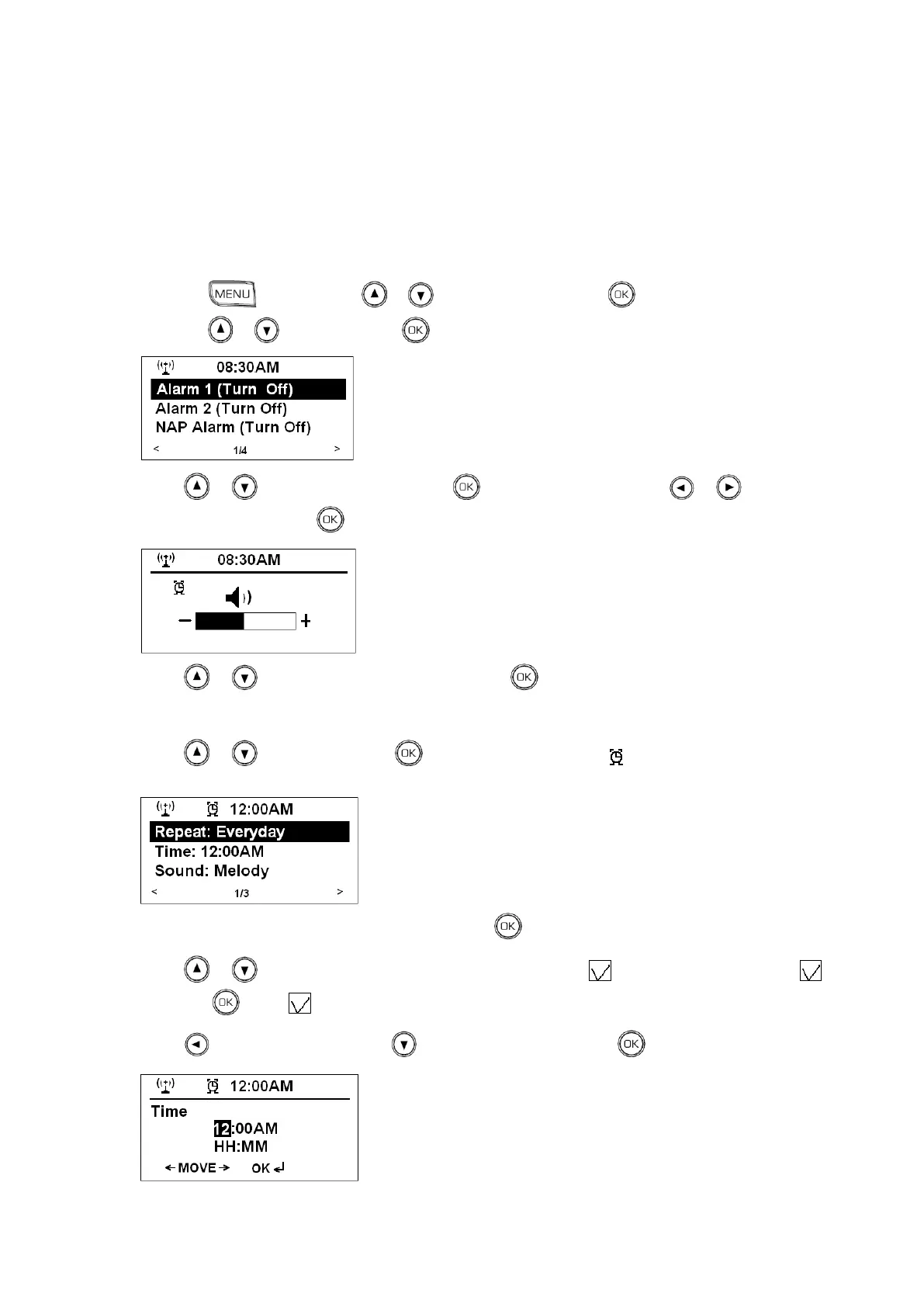
1. To get alarm setting mode, you can press the ALARM button directly, or follow below 2 steps:
a) Press , and then press or to <Configuration>, press to confirm.
b) Press or to <Alarm>, press to confirm.
2. Press or to <Alarm Volume>, press to confirm, and then press or to adjust
alarm volume level, press to confirm.
3. Press or to pick the alarm you wanted, press to confirm, it will ask you to set alarm states
“Turn On” or “Turn Off”.
4. Press or to „Turn on‟, press to confirm, the alarm icon shows up, and it will ask you to
set alarm repeat frequency.
5. While cursor point to < Repeat: Everyday >, press to confirm.
6. Press or to check if your preferred option have got a tick before it, if it haven‟t got a
yet, press to get for it.
7. Press to return, and then press to <Time: 12:00AM>, press to confirm.



 To Next Page