[DS-RX1 Printer Driver] Instruction Manual (For Windows 11)
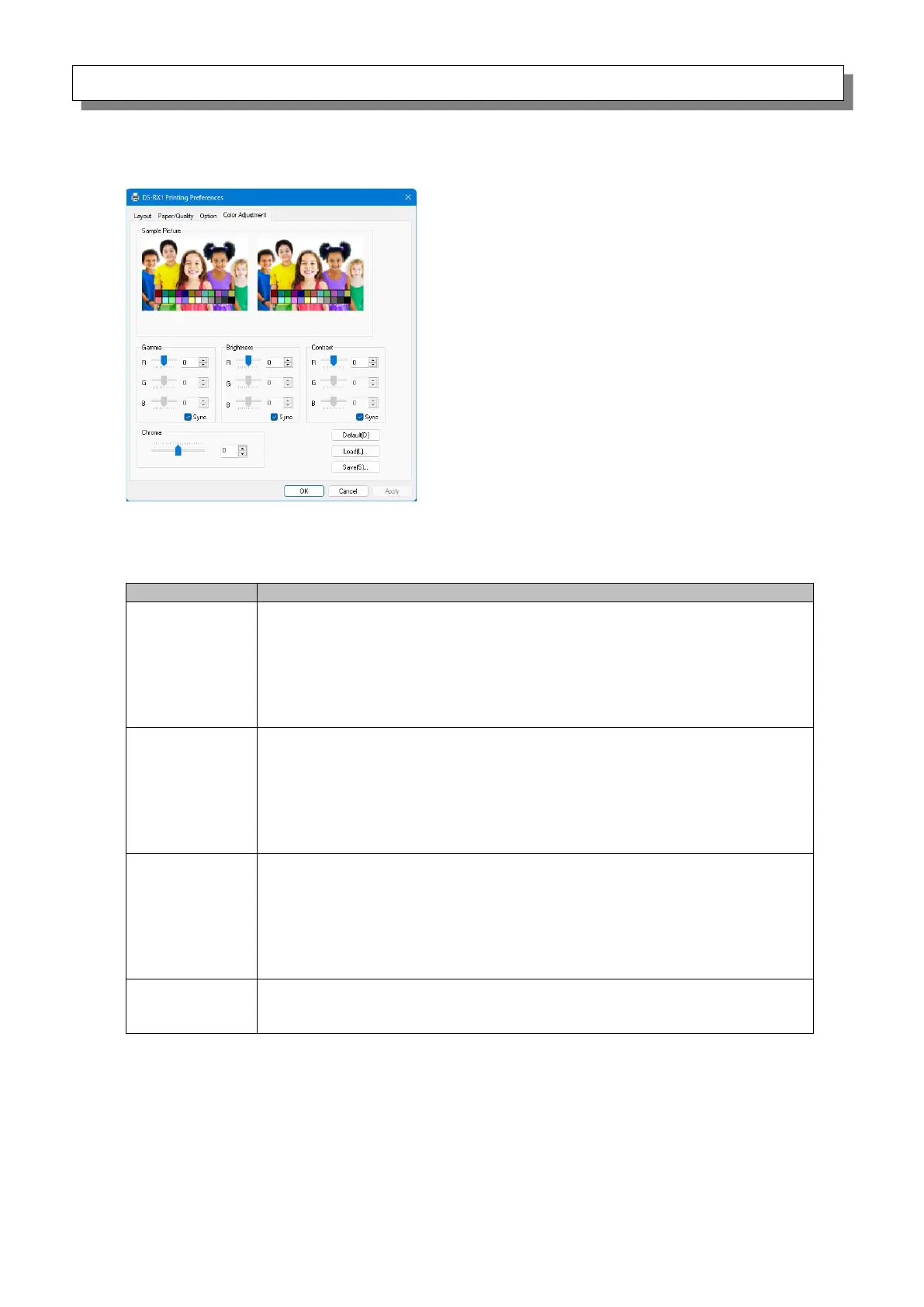
2.2.5 Color Adjustment
If the Handled by Driver check box is selected in the 2.2.4 Option, the adjustment values of the
Color Adjustment tab are applied to the image.
The following section shows the setting ranges on the Color Adjustment tab.
-100 (dark) to 100 (bright) (“0” results in no adjustment, γ2.0 to 0.5)
Adjust the density of the half-tone section of the image. Increasing the
gamma value brightens the half-tone section.
Sync check box
ON: Set RGB to same value.
OFF: Set RGB to different value.
-100 (dark) to 100 (bright) (“0” results in no adjustment)
Adjust the brightness of the image. Increasing the brightness value brightens
the entire image.
Sync check box
ON: Set RGB to same value.
OFF: Set RGB to different value.
-100 (weak) to 100 (strong) (“0” results in no adjustment)
Adjust the contrast of the image. Increasing the contrast value increases the
difference of brightness and darkness.
Sync check box
ON: Set RGB to same value.
OFF: Set RGB to different value.
-100 (weak) to 100 (strong) (“0” results in no adjustment)
Adjust the chroma of the image.
Figure 2.2.5 Color Adjustment tab



 To Next Page