EasyManua.ls Logo

DNP DS-RX1 HS - 2.6 Orientation

DNP DS-RX1 HS
32 pages
Print Icon
To Next Page IconTo Next Page
To Previous Page IconTo Previous Page
Loading...
20
2.6 Orientation
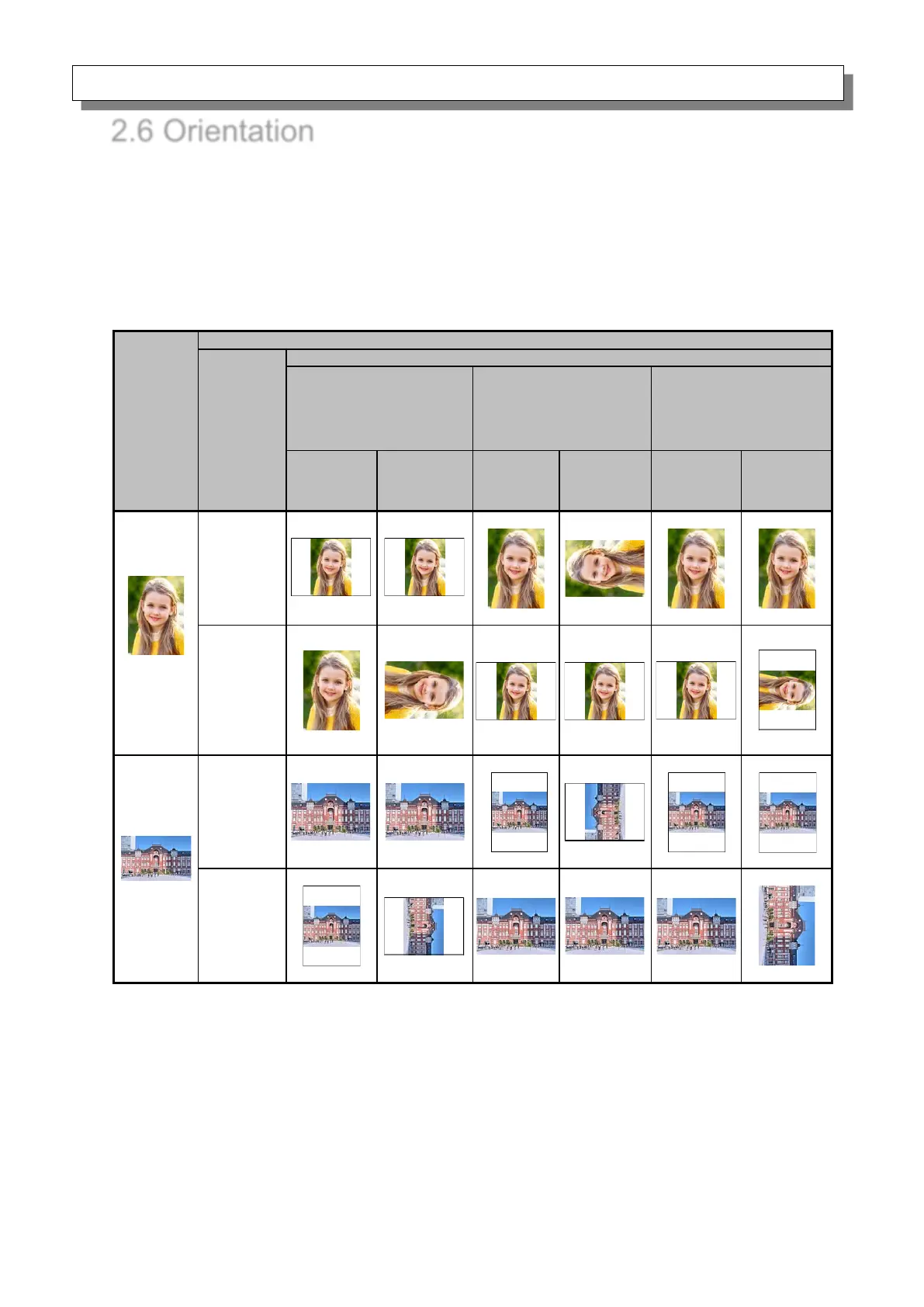
The following chart shows the relationship of images generated by an application and printed items
(output direction) according to the orientation setting.
Hint: The PR print size (center column) is prepared for applications that are not able to change from
landscape to portrait and back using the orientation setting on the layout tab. Normally it is
recommended to use the non-PR print sizes and use the orientation settings for landscape and
portrait on the layout tab.

Original
image
Driver setting
Orientation
Paper setting
(5x3.5)
(5x5)
(6x4)
(6x4)x2
(6x6)
PR (3.5x5)
PR (4x6)
PR (4x6)x2
(5x7)
(6x8)
Generated
image
Printed item
(Output
orientation ↓)
Generated
image
Printed item
(Output
orientation ↓)
Generated
image
Printed item
(Output
orientation ↓)
Portrait
Landscape
Portrait
Landscape

Other manuals for DNP DS-RX1 HS

Related product manuals