12
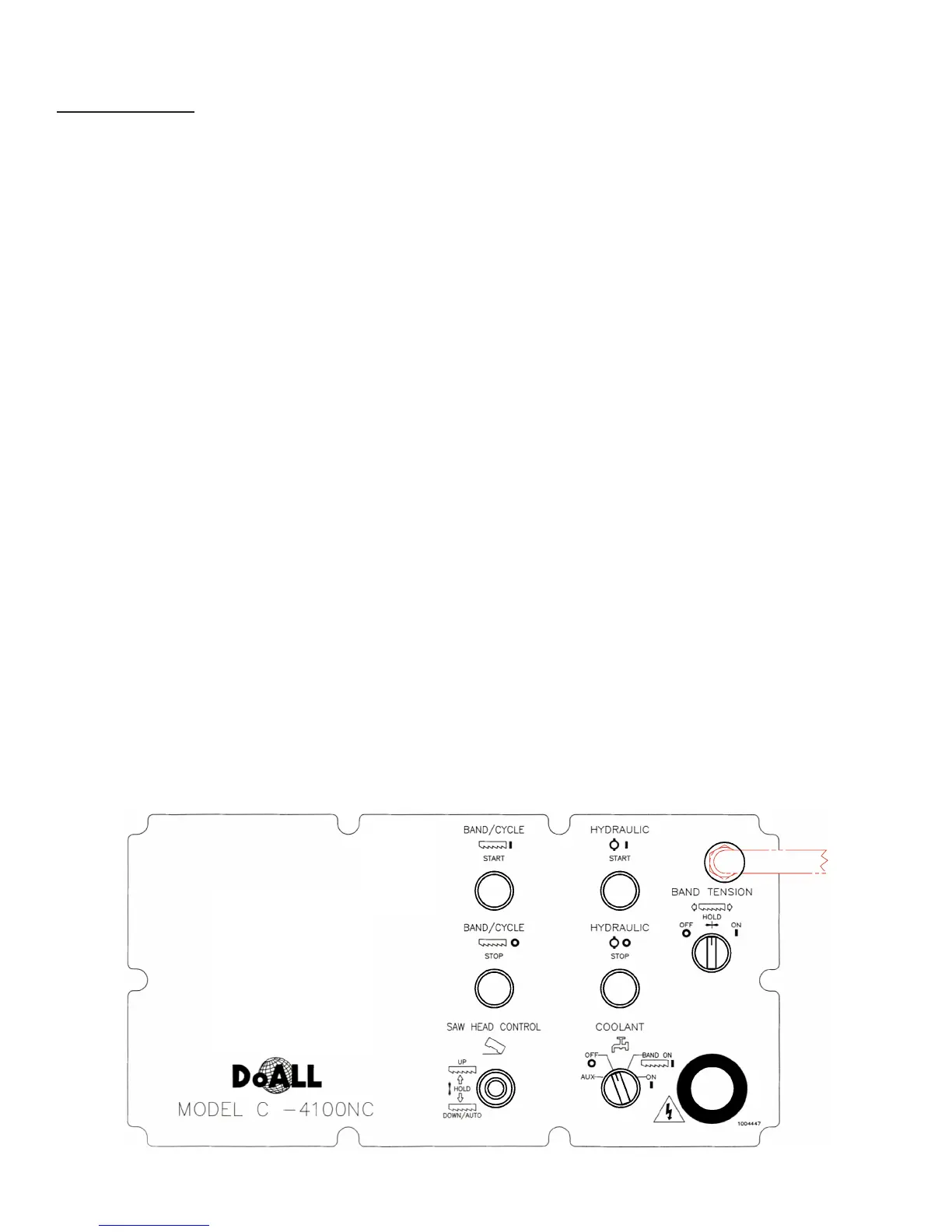
Typical Electrical Pushbutton Panel.
• During manual or automatic mode: (a) If the saw
band is running and the xed vise is clamped, the
saw head will move down rapidly until the work
sensing arm contacts the material. The saw head
continues moving down under Feed Force valve
control; (b) If the work sensing arm is locked in the
up position, the saw head will move down under
Feed Force valve control (no rapid).
• During manual operating mode: The following
alarm message will be displayed across the bottom
of the VIEW screen if the band drive motor is not
running: F2 TO LOWER HEAD
• If the operator pushes F2: (a) The saw will move
down rapidly until the work sensing arm contacts
the material and saw head motion is stopped; (b)
Starting the band drive motor removes the displayed
message.
• During automatic operating mode: The following
message will be displayed if the band drive motor is
not running: TURN ON SAW BAND. The operator
must turn the band drive motor on before the saw
head will be allowed to move.
4. Hydraulic Start. Push this green button to start the
hydraulic pump, coolant pump, and chip conveyor
motors (the button will be illuminated when the
hydraulics are operating).
• The following conditions must exist before trying
to start the hydraulics: (a) The All Stop button is
reset (turn clockwise); (b) Disconnect switches on
the control console and band drive enclosure are
"ON".
5. Hydraulic Stop. Pushing this red button turns off
the hydraulic pump, coolant pump, chip conveyor,
and band drive motors.
CONTROL CONSOLE
Electrical Controls
1. Band/Cycle Start. Push this green button to start
the band drive motor. The button will be illuminated
when the band drive motor is operating. Allow
the motor to accelerate to operating speed before
starting a cut.
• The following conditions must exist before pushing
the Band Start button: (a) Hydraulics must be
"ON"; (b) All doors and covers must be closed;
(c) A saw band must be installed and the Band
Tension selector must be at “ON”; (d) There must
be no band drive fault (malfunction or overload of
the band drive inverter); (e) The Saw Head Control
selector must be in the "DOWN/AUTO" position.
2. Band/Cycle Stop. Push this red button to stop the
band drive motor.
3. Saw Head Control. Use this selector switch with
"UP", "HOLD" and "DOWN/AUTO" settings to
regulate the direction of saw head movement.
• Upward saw head movement can be executed at
any time by moving the Saw Head Control selector
to “UP”.
• If the band drive motor is off, downward saw head
movement can be executed by moving the Saw
Head Control selector to “DOWN/AUTO”, then
press the F2 key.
• When switching from automatic cycle to manual
machine operation, move the Saw Head Control
selector to “HOLD” and then to “DOWN/AUTO”.



 To Next Page