NOTE:
• Only the beginning of your custom message
will be seen on the touchscreen.
• Reply with text message is not compatible
with iPhones.
• Auto reply with text message is only available
on phones that supporting Bluetooth MAP.
Incoming Text Messages
After pairing your Uconnect system with a
Bluetooth enabled mobile device with the Mes-
sage Access Profile (MAP), the Uconnect system
can announce a new incoming text message and
read it to you over the vehicle’ s audio system.
NOTE:
Only incoming text messages received during
the current ignition cycle can be viewed/read.
To enable incoming text messaging:
iPhone
1.
Press the settings button on the mobile phone.
2. Select Bluetooth.
• Ensure Bluetooth is enabled, and the
mobile phone is paired to the Uconnect
system.
3. Select
located under DEVICES next to
Uconnect.
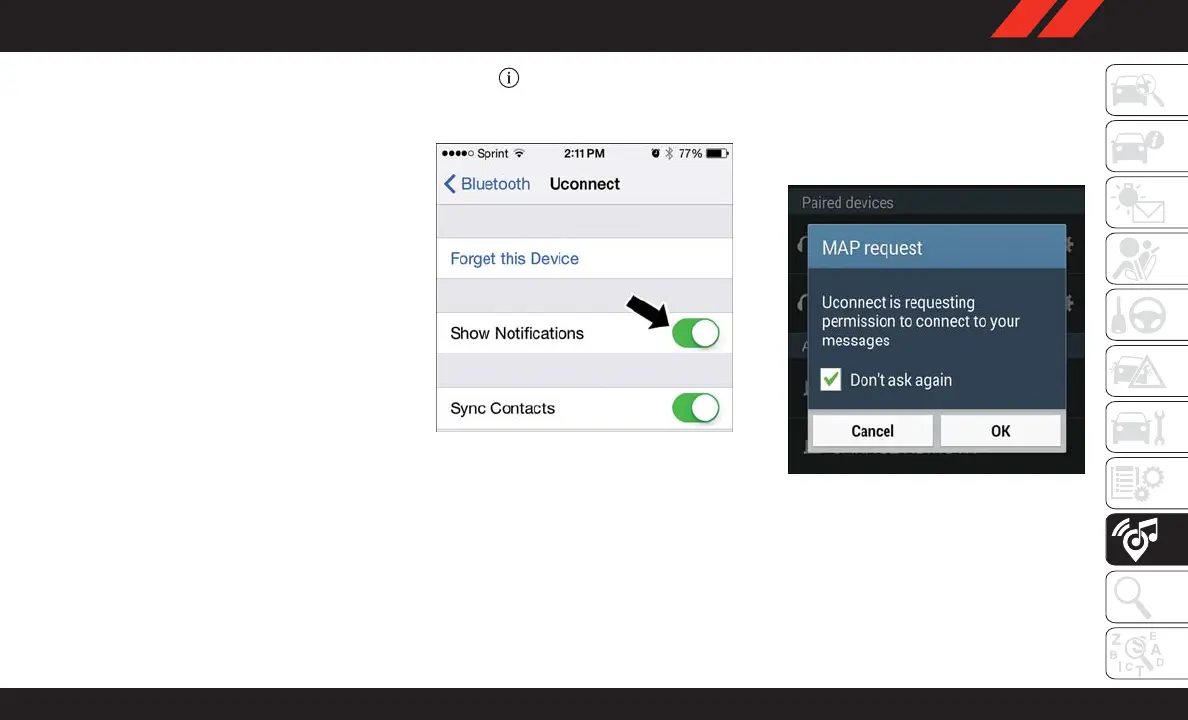
4. Turn “Show Notifications” to on.
Android Devices
1. Push the Menu button on the mobile phone.
2. Select Settings.
3. Select Connections.
4. Turn “Show Notifications” to on.
• A pop up will appear asking you to accept
a request for permission to connect to
your messages. Select “Don’t ask again”
and press OK.
NOTE:
All incoming text messages received during the
current ignition cycle will be deleted from the
Uconnect system when the ignition is turned to
the OFF position.
Enable iPhone Incoming Text Messages
Enable Android Device Incoming Text
Messages
285















 To Next Page