- 35 -
CHANGING PRESSURE SENSORS
The numbers within brackets refer to g. R.
Disconnect the water purier from electricity.1.
Remove the top cover (two screws at rear).2.
Remove the control panel (two screws at top and two at 3.
bottom).
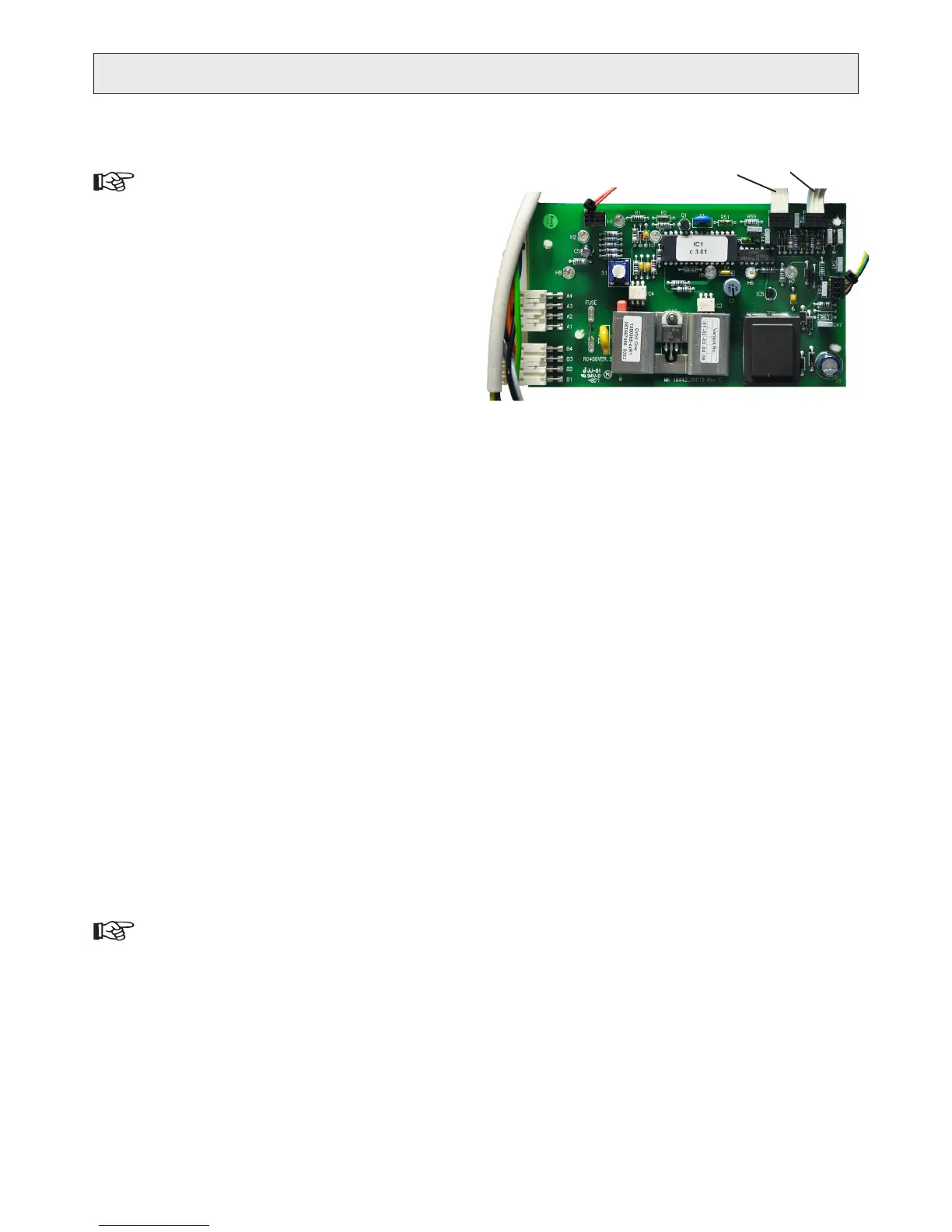
On the PCB, release the connection from the pressure 4.
sensor by pulling them carefully out- and upwards so
that the contact unlocks.
Connector on the pressure sensor ().
Connector on the pressure sensor ().
Use a suitable tool (preferably a small hose gripper) to 5.
free the pressure sensor from the quick connector.
The inlet pressure sensor is located in the end of the a)
1/4” hose coil connected to the pressure regulating
valve.
The outlet pressure sensor is located in the pressure b)
accumulator valve which is oriented downwards
from the puried water outlet.
(See “CHANGING THE PURIFIED WATER OUTLET”
for instructions.)
Lead the pressure sensor cable through the opening in 6.
the casing and connect to the PCB.
Cut the ties holding the old sensor and remove it. Se-7.
cure the new sensor in the same way to the casing.
Secure the hose coil away from the motor and its fan.8.
Put back the control panel, top cover and front cover.9.
The new pressure sensor must be calibrated (paired)10.
with the PCB.
If the outlet pressure sensor was changed, see “CALI-
BRATING OUTLET PRESSURE SENSOR” for instruc-
tions.
If the inlet pressure sensor was changed, is the calibra-
tion done automatically, see “CALIBRATING INLET
PRESSURE SENSOR”.
CALIBRATING PRESSURE SENSOR
The pressure sensors must be calibrated (paired) with the PCB af-
ter changing either the sensor or PCB. This is to set the individual
offset (output at zero pressure) from the sensor to the PCB.
Outlet pressure sensor
Disconnect the electrical supply.1.
Remove the 3/8” hose from the puried water outlet, to 2.
relase the pressure on the outlet pressure sensor.
Press and hold the ‘calibration’ button.3.
Connect electrical supply and keep the button pressed 4.
until the red ‘stop’ lights up. Release the button.
Disconnect the electrical supply.5.
Reconnect the puried water hose.6.
Connect electrical supply. 7.
The product is now ready for use.
Inlet pressure sensor
The inlet pressure sensor is calibrated automatically every time
the product is connected to electrical supply, during the start up
sequence.
SERVICE
1
2
Replace with a new pressure sensor.
R


 To Next Page