- 18 -
TROUBLESHOOTING
guide compromises the internal safety systems of the product
and may also involve operation of the water purier without
protective cover.
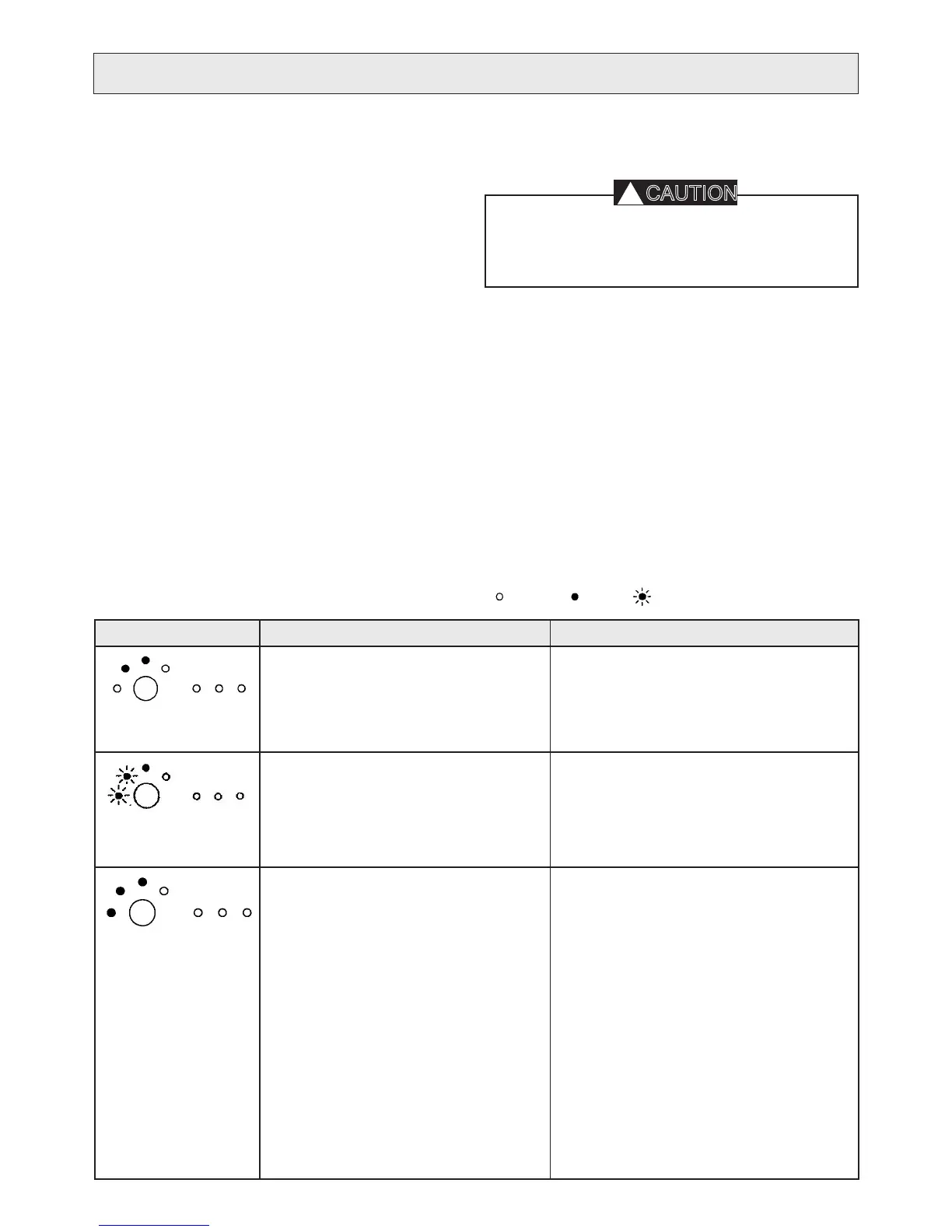
The “1) LED INFORMATION GUIDE” will help you to inter-
pret the LED information shown on the product’s display.
The “2) FAULT IDENTIFICATION GUIDE” offers additional
information such descriptions of a number of symptoms,
e.g. low ow, and suitable solutions.
If a fault can be identied based on the LED-information, it is
advisable to see the “FAULT IDENTIFICATION GUIDE” which
offers more extensive information about the symptoms as well
as suitable solutions and actions to take.
If a faulty component is identied, replace the component
referring to the step-by-step instructions in this manual, see
“SERVICE”. In addition, please consult the user’s manual for
the product and its “TROUBLESHOOTING” section for further
information.
Please note that some of the methods in this troubleshooting
To protect the user and the water purier from incorrect use, there are several different built-in alarms, which cause the purier to
give an indication and stop. The table below gives probable causes of warnings given by the water purier.
The lights can appear in the following three ways: extinguished lit ashing
INDICATION FAULT CASE REMEDIAL ACTION
Time to replace lter or clean the grid.
The feed water’s pressure is too low.
There is time before the water purier experi-•
ences an emergency stop. Prepare to replace
lter I and to clean the grid.
Check the feed pressure. If necessary, increase •
the pressure.
The feed pressure is too low so the water
system has stopped. The system is idle
waiting for restart.
The system will attempt to restart automatically. •
Make sure that the feed pressure is sufcient. If
necessary, change lters.
If the calibration button is pressed, the system •
will restart. Release the button as soon as the
Filter I and Alarm light goes out.
Alarm for blocked lter I or II.
Alarm for dirt in the grid.
Alarm for water leak/condensation on the base
plate under the pre-lters.
The feed water’s pressure is too low.
Check that there is nothing in the lter contain-•
ers that is obstructing the water ow.
If necessary, replace lter I or II.•
Check the grid according to • CLEANING THE
GRID.
Check that all the connections are watertight.•
If there is water on the base plate, lean the prod-•
uct forward and wipe it up.
A pressure increase pump for the feed water can •
alleviate this.
Check the parts that can affect the feed water’s •
pressure (water line, coarse lter, extra pre-l-
ter).
LED INFORMATION GUIDE


 To Next Page