- 38 -
9
FITTING PUMP- / MEMBRANE SERVICE KIT
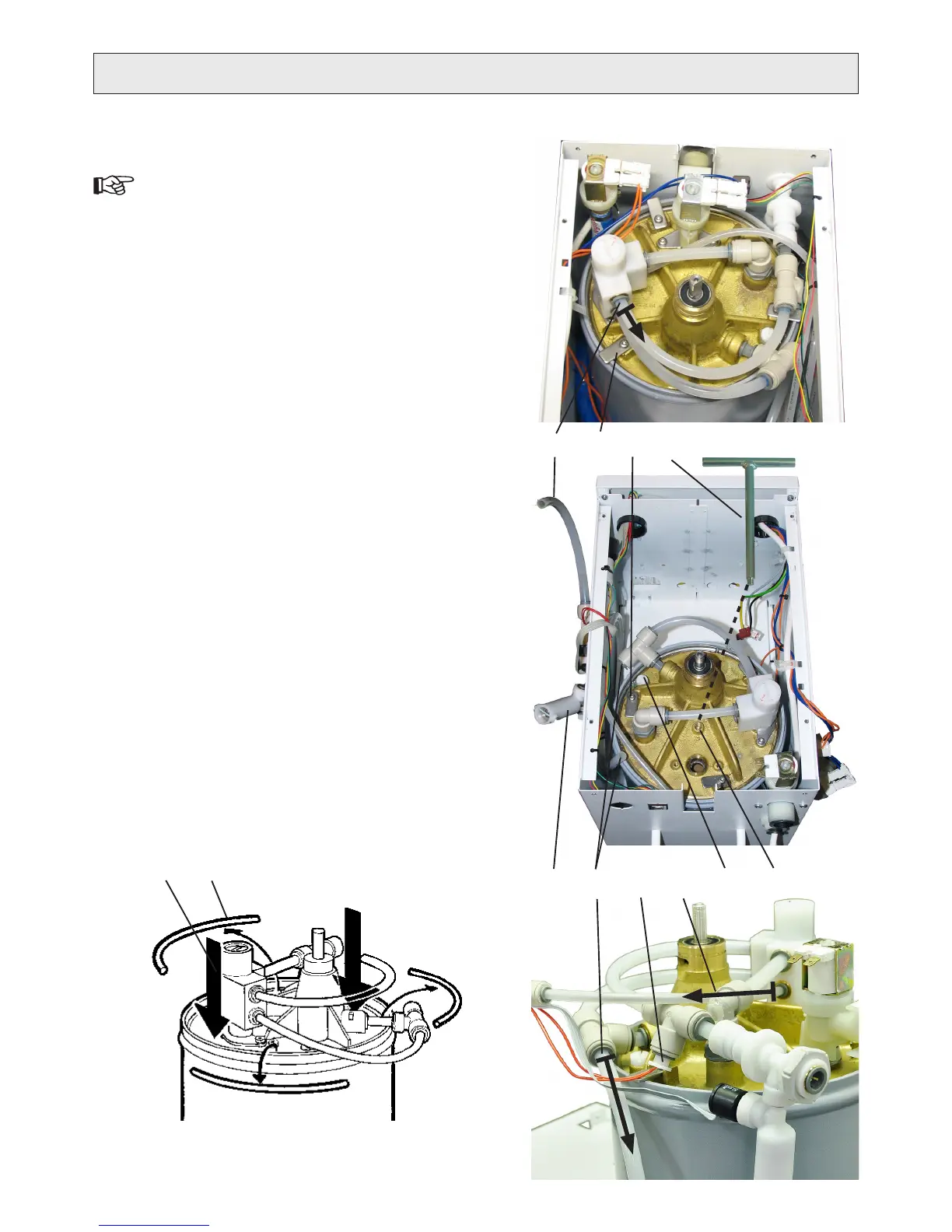
The numbers within brackets refer to g. V.
Disconnect the water purier from electricity and water 1.
supplies.
Remove the top cover (two screws at rear).2.
Remove the hoses from the backside of the product: the 3.
inlet-, reject- and puried water hose.
Remove the motor assembly, see “4. CHANGING MO-
TOR”, point 3-8, and put it aside.
Disconnect the hose from the pressure regulating valve 5.
that leads to the tee-connection with the conductivity
sensor ().
Remove the plastic nut holding the puried water outlet 6.
to the casing. Lift out the assembly and attached com-
ponents and let it hang outside the casing. ()
Disconnect the hose from the tee-connection (at the 7.
high pressure pump intake) that leads to the prelter
assembly ().
Remove the ush valve from the brass gable, see 8.
“CHANGING FLUSH VALVE”, points 5-6.
Release (do not remove) the three locking pieces (9. 4a)
just enough to rotate and tighten them again inside the
edge of the membrane pressure vessel (4b).
Remove the ¼” hose for the inlet pressure sensor from 10.
the pressure regulating valve ().
Lean the product backwards to pour out the water inside 11.
the vessel through the hole for the ush valve. It will
take less time if the white plastic plug (6) on the brass
gable is removed rst.
Attach a tee-handle (12. ) to the M8 thread () near the
centre of the brass gable. It will make it easier to lift out
the assembly out of the vessel.
Press down the pump/membrane assembly into the 13.
vessel () to remove the three sections of locking rings
().
SERVICE
Continues on next page
2
1
4A 4B
5
6
3
7
8
10
19
V


 To Next Page