Product description Assembly Instruction
6 ED UPS 060675 45532/17224 - 07/2023
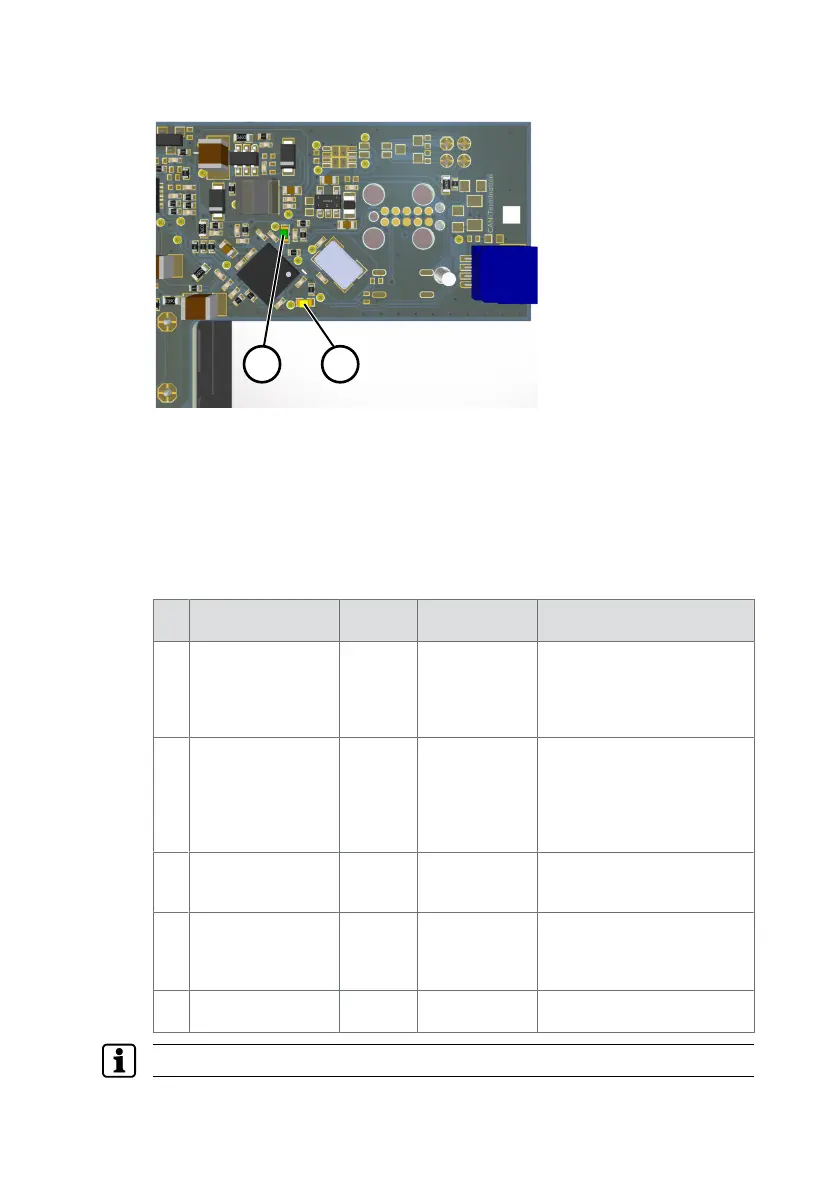
3.3 LED display
1 Green LED
2 Yellow LED
The green LED lights up continuously during operation.
The yellow LED has the following functionalities:
• Flashes when device identification is active.
• Lights up continuously if there are no errors and the device identification is
inactive.
• Is off if an error occurred while testing the self-test library.
• Error display
No. Error LED
display
Fix Acknowledgment
1 Connection to the
battery is faulty.
=> Charge con-
troller is switched
off
1 x short,
1 x long
Establish con-
nection.
Automatically when the con-
nection is OK.
2 Battery tempera-
ture is too high or
too low.
=> Charge con-
troller is switched
off
2 x short,
1 x long
Allow battery
to cool or bring
it to operating
temperature.
Automatically when the bat-
tery temperature is within
the permitted temperature
range.
3 Charge controller
has a temporary
error
3 x short,
1 x long
Restart Automatically when the
charge regulator is working
again.
4 ED error:
ED consumes too
little power (I_ED <
65 mA)
4 x short,
1 x long
Check the con-
nection be-
tween ED and
ED-AMP.
Automatically, when the ED
draws a current higher than
65 mA again.
5 Self-test or hard-
ware error
5 x short,
1 x long
Restart None
In case of permanent errors, contact dormakaba.











 To Next Page