Vigor2920 Series User’s Guide
328
5
5
.
.
8
8
C
C
r
r
e
e
a
a
t
t
i
i
n
n
g
g
a
a
n
n
A
A
c
c
c
c
o
o
u
u
n
n
t
t
f
f
o
o
r
r
M
M
y
y
V
V
i
i
g
g
o
o
r
r
The website of MyVigor (a server located on http://myvigor.draytek.com) provides several
useful services (such as Web Content Filter) to filtering the web pages for the sake of
protecting your system.
In general, Service Activation Wizard can activate WCF service for the router by using
simple steps. However, if you (for example, a company) purchase several different routers and
activate the services respectively, you might need an account to achieve the goal of
management.
Please follow the sections below to create an account for MyVigor.
5
5
.
.
8
8
.
.
1
1
C
C
r
r
e
e
a
a
t
t
i
i
n
n
g
g
a
a
n
n
A
A
c
c
c
c
o
o
u
u
n
n
t
t
v
v
i
i
a
a
V
V
i
i
g
g
o
o
r
r
R
R
o
o
u
u
t
t
e
e
r
r
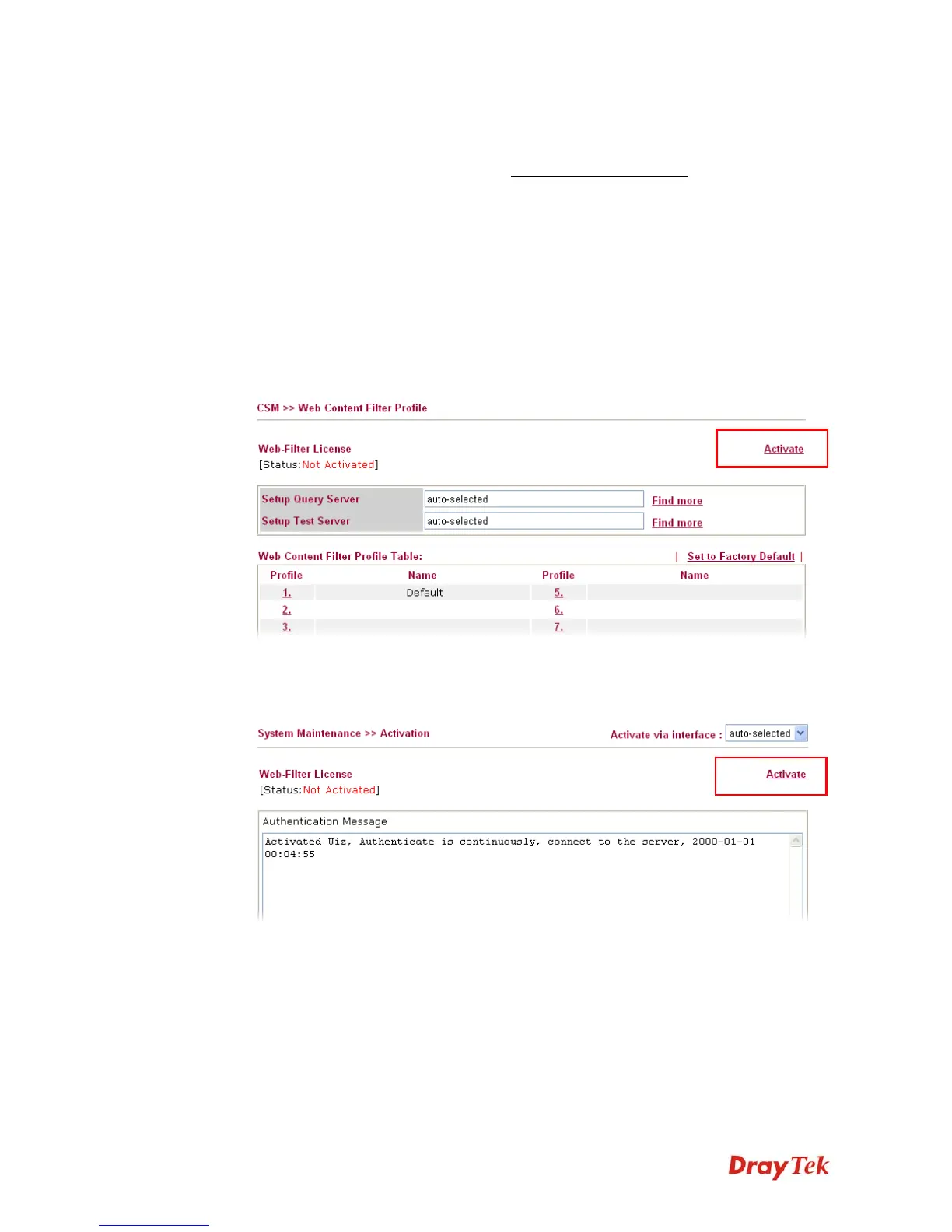
1. Click CSM>> Web Content Filter Profile. The following page will appear.
Or
Click System Maintenance>>Activation to open the following page.














 To Next Page