Vigor2920 Series User’s Guide
86
3
3
.
.
6
6
.
.
2
2
G
G
e
e
n
n
e
e
r
r
a
a
l
l
S
S
e
e
t
t
u
u
p
p
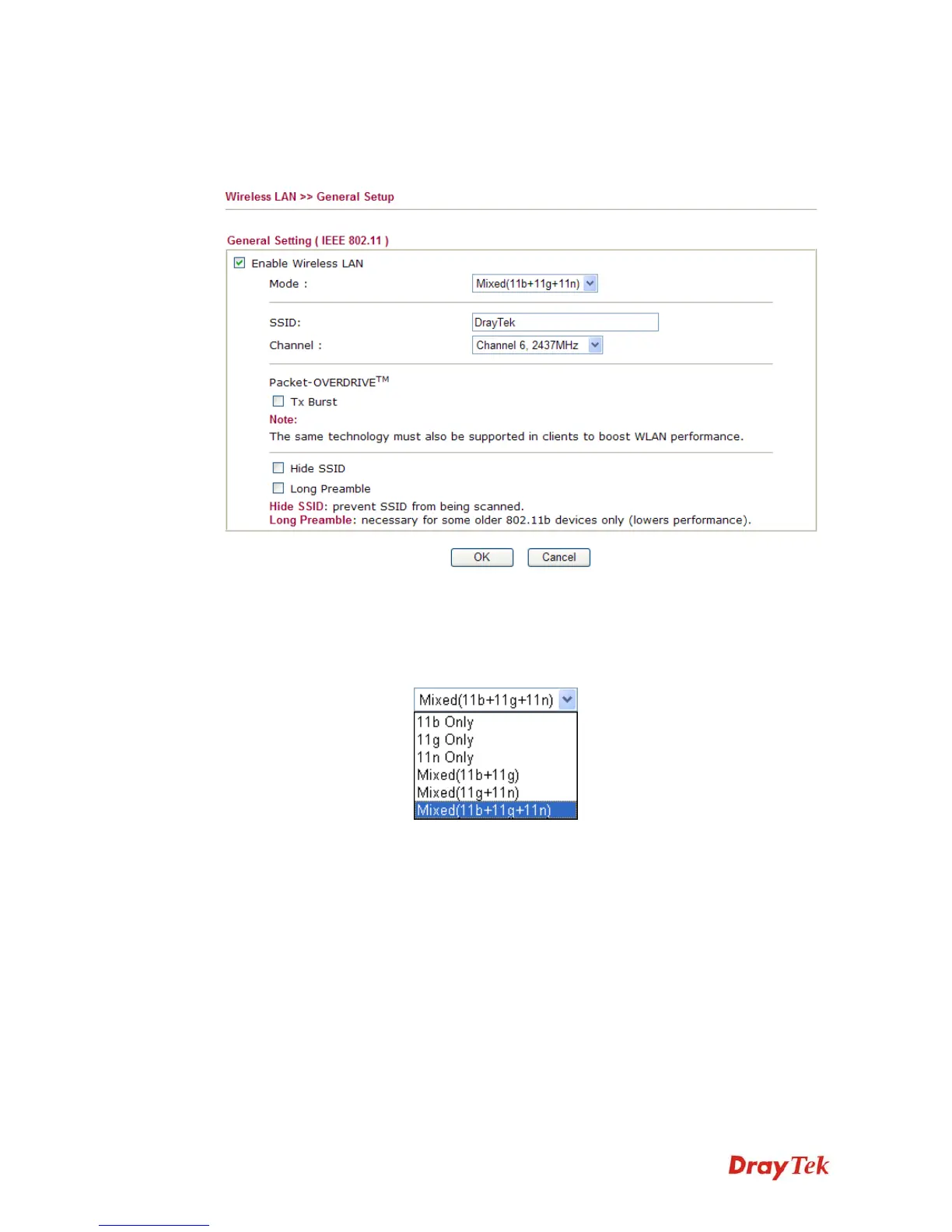
By clicking the General Settings, a new web page will appear so that you could configure the
SSID and the wireless channel. Please refer to the following figure for more information.
Enable Wireless LAN Check the box to enable wireless function.
Mode At present, the router can connect to Mixed (11b+11g), 11g
Only, 11b Only, Mixed (11g+11n), 11n Only and Mixed
(11b+11g+11n) stations simultaneously. Simply choose Mix
(11b+11g+11n) mode.
SSID Means the identification of the wireless LAN. SSID can be any
text numbers or various special characters. The default SSID is
"DrayTek". We suggest you to change it.
Channel Means the channel of frequency of the wireless LAN. The
default channel is 6. You may switch channel if the selected
channel is under serious interference. If you have no idea of
choosing the frequency, please select Auto to let system
determine for you.














 To Next Page