Vigor2920 Series User’s Guide
34
interface.
Active Mode
Display whether such WAN interface is used as Active device or
backup device.
Backup WAN
Display the Backup WAN interface for such WAN when it is
disabled.
Note: In default, each WAN port is enabled.
W
W
A
A
N
N
1
1
/
/
W
W
A
A
N
N
2
2
w
w
i
i
t
t
h
h
E
E
t
t
h
h
e
e
r
r
n
n
e
e
t
t
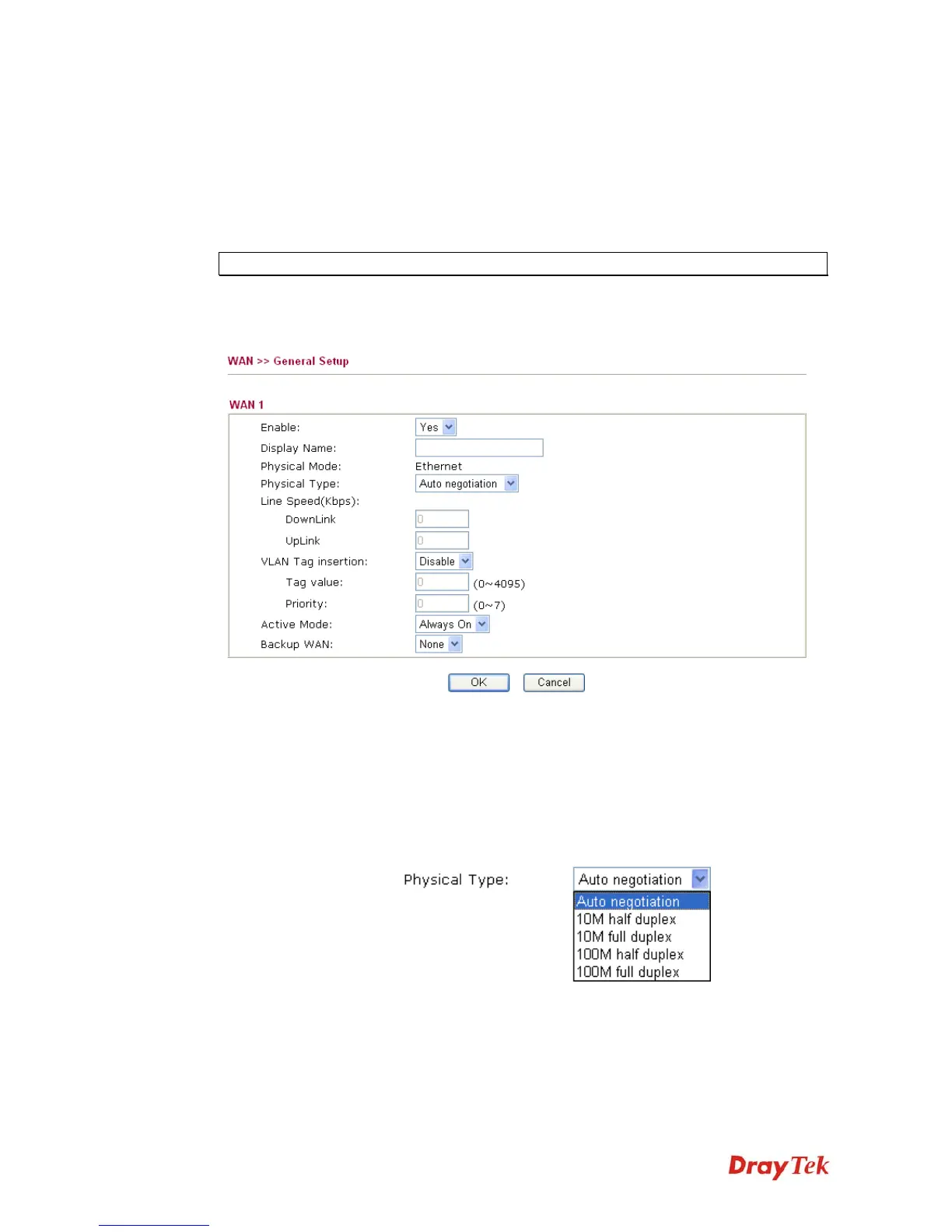
Be aware that WAN2 is fixed with physical mode of Giga Ethernet.
Enable
Choose Yes to invoke the settings for this WAN interface.
Choose No to disable the settings for this WAN interface.
Display Name
Type the description for such WAN interface.
Physical Mode
Display the physical mode of such WAN interface.
Physical type
You can change the physical type for WAN2 or choose Auto
negotiation for determined by the system.
Line Speed
If your choose According to Line Speed as the Load Balance
Mode, please type the line speed for downloading and
uploading for such WAN interface. The unit is kbps.
VLAN Tag insertion
Enable – Enable the function of VLAN with tag.
The router will add specific VLAN number to all packets on the














 To Next Page