VigorAP 710 User’s Guide
12
2
2
.
.
7
7
Q
Q
u
u
i
i
c
c
k
k
S
S
t
t
a
a
r
r
t
t
W
W
i
i
z
z
a
a
r
r
d
d
Quick Start Wizard will guide you to configure 2.4G wireless setting and other
corresponding settings for Vigor Access Point step by step.
2
2
.
.
7
7
.
.
1
1
C
C
o
o
n
n
f
f
i
i
g
g
u
u
r
r
i
i
n
n
g
g
2
2
.
.
4
4
G
G
H
H
z
z
W
W
i
i
r
r
e
e
l
l
e
e
s
s
s
s
S
S
e
e
t
t
t
t
i
i
n
n
g
g
s
s
–
–
G
G
e
e
n
n
e
e
r
r
a
a
l
l
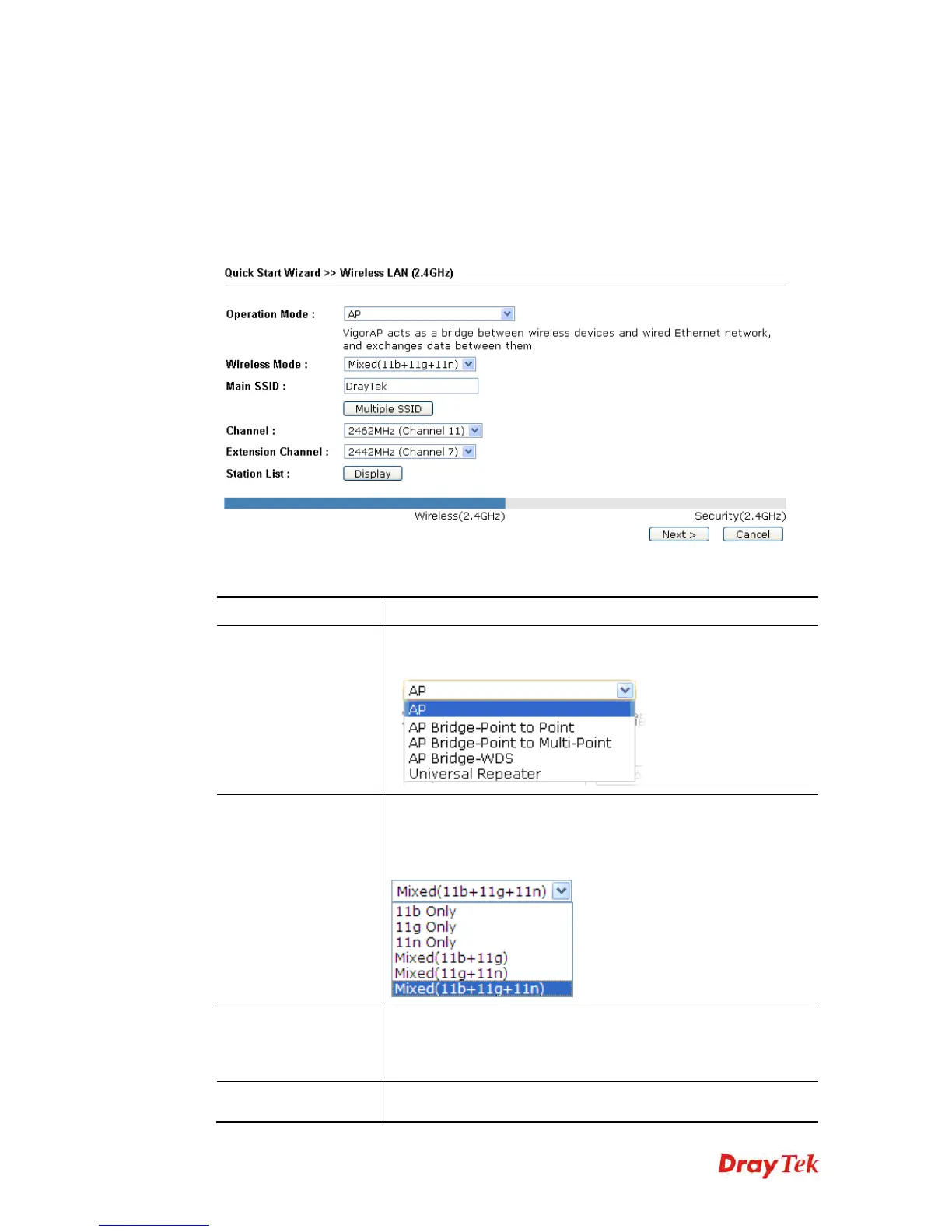
This page displays general settings for the operation mode selected.
Available settings are explained as follows:
Item Description
Operation Mode
There are six operation modes for wireless connection. Settings
for each mode are different.
Wireless Mode
At present, VigorAP 710 can connect to 11b only, 11g only, 11n
only, Mixed (11b+11g), Mixed (11g+11n) and Mixed
(11b+11g+11n) stations simultaneously. Simply choose Mixed
(11b+11g+11n) mode.
Main SSID
Set a name for VigorAP 710 to be identified.
Multiple SSID - You can specify subnet interface for SSID2 ~
SSID4.
Channel
Means the channel frequency of the wireless LAN. The default
channel is 6. You may switch channel if the selected channel is











 To Next Page