VigorAP 810 User’s Guide
103
Available settings are explained as follows:
Item Description
Schedule
Enable Schedule - Check it to enable the function of schedule
configuration.
Schedule
Configuration
Index – Display the sort number of the schedule profile.
Setting – Display the summary of the schedule profile.
Status – Display if the profile is enabled (V) or not (X).
Add – Such button is available when Enable Schedule is
checked. It allows to add a new schedule profile.
You can set up to 15 schedules. To add a schedule:
1. Check the box of Enable Schedule.
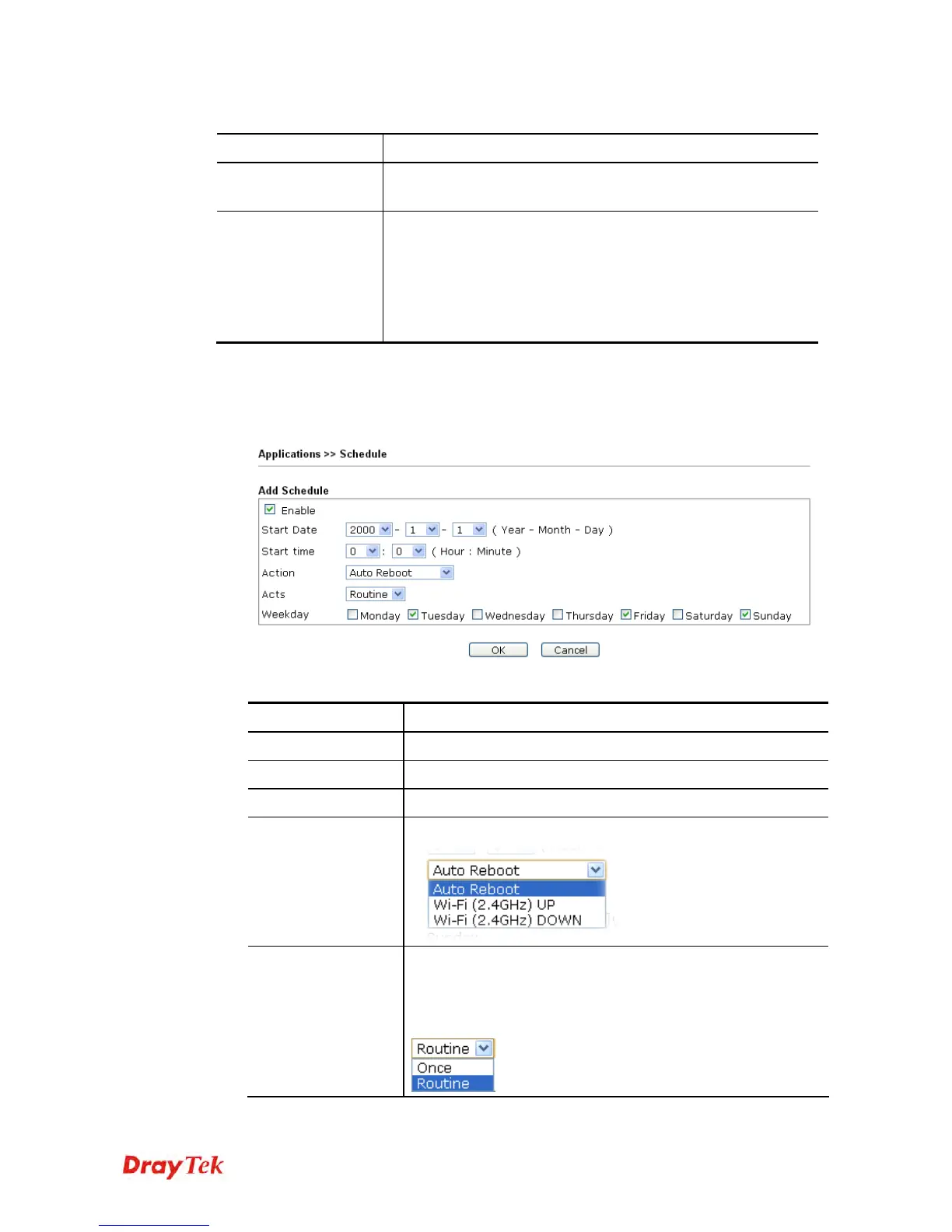
2. Click the Add button to open the following web page.
Available settings are explained as follows:
Item Description
Enable
Check to enable such schedule profile.
Start Date
Specify the starting date of the schedule.
Start Time
Specify the starting time of the schedule.
Action
Specify which action should apply the schedule.
Acts
Specify how often the schedule will be applied.
Once -The schedule will be applied just once
Routine -Specify which days in one week should perform the
schedule.












 To Next Page