VigorAP 810 User’s Guide
52
3
3
.
.
5
5
Wireless LAN Settings for Station-Infrastructure Mode
When you choose Station-Infrastructure as the operation mode, the Wireless LAN menu
items will include General Setup, Site Survey, Statistics and WPS.
3
3
.
.
5
5
.
.
1
1
G
G
e
e
n
n
e
e
r
r
a
a
l
l
S
S
e
e
t
t
u
u
p
p
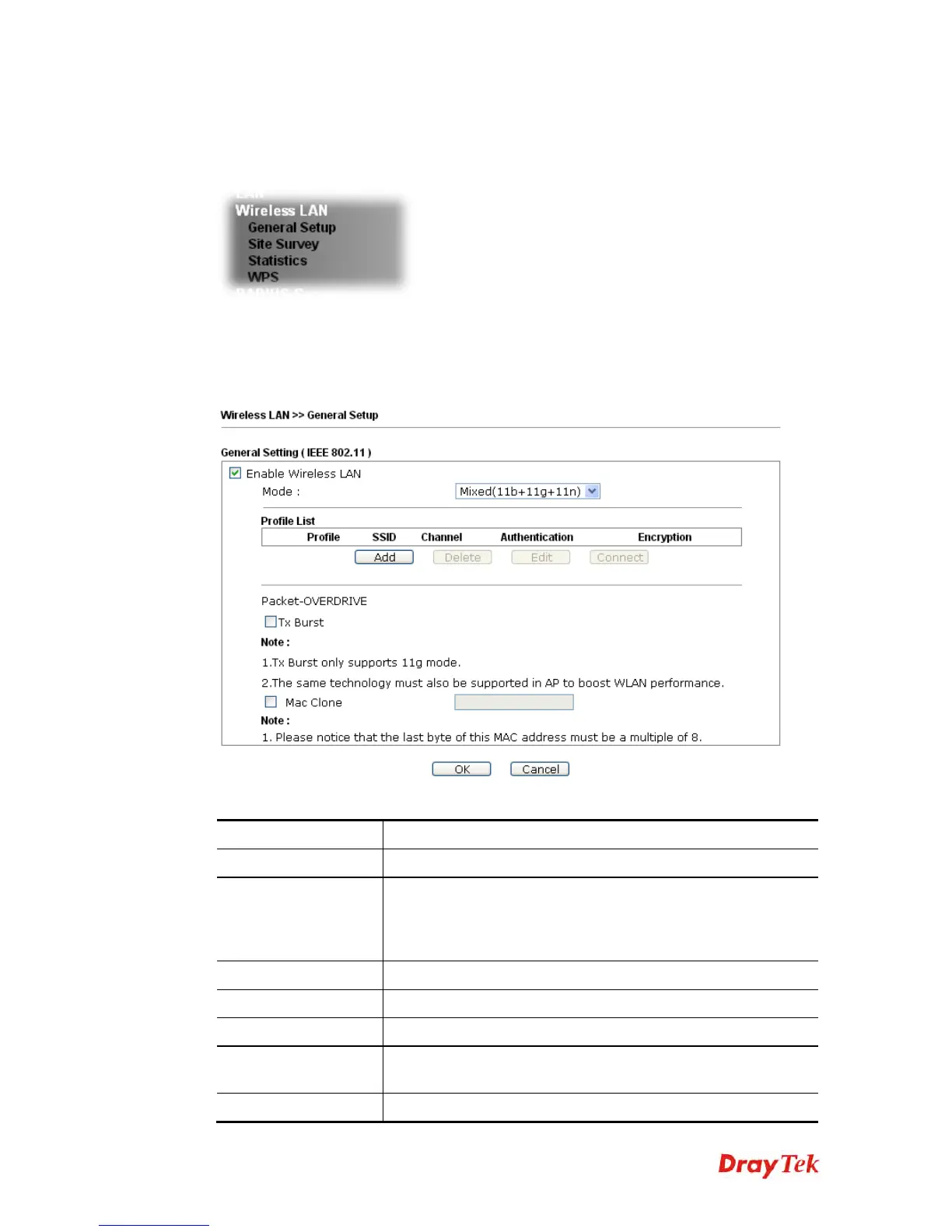
By clicking the General Setup, a new web page will appear so that you could configure the
wireless profile and choose proper mode. Please refer to the following figure for more
information.
Available settings are explained as follows:
Item Description
Enable Wireless LAN
Check the box to enable wireless function.
Mode
At present, VigorAP 810 can connect to 11 b only, 11 g only,
11
n only, Mixed (11b+11g), Mixed (11b+11g+11n) and
Mixed
(11g+11n) stations simultaneously. Simply choose
Mixed
(11b+11g+11n) mode.
Add
Click this button to add new wireless profiles.
Delete
Click this button to delete the selected wireless profile.
Edit
Click this button to modify the existing wireless profile.
Connect
Click this button to connect the wireless station to AP with the
selected profile.
Packet-OVERDRIVE
This feature can enhance the performance in data transmission












 To Next Page