41
DEHUMIDIFIER INSTALLATION, OPERATION, AND MAINTENANCE MANUAL
INSTALLATION
System set-up & checkout
• A Model D77 or other external control is not going to be installed
• Changing the air sampling rate (see instructions below)
• Changing the RH offset (see instructions below)
1. Check all wiring.
2. Make sure the wire access cover has been snapped back onto the
on-board control.
3. Plug unit in and turn power switch to ON.
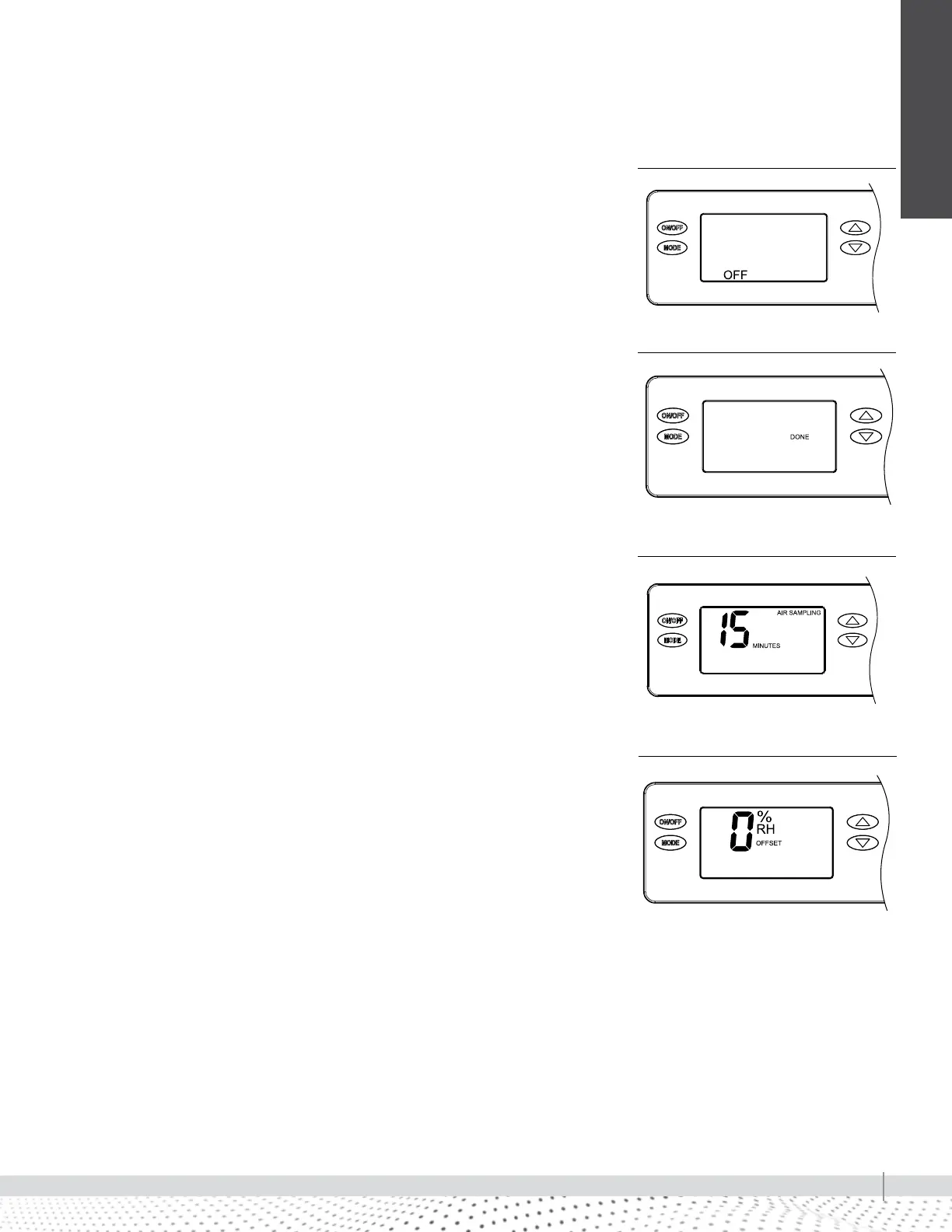
4. The on-board control screen should display OFF (see Figure 41-1).
NOTE: If the display backlight is not on, the first button press (any button) will
only turn on the backlight. Press the button a second time to achieve function.
5. Hold the MODE button on the on-board control for 3 seconds to enter the
Installer Set-up Menu.
6. Navigate through the following screens to set up the dehumidifier for the
installed application.
Use the UP or DOWN arrows to select items and use MODE to switch to
the next set-up option. To exit installer set-up, all options must be scrolled
through using the MODE button.
7. After the installer set up options have been completed, DONE (see Figure
41-2) will blink for 3 seconds and the control will return to the OFF
screen (see Figure 41-1).
If remote control and external control are both disabled (default), the
control will be by the on-board controller. Air sampling and RH Offset are
MODE options only available with on-board control.
AIR SAMPLING
Use the UP or DOWN button to adjust how frequently the dehumidifier samples
the air to determine whether or not to dehumidify. Fewer minutes means the
dehumidifier will sample more frequently to minimize humidity swings, but
increases cost to operate due to more frequent fan operation. Press MODE
when done to move to the next screen (see Figure 41-3).
RH OFFSET
An offset can be applied to the on-board humidity reading to avoid
discrepancies with other humidity measuring devices. Use the UP/DOWN
arrows to select an offset from -5% to 5%. Press MODE to exit the installer set-
up screens (see Figure 41-4).
90-1854
FIGURE 41-1: DISPLAY SCREEN OFF
90-1854
FIGURE 41-2: DISPLAY SCREEN DONE
90-1854
FIGURE 41-3: AIR SAMPLING
90-1854
FIGURE 41-4: RH OFFSET


 To Next Page