46
DEHUMIDIFIER INSTALLATION, OPERATION, AND MAINTENANCE MANUAL
INSTALLATION
+ - A B ODT
SensorRemote
Gh Rf Cf Gs YW
HVAC EQUIP.
Float
Switch
DHDH
Vent
+ - A B ODT
SensorRemote
Gh Rf Cf Gs YW
HVAC EQUIP.
Float
Switch
DHDH
Vent
+ - A B ODT
SensorRemote
Gh Rf Cf Gs YW
HVAC EQUIP.
Float
Switch
DHDH
Vent
DEH DEH DEH
EXTERNAL DRY CONTACT CONTROL
UNIT #1
SET UP FOR EXTERNAL CONTROL
SET UP FOR EXTERNAL CONTROL
SET UP FOR EXTERNAL CONTROL
90-2509
Table 46-1:
Codes
Error
Code
Failure Mode
E1 Internal %RH/Temperature Sensor Failure
E3 Model D77 Remote Control Communication Loss
E4 Insufficient Capacity
E5 High Temperature Thermistor Failure
E6 Low Temperature Thermistor Failure
E7 Float Switch Open
E8 Inlet Air Temperature Out of Range
E9 Fan or Compressor Fault
ALTERNATE EXTERNAL OR DRISTEEM BACNET HUMIDISTAT DRY CONTACT CONTROL
AS DRIVING CONTROL
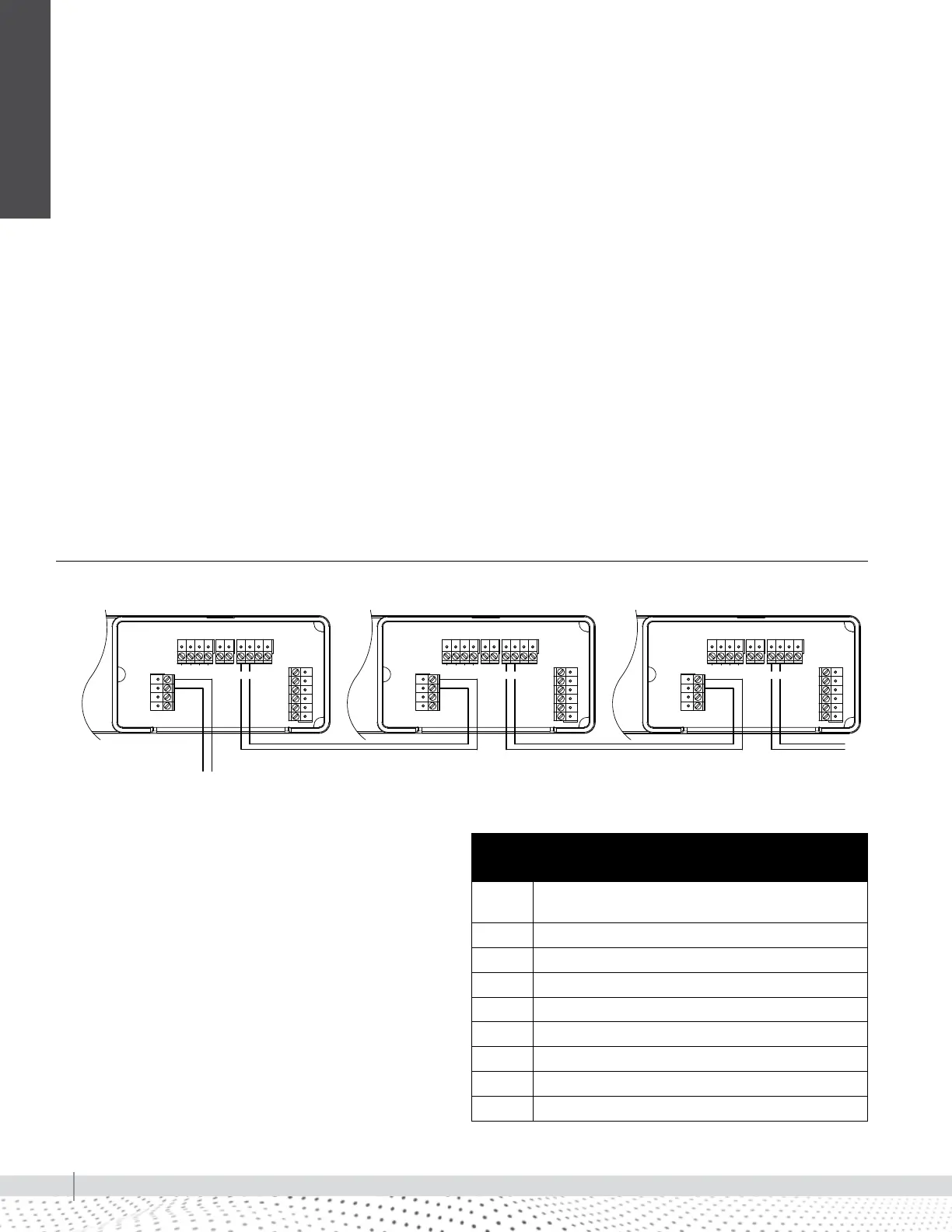
When a dry contact control is used to control the first dehumidifier, Unit #1
must be set to External Enabled in the set-up menu. All downstream units must
be set up to External Enabled in each set-up menu. See page 44 for set up
details and wire as shown in Figure 46.
SEQUENCE OF OPERATION
Each unit in the daisy chain responds to the first unit being controlled by the
external control. When the humidity level rises above the humidity setting, all
units will dehumidify until the humidity measured by the external control falls
below the setting.
IMPORTANT: If the external control experiences a fault, all downstream
dehumidifiers will also stop function. If any dehumidifier experiences a fault,
that unit will stop operation as determined by the fault but all other units will
continue operating. If any unit loses power, all downstream units will stop
function.
FIGURE 46-1: WIRING WITH ALTERNATE EXTERNAL CONTROL
CODES (LOCATED ON BACK OF WIRE ACCESS COVER)
See the Installation Instructions for troubleshooting error
codes. For additional assistance, call Technical Support at
(800)328-4447.
Contact Technical Support before replacing the unit or
components and for additional troubleshooting.
Daisy chain wiring


 To Next Page