Tamarisk
®
Camera Control Software User Guide
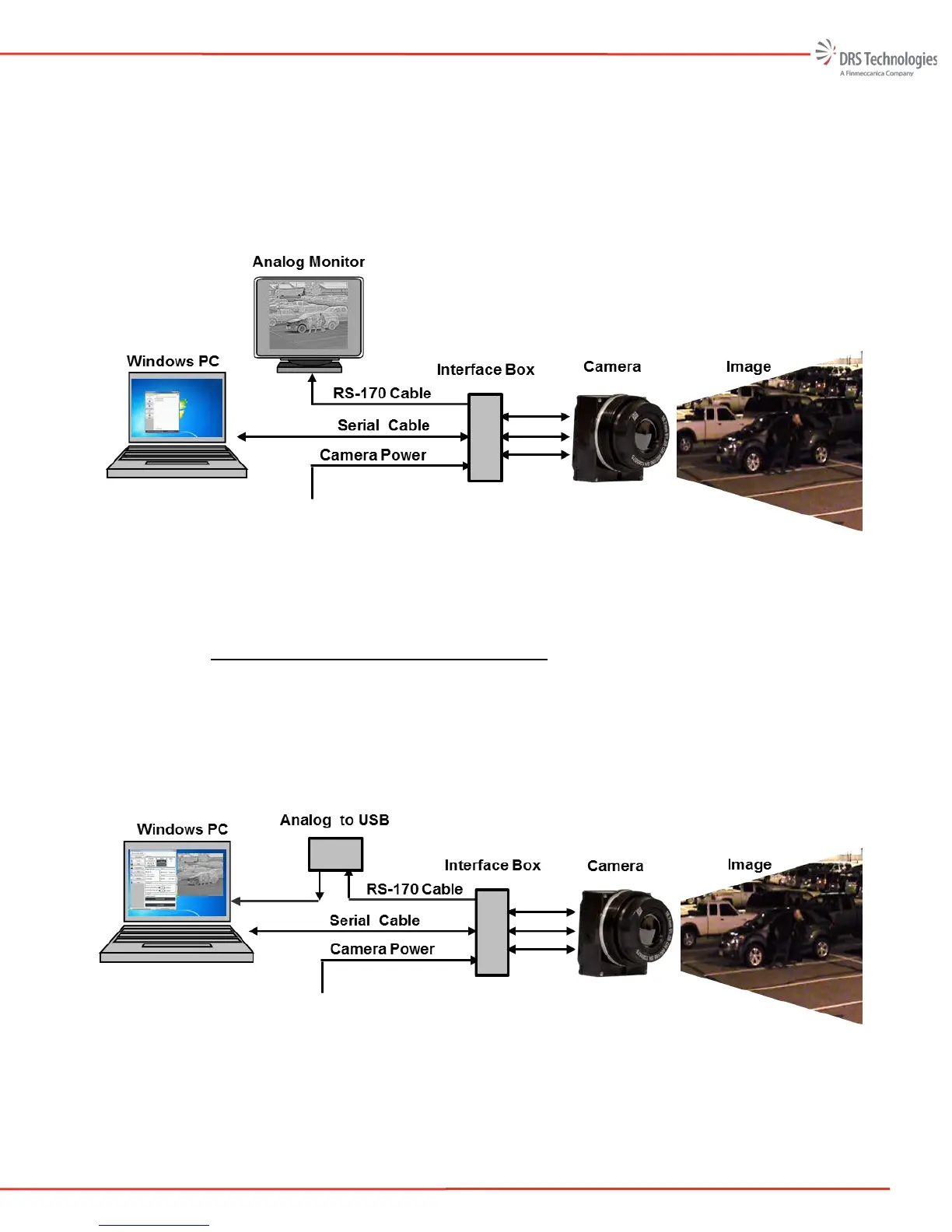
cameras, a USB cable may be used to provide both power and control. The user will immediately
see video displayed on the analog monitor. To manipulate or change the camera settings a serial
communication link (serial RS232 or USB ) is required. The camera may be control through
issuing serial commands via the serial link or by using the Camera Control Software described
herein.
Figure 1. Analog Video Displayed on an Analog Monitor
2.1.2 Connecting to an Analog Frame Grabber
Alternatively, an analog video-to-USB frame grabber (as shown in Figure 2) may be used to
display the camera’s output video. In this case, the RS-170 feed from the camera or interface box
is connected to an analog video-to-USB frame grabber. To display the video on screen please
follow the instructions that came with your analog-to-USB frame grabber.
The frame grabber allows the user to capture video or images and analyze or view them later.
Figure 2. Analog Video Displayed on a PC, via Analog Frame Grabber


 To Next Page