Tamarisk
®
Camera Control Software User Guide
5.6 PAN AND ZOOM
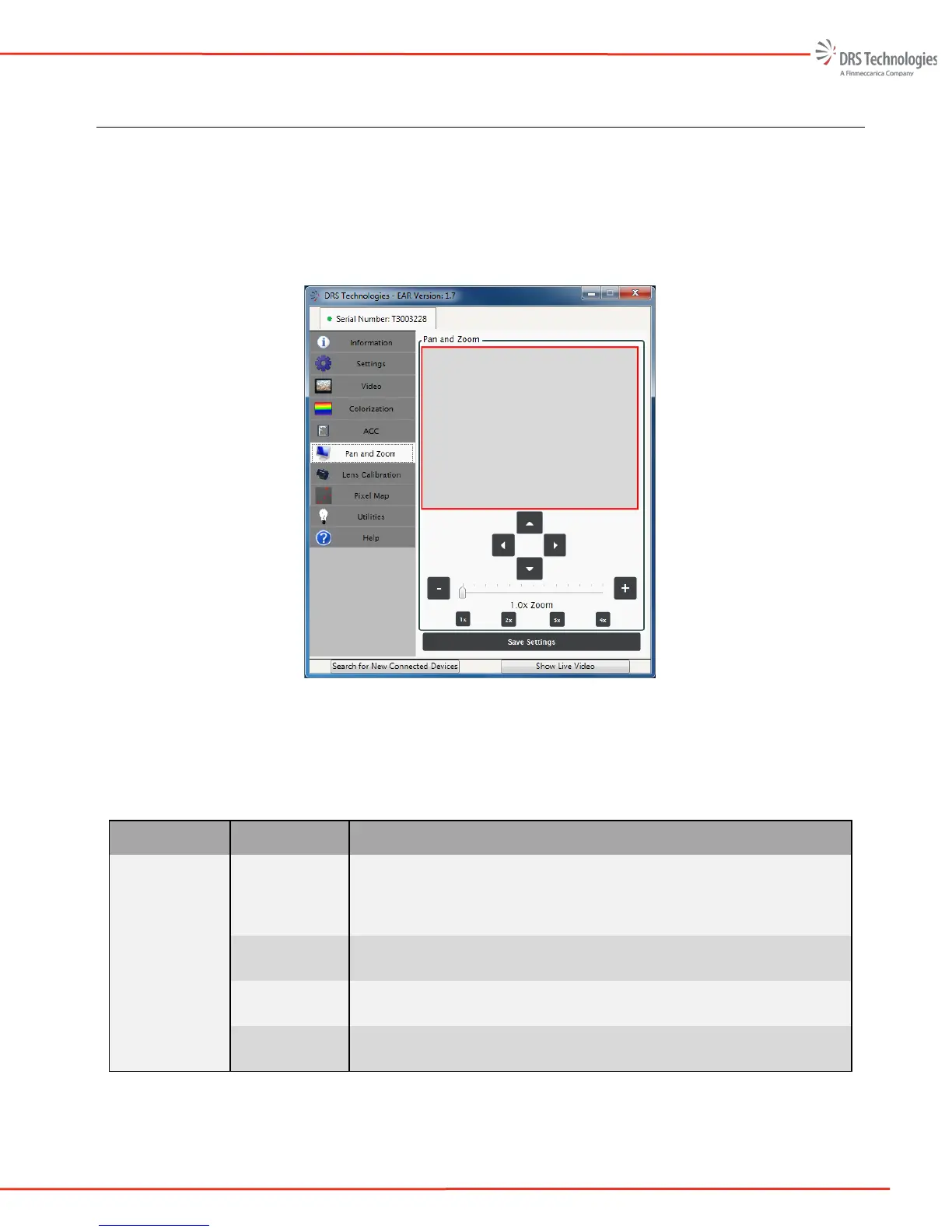
Figure 35 illustrates the Pan and Zoom tab. This feature enables the user to define a region of interest
(ROI) using a combination of the Zoom and Pan functions. Once a region has been defined, the user
may reposition the ROI using the up, down, left, and right arrow keys or selecting the ROI box and
moving it with a mouse/pointer device. The user also has the option to perform an electronic zoom
between 1x and 4x. See Figure 35.
Figure 35. Pan and Zoom Tab
Table 6 provides an overview of the features and functions that are available on the Pan and Zoom
tab.
Table 6 – Pan and Zoom Overview
Item Description Function
Pan and Zoom
Pan and Zoom
Area
To change the region of interest, hold down the right mouse
button and draw a new region of interest on the gray area. To
move the current region of interest, hold down the left mouse
button and drag.
Arrows
The up, down, right, and left arrows can be used to move the
region of interest
E-Zoom
The e-zoom value can be set using the plus and minus
buttons or by moving the slider to the desired value.
Presets
The 1x, 2x, 3x, and 4x buttons will move the e-zoom to the
corresponding zoom positions.
ROI



 To Next Page