057-001 720 Operating Instructions Issue 3.1 20/12/2005 AM - 11 -
4 FRONT PANEL CONFIGURATION
The DSE 720 module is fully configurable from the front panel or from the 7xx PC configuration
software.
4.1 ACCESSING THE FRONT PANEL CONFIGURATION EDITOR
NOTE:- Configuration mode can ONLY be entered when the module is in the STOP
mode and the engine is at rest.
Press the DOWN and STOP buttons to enter
configuration mode.
and
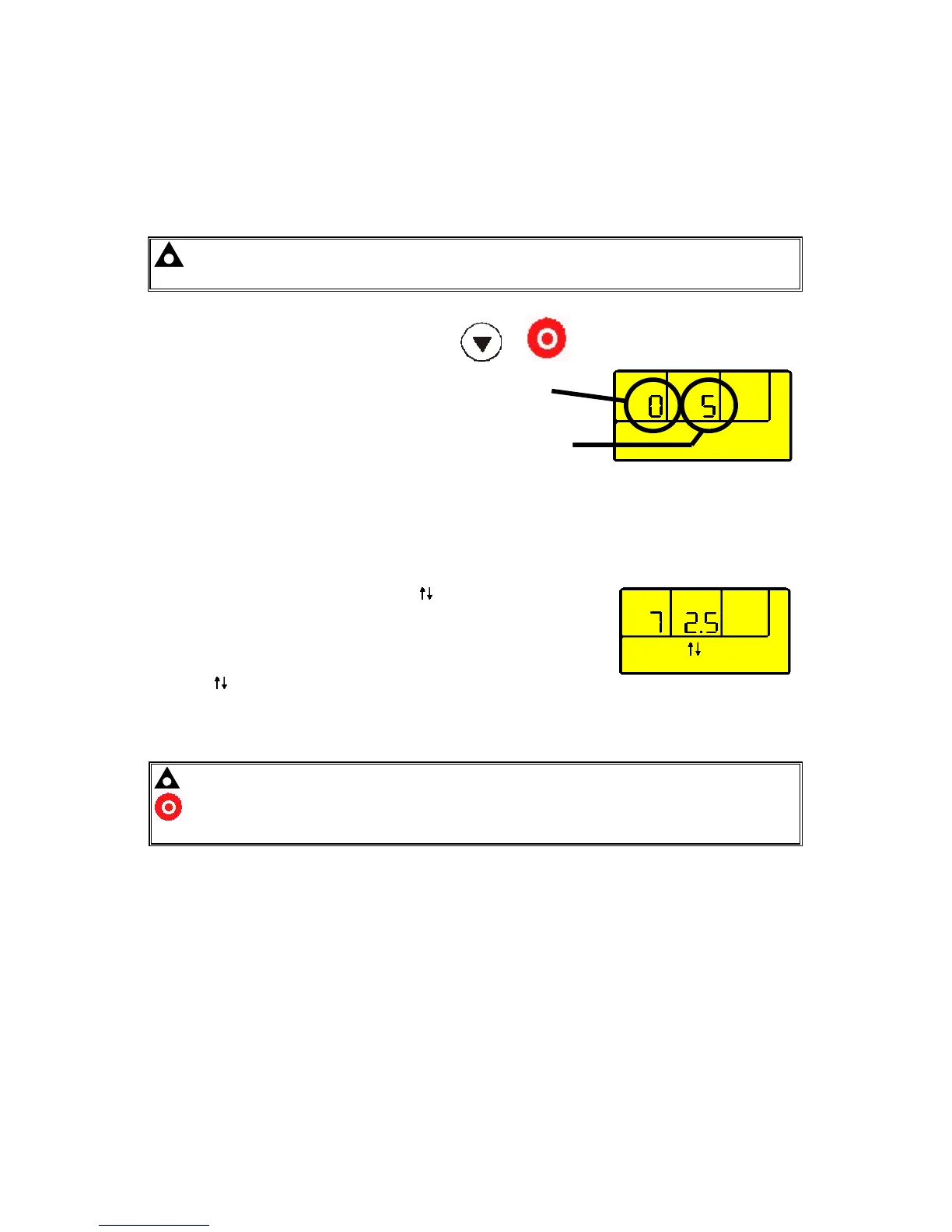
The first configurable parameter is displayed.
In this example, the Start delay timer
(parameter 0) is currently set to 5s.
Parameter
(Start delay)
Current value
(5 seconds)
4.2 EDITING A PARAMETER
• Enter the editor as described above.
• Press + / - to scroll through the parameters to the one you want to change.
• Press 9 to enter edit mode. The symbol will flash on the
display to indicate that edit mode has been entered.
• Press + / - to change the value to the desired parameter.
• Press 9 to save the value and exit edit mode for this parameter.
• The symbol will be removed from the display to indicate that edit mode has been exited.
• To select another value to edit, press the + / - buttons. Continuing to press the + and –
buttons will cycle through the adjustable parameters as shown in the following lists.
NOTE: To exit the front panel configuration editor at any time, press the Stop/Reset
button.
Ensure you have saved any changes you have made by pressing the 9 button first.


 To Next Page