-4-
2011-09
17 / 30
850 mini
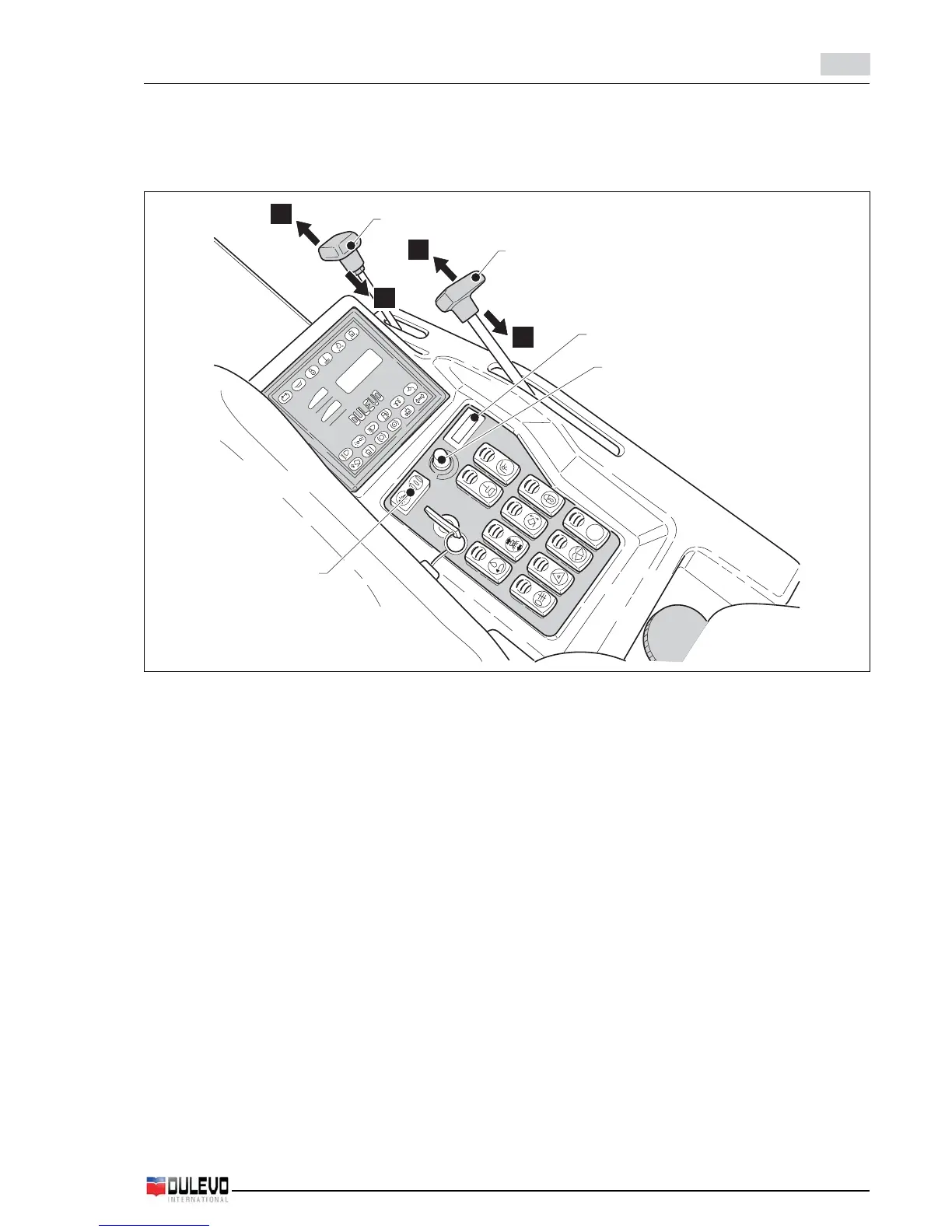
4.4.b - CRUSCOTTO COMANDI GUIDA
4.4.b.a - Indicatori e pulsanti
1) Acceleratore a mano
Agendo sulla leva (1) con motore avviato si aumenta
o si diminuisce il numero di giri del motore.
- Spostando la leva verso “A” si aumenta il numero dei
giri del motore
- Spostando la leva verso “B” si diminuisce il numero
dei giri del motore
2) Leva comando apertura/chiusura Flap
Agendo sulla leva (2) si aumenta o si diminuisce
l’apertura della bocca di aspirazione “Flap”.
- Spostando la leva verso “A” si aumenta l’apertura.
- Spostando la leva verso “B” si diminuisce l’apertura.
3) Pulsante inversione rotazione spazzole (OPT)
Il pulsante permette di invertire il senso di rotazione
delle spazzole, il materiale anzichè essere convogliato
verso l’interno della macchina per poi essere raccol-
to, viene convogliato verso l’esterno. Per le modalità
oprative fare riferimento al relativo paragrafo.
4) Non abilitato
5) Pomello regolazione velocità spazzole
- Ruotando la manopola in senso orario si aumenta la
velocità delle spazzole, ruotando la manopola in sen-
so antiorario si diminuisce la velocità delle spazzole.
6) Interruttore rotazione spazzole
Premuto da un lato avvia la rotazione delle spazzole
laterali e le fa scendere a terra. Premuto dalla parte
opposta ferma la rotazione delle spazzole laterali e
1
2
5
4
3
A
B
A
B
4.4.b - DRIVING CONTROLS DASHBOARD
4.4.b.a - Indicators and push buttons
1) Hand-operated engine accelerator
By moving the lever (1) with engine started the engine
speed (rpm) is either increased or decreased.
- By shifting the lever to “A” the engine speed (rpm) is
increased
- By shifting the lever to “B” the engine speed (rpm) is
decreased
2) Flap opening/closing control lever
By acting on the lever (2) the opening of the “Flap”
waste intake duct is either increased or decreased.
- By shifting the lever to “A” the opening is increased.
- By shifting the lever to “B” the opening is decreased.
3) Brush rotation direction button (OPT)
This button allows changing the direction of rotation
of the brushes. Instead of conveying the material into
the machine to be collected, it is conveyed to the
outside. Refer to the relative paragraph for the
operating procedures.
4) Not enabled
5) Brushes speed adjusting knob
- By turning the knob clockwise the brushes speed is
increased, while by turning the knob counter-clock-
wise, the brushes speed is decreased.
6) Brushes rotation switch
Pushed to one side the side brushes start rotating
and are lowered to the ground; pushed to the opposite
side, the side brushes stop rotating and holding it



 To Next Page