-4-
2011-09
19 / 30
850 mini
del pulsante stesso.
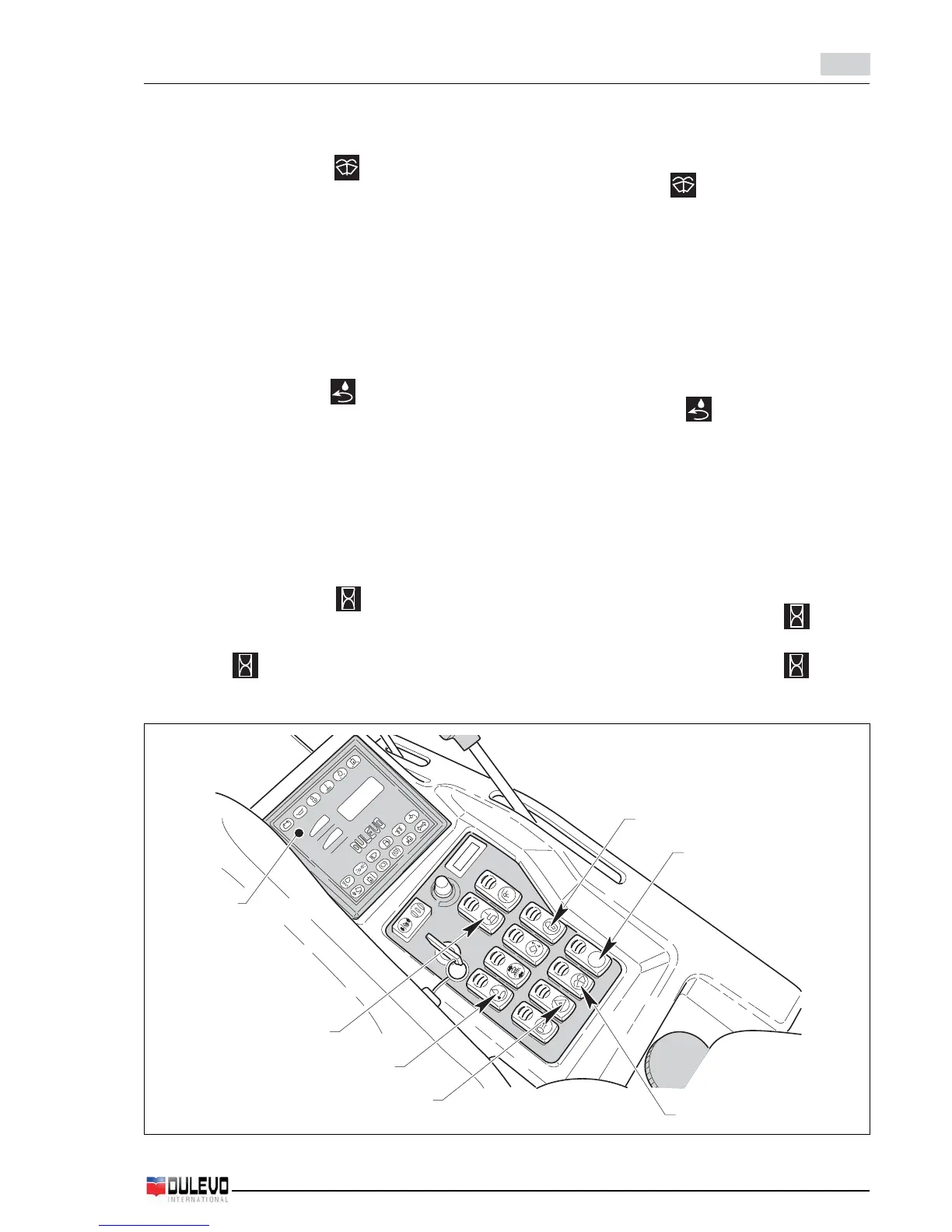
12) Interruttore tergicristalli e lavavetri
- Premendo il pulsante su si inserisce il funzio-
namento dei tergicristalli. Premendo ulteriormente
il pulsante si avvia la pompetta del lavavetri.
- Premendolo dalla parte opposta ferma il funziona-
mento del tergicristalli.
13) Pulsante abilitazione funzioni di lavoro
- Premendo il pulsante si illumina la spia del pulsan-
te che abilita le funzioni di lavoro. Premendolo nuo-
vamente si disabilitano le funzioni di lavoro nello
stato in cui si trovano.
Se si spegne la macchina va abilitato nuovamente.
14) Pulsante riciclo (OPT)
- Premendo il pulsante su si abilita la funzione di
riciclo dell’acqua contenuta nel contenitore di rac-
colta (si illumina la lampada del pulsante), la quale
viene spruzzata direttamente nella bocca di aspira-
zione per abbattere ulteriormente le polveri.
Premendolo dalla parte opposta si ferma la funzio-
ne di riciclo dell’acqua e si spegne la lampada del
pulsante.
15) Pulsante selettore display
- Premuto visualizza sul display i giri/min. (Led RPM
illuminato), ripremuto visualizza sul display le ore di
funzionamento totali (Led illuminato); ripremuto
un’ulteriore volta sul display vengono visualizzate
le ore effettive di lavoro di spazzamento (il Led RPM
ed il Led sono spenti).
16) Cruscotto spie ed indicatori
6
13
14
12
11
15
16
button itself start blinking.
12) Windscreen wiper and windows washer on-off
switch
- Pushing the switch , the windscreen wipers are
activated; pushing it again, the windscreen washer
pump is started.
- Pushing it to the opposite side, the windscreen
wipers are stopped.
13) Operating switch enabling button
- By pressing the button the signal bulb of the button
enabling operating switch illuminates. Press it once
again to disable the operating switch in their current
status. If the machine is turned off, the button is to
be enabled again.
14) Recycling button (OPT)
- Pushing the switch to , the recycling function of
the water contained in the collection container is
enabled (the LED on the switch comes on).
The water is sprayed directly into the intake to further
remove the dust.
Pushing it to the opposite side, the water recycling
function is stopped and the LED on the switch goes
off.
15) Display selection switch
- When pressed it shows the RPM on the display
(RPM LED on), when pressed again it shows the
total hours of running on the display ( LED on),
and when pressed once more the actual hours of
sweeping are shown (RPM LED and LED off).
16) Signal bulbs and indicator lights dashboard


 To Next Page