9
DYMO MobileLabeler
User Guide
Inserting the Label Cassette
Your label maker uses DYMO D1 label cassettes. Visit www.dymo.com for
information about purchasing additional label cassettes.
To insert the label cassette
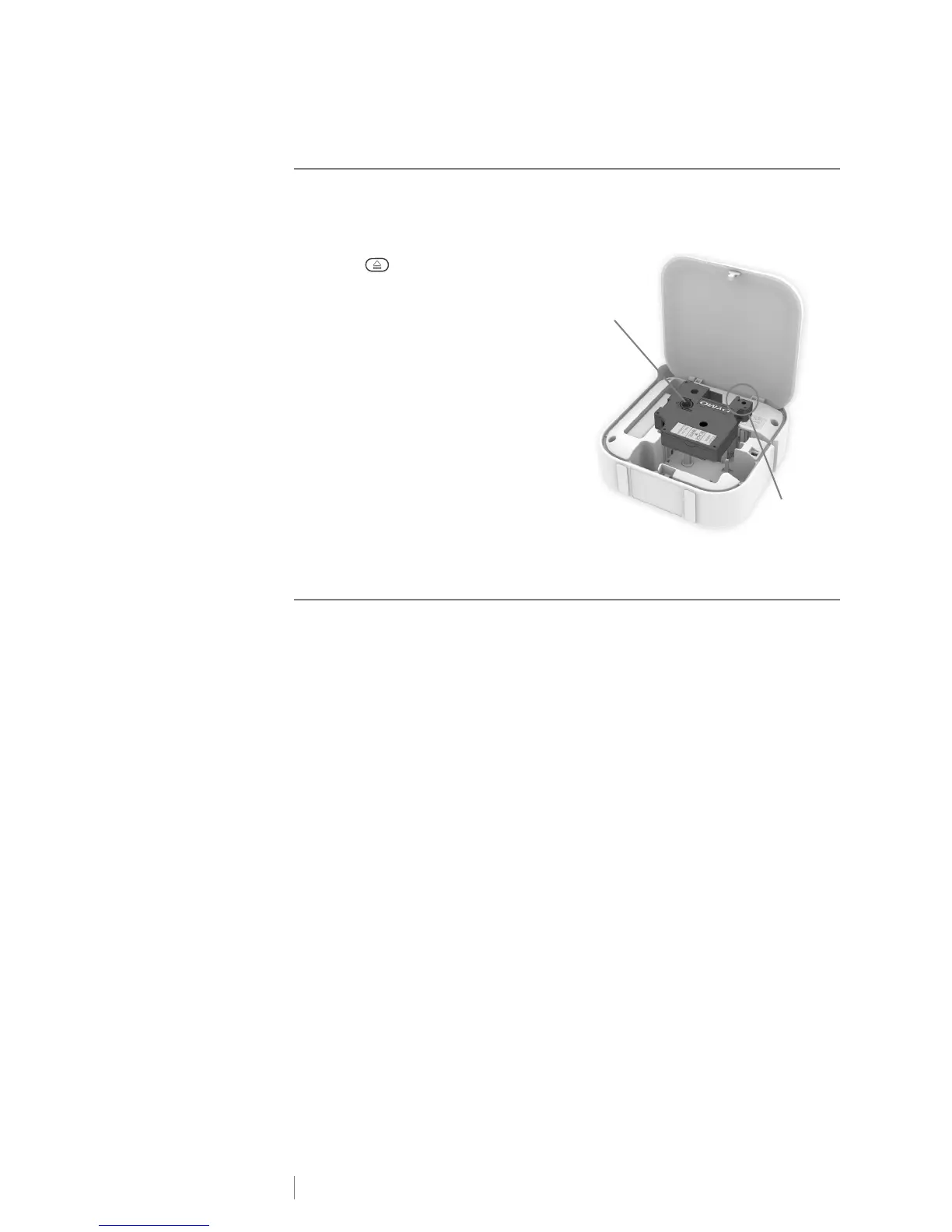
1 Press and then pull outward to
open the side cover of the label
maker. See Figure 6.
2 Make sure the tape and ribbon are
taut across the mouth of the
cassette and that the tape passes
between the label guides. See
Figure 6.
If necessary, turn the ribbon rewind
spool clockwise to tighten the
ribbon.
3 Insert the cassette and press firmly
until the cassette clicks into place.
4 Close the side cover of the label
maker.
Cutting the Labels
The label maker has an automatic cutter which will cut the label after each label is
printed. Clear the label exit slot of labels after every 10 labels to prevent a label
jam.
Figure 6
Label guides
Ribbon rewind
spool











 To Next Page