13
DYMO MobileLabeler
User Guide
About DYMO Label Software
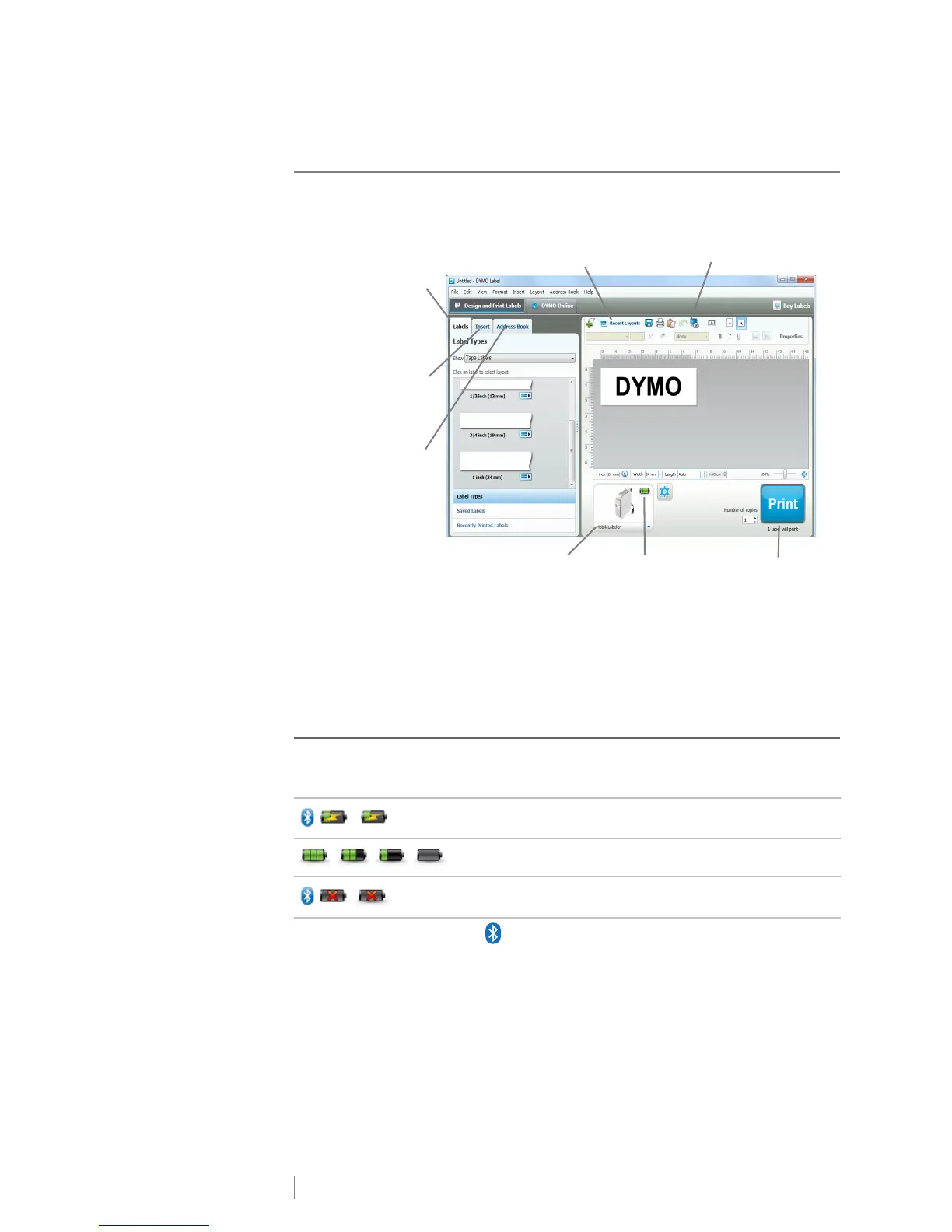
The following figure shows some of the major features available in DYMO Label
software.
For complete details on using the software, refer to the online Help or the DYMO
Label Software User Guide.
From the Help menu in DYMO Label software, you can view the following:
DYMO Label Help
DYMO Label User Guide
Label Maker Status
The label maker status is displayed in DYMO Label software window. The
following table describes the possible states of the label maker.
When the Bluetooth symbol is present, the label maker is connected using
Bluetooth technology. Otherwise, the label maker is connected using the USB
cable.
Label maker is connected and battery is charging
Label maker is connected and battery is not charging
Label maker is connected and there is a problem with the
battery
Print a label.
Apply a recently used
layout to a label.
Capture an area of the
screen to insert on your label.
Visually choose
your label type
and apply
layouts
Insert text,
addresses,
images, shapes,
lines, barcodes,
dates, and
counters
Store your favorite
addresses or
other data in the
Address Book;
automatically
insert the data on
your label
Select a label maker
to print your labels
View the status of
the label maker











 To Next Page