iii
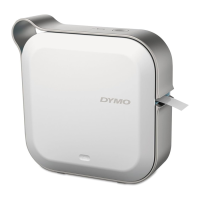
DYMO MobileLabeler
User Guide
1 About Your New Label Maker
1 Registering Your Label Maker
1 Wireless Safety Warnings
2 Safety Precautions for Lithium-Polymer Rechargeable Battery
2 General Safety Precautions
4 Getting to Know the Label Maker
5Power
5 Power Status Light
5 Battery Status Light
5 Bluetooth Connection
6 Bluetooth Status Light
6RESET
7Getting Started
7 Connecting the Power
7 Inserting the Battery
7 Removing the Battery
8Charging the Battery
9 Inserting the Label Cassette
9 Cutting the Labels
10 Printing Labels from a Mobile Device
10 Pairing the Label Maker to your Mobile Device
10 Downloading the DYMO Connect App
11 About the DYMO Connect Mobile App
11 Home Screen
11 Design Screen
12 Printing Labels from your Computer
12 Downloading and Installing DYMO Label Software
12 Connecting your Label Maker to your Computer
13 About DYMO Label Software
13 Label Maker Status
14 Caring for the Label Maker
14 Cleaning the Cutter Blade
15 Cleaning the Print Head
16 Troubleshooting
16 General
17 Bluetooth Connection
18 Technical Specifications
19 Documentation Feedback
19 Environmental Information











 To Next Page