Leaders in Pipeline Survey Systems
OPERATOR’S MANUAL
Issue 4.04 - 1207 26
We have now completed the first ‘virtual’ survey. In a real situation, a surveyor may do a
number of surveys before downloading the data. As the first survey is complete, we now need to
know how to create a ‘new’ survey. The start screen should be shown and still be in Demo
Mode: if it isn’t, re-select Demo Mode as explained above.
4.3. Creating a new survey
As before, wait until the detector is overhead and press the CALCULATE key. When the
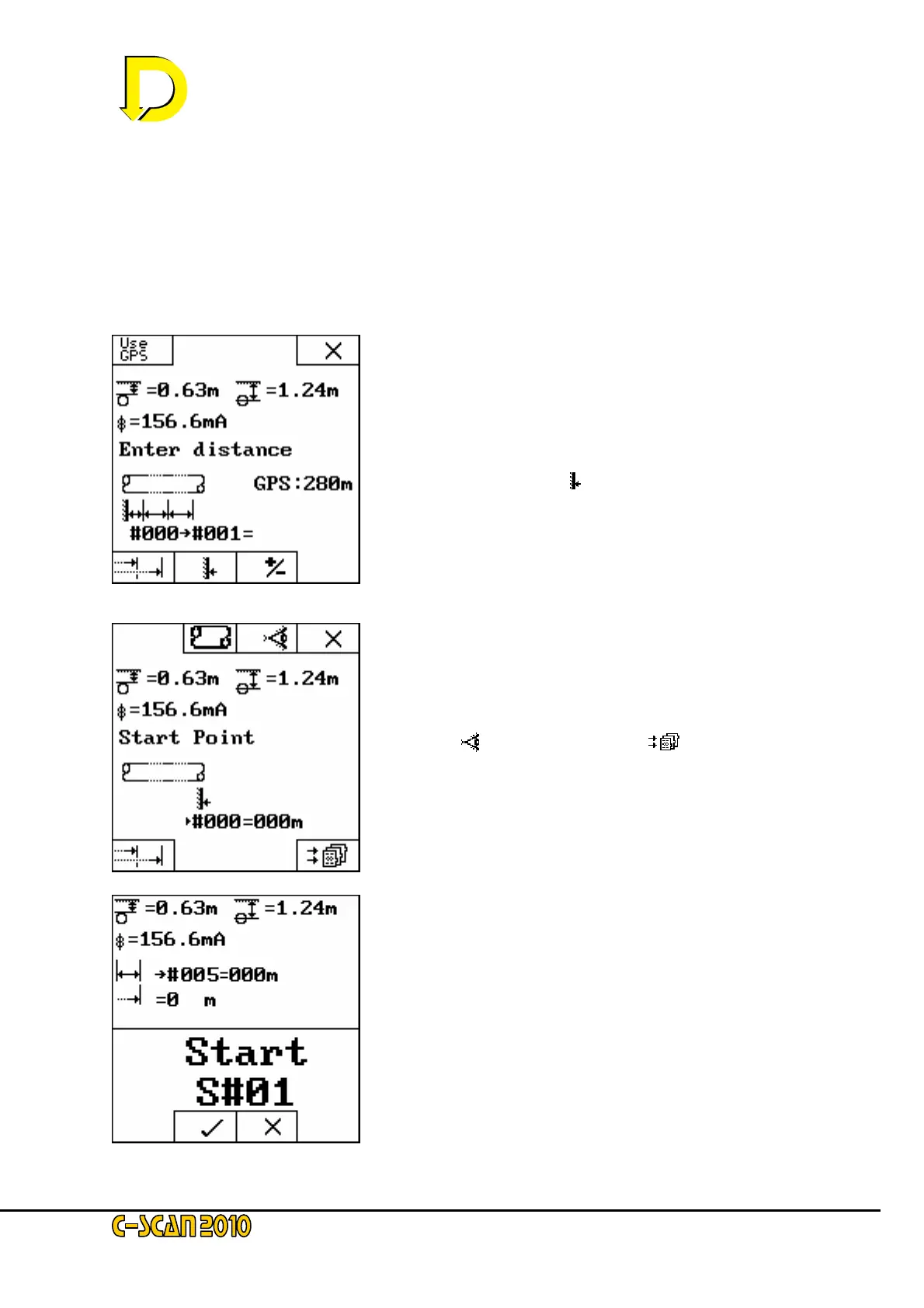
calculation is done and stored, the following display is shown.
This is the point at which a new survey is created.
The START POINT key (
) defines the new survey. Press it
now.
The display will jump straight to the START POINT screen.
You will see that the pipeline key has re-appeared. This is
because a new survey has been started. Once the new
pipeline details have been entered (along with any visual
references
) press the store key [ ].
Final confirmation is required before a new survey is started.
Pressing the tick will start the new survey and store the new
point. You will automatically revert to the main startup
screen.



 To Next Page