Leaders in Pipeline Survey Systems
OPERATOR’S MANUAL
Issue 4.04 - 1207 15
2.3.3. Search
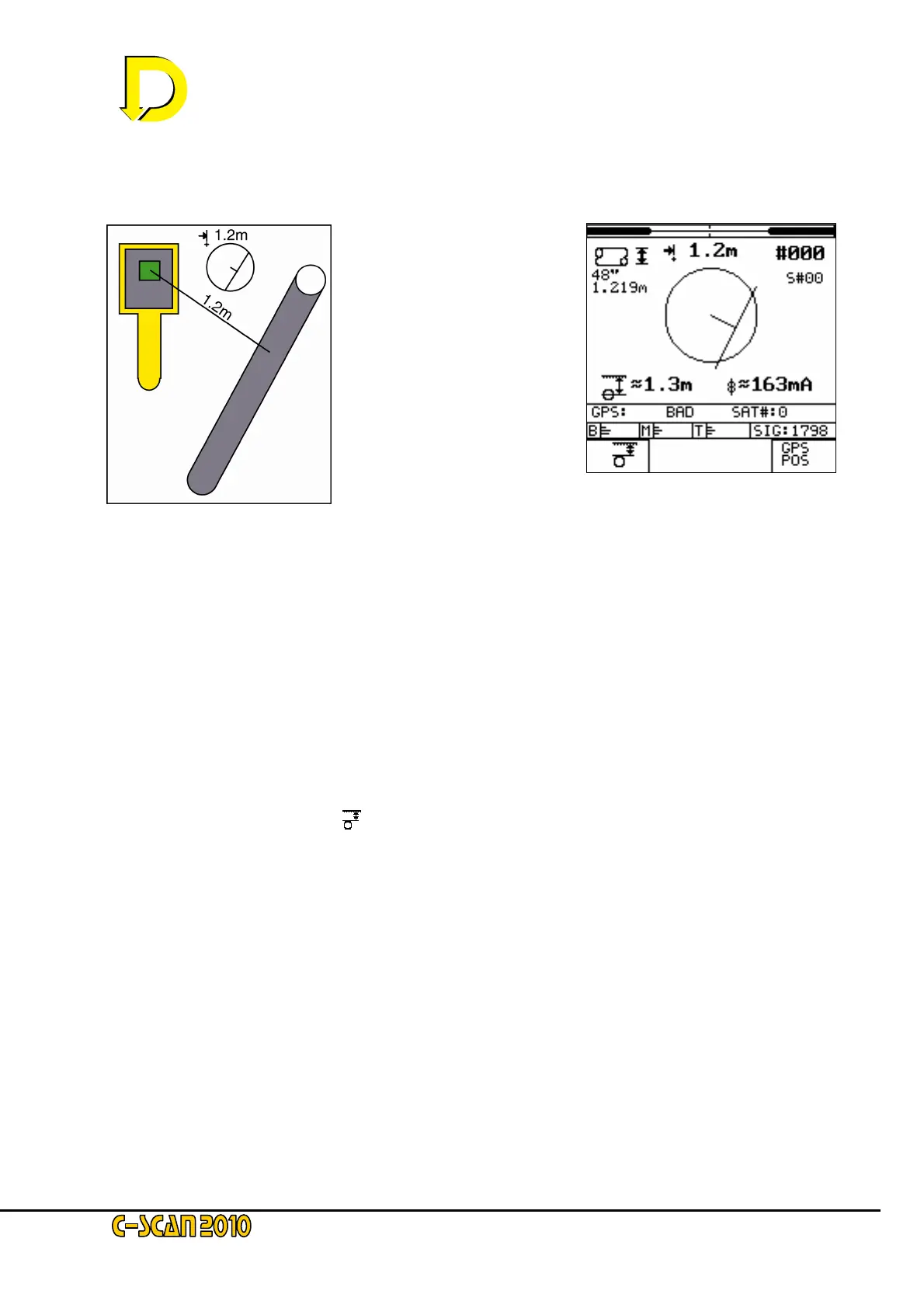
In this example, from the
Search screen display – see
Fig 13 right – it can be seen
that the pipeline is located
behind and to the right of the
current position of the
Detector Unit (DU) – see
Fig, 12 left.
As the DU is turned so the indicator in the centre of the screen will rotate.
NOTE: The circle equals a 2 metre (approx. 6ft 6”) distance. If the pipeline is greater than 2 metres away
then the line will stay in the boundary. The number above the circle indicates the horizontal distance in
metres (1.2m in this example). If the pipeline is out of range no figure will be displayed. It is not possible
to give accurate figures when the DU is not directly over the pipeline, so all numbers shown are
approximate (indicated by the ~ symbol).
In this example depth to the centre is 1.3m. To change this to depth of cover, press the key
adjacent to the cover symbol (
- bottom LH corner box). Note that if the pipeline diameter has
not been entered, this symbol will not be shown.
The GPS status indication is showing a ‘BAD’ signal – i.e: no satellites in view.
NOTE: If the GPS has just been powered up, this ‘BAD’ signal will be displayed. Acquisition times vary
from 10 secs to 45 mins. If the DU has been moved a large distance – or this is the first time that the DU
has been used – the acquisition time will be likely to be nearer to 45 mins. It is important that the DU
(with GPS ON) is switched on for at least 15 minutes after a position is displayed; this will ensure a fast
turn-on next time. After acquisition, the display will show ‘GOOD’ plus the number of satellites available.
Fig. 12 – diagram showing the
position of the DU relative to the
pipeline as indicated on the
Search screen
Fig. 13 – the Search screen



 To Next Page