10 CA300 O300EN1
INSTRUMENTS AND CONTROLS, FUNCTIONAL DESCRIPTION
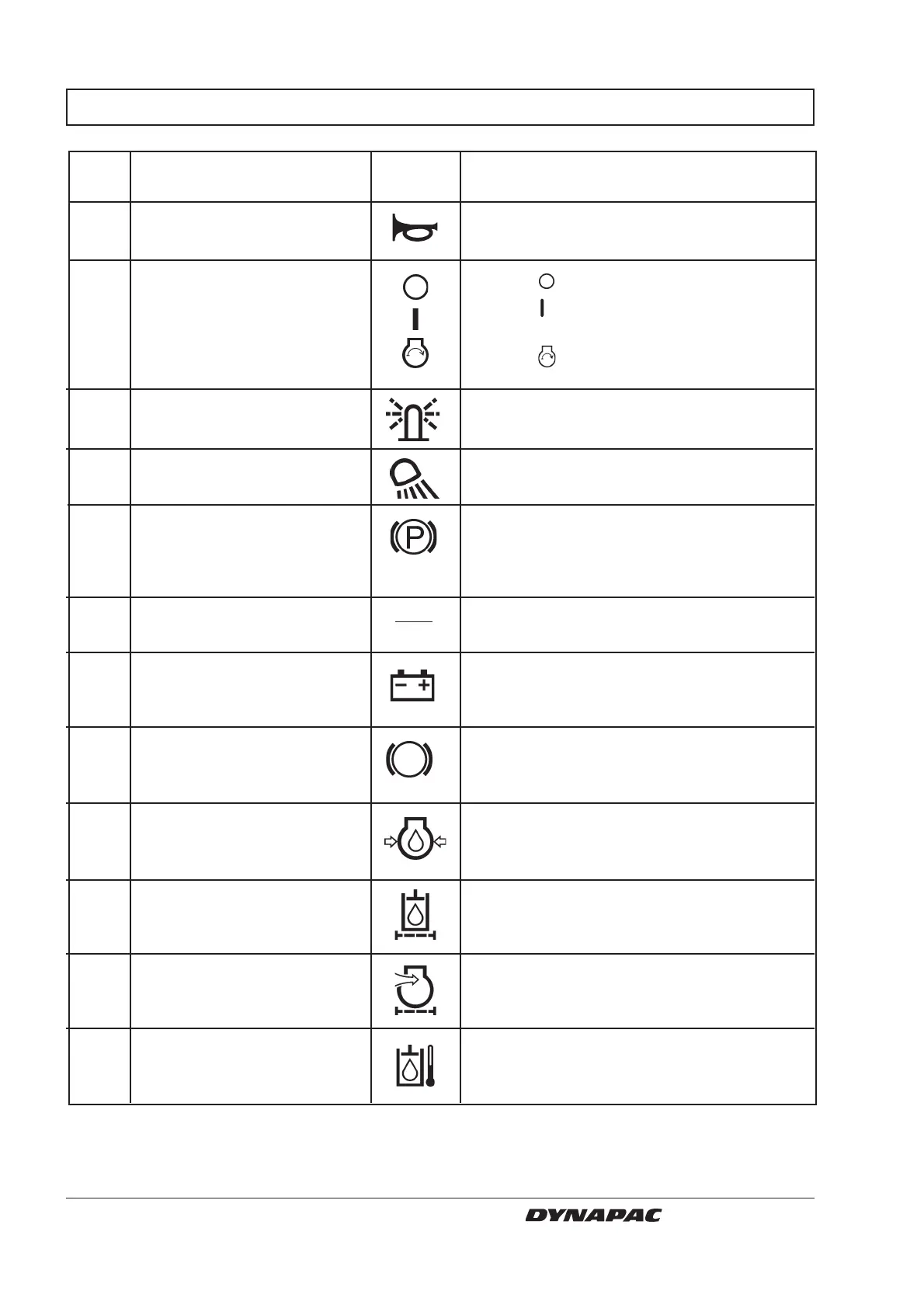
1 Horn, switch
2 Starter switch
3 Hazard beacon, switch
(Optional)
4 Working lights,
switch (Optional)
5 Reserve brake/Parking brake
6 Instrument protection
7 Warning lamp, battery
charging
8 Brake warning lamp
9 Warning lamp, oil pressure
10 Warning lamp, hydraulic filter
11 Warning lamp, air filter
12 Warning lamp, hydraulic
temperature
Item in Designation Symbol Function
fig. 6
Press to sound the horn.
In mode
the electric circuit is broken.
In mode
all instruments and electric
controls are powered.
In mode
the starter motor is energized.
Turn to the right to switch on the hazard
beacon.
Turn to the right to switch on the working
lights.
Push in to activate the reserve brake.
Parking brake is applied if pushed in when
machine is stationary. Both brakes are
released when knob is pulled out.
Fold down over the instruments to protect
from weather and damage.
The alternator is not charging if this lamp
lights when the engine is running.
Stop the engine and locate the fault.
This lamp will light when the parking or
reserve brake knob is pressed and the
brakes are applied.
This lamp lights if lubricating pressure in the
engine is too low. Stop the engine
immediately and locate the fault.
If the lamp lights up when the diesel engine
is running at full speed, the hydraulic fluid
filters must be replaced.
The air filter should be cleaned or replaced if
this lamp lights when the engine is running at
full speed.
This lamp lights if the hydraulic fuel is too hot.
Stop the roller, and allow the fluid to cool down by
idling the engine. Locate and remedy the fault.



 To Next Page