35
Chorus
You can use the DATA UP and DOWN buttons instead of the CHORUS DEPTH UP and DOWN buttons.
If you press both UP and DOWN Buttons at the same time automatically return to the default chorus
depth of each part. (default Main Voice 70, Layer Voice 70, Split Voice 70, Chord parts 0, Bass 0, Drum 0)
The range of volume is 0 ~ 100.
Hold the button for continuous decrementing or incrementing.
If the DISPLAY HOLD is on, the pop-up display does not return to the main menu and the LCD
screen shows the current pop-up display.
The chorus depth pop-up display can be called up from the chorus pop-up display.
When the LCD screen shows the chorus pop-up display, press the YES button. The chorus depth pop-up
appears.
ADJUSTING THE TOTAL DEPTH
This determines the total depth of the chorus.
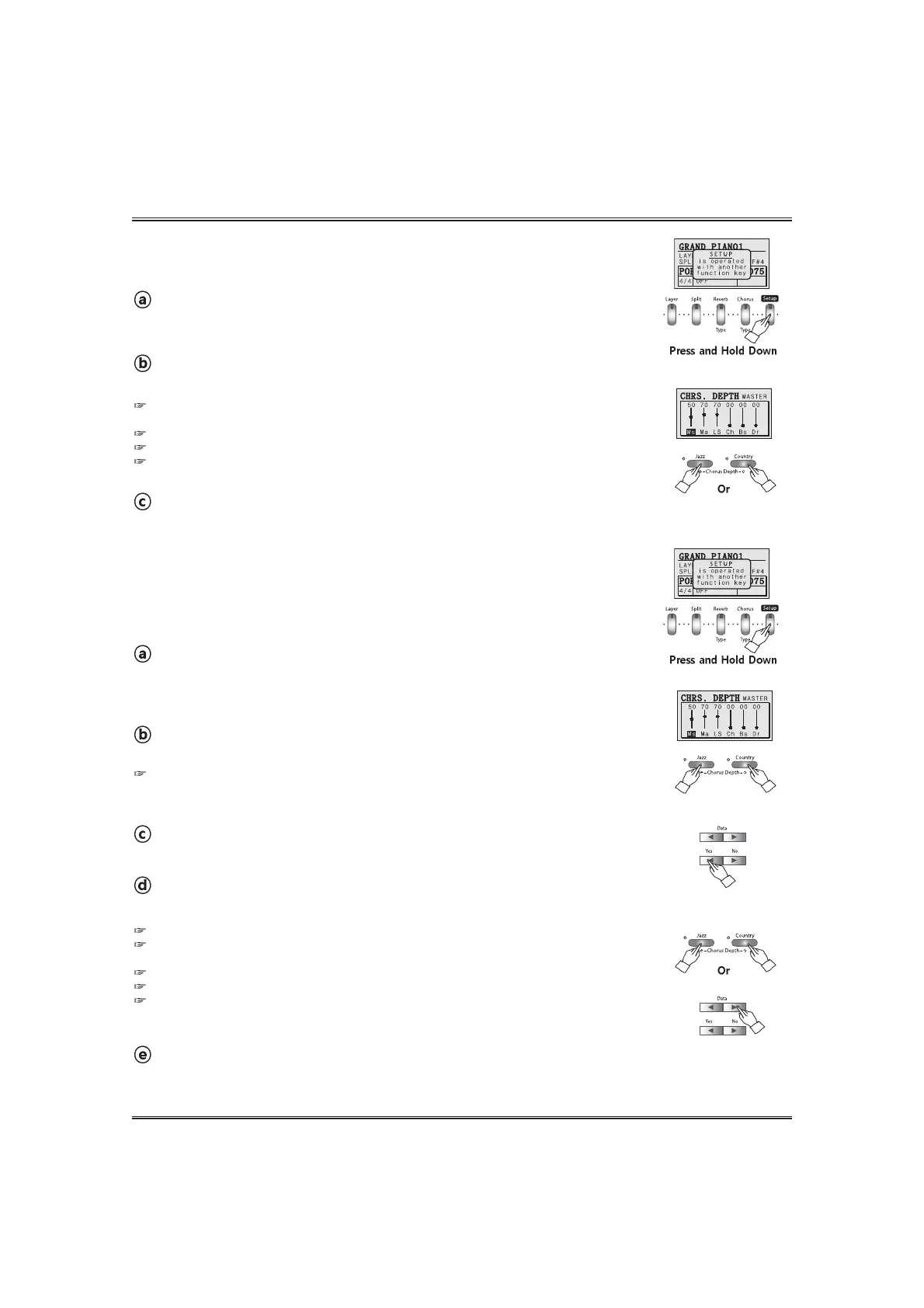
Call up the SETUP mode.
Press and hold down the SETUP button. The setup pop-up appears in the LCD
screen.
Adjust the total depth.
Adjust the total depth by using the CHORUS DEPTH UP and DOWN buttons .
Return to the play mode.
Release the SETUP button.
If you press both UP and DOWN Buttons at the same time automatically return to the default
reverb total depth (50).
The range of volume is 0 ~ 100.
Hold the button for continuous decrementing or incrementing.
If the DISPLAY HOLD is on, the pop-up display does not return to main menu and the LCD screen
shows the current pop-up display.
ADJUSTING THE DEPTH FOR EACH PART
The chorus part depth parameter lets you make different chorus depth setting
for the rhythm, bass and chord parts of the auto-accompaniment, as well as the
parts you play from keyboard.
Call up the SETUP mode.
Press and hold down the SETUP button. The setup pop-up appears in the LCD
screen.
Adjust the depth of the selected part.
Adjust the depth of the selected part by using the CHORUS DEPTH UP and DOWN buttons .
Move the cursor to the desired part.
Press the YES button until the cursor is located on the desired part.
Call up the chorus depth pop-up display.
Press the CHORUS DEPTH UP or DOWN button. The chorus depth pop-up appears.
Return to play mode.
Release the SETUP button.



 To Next Page