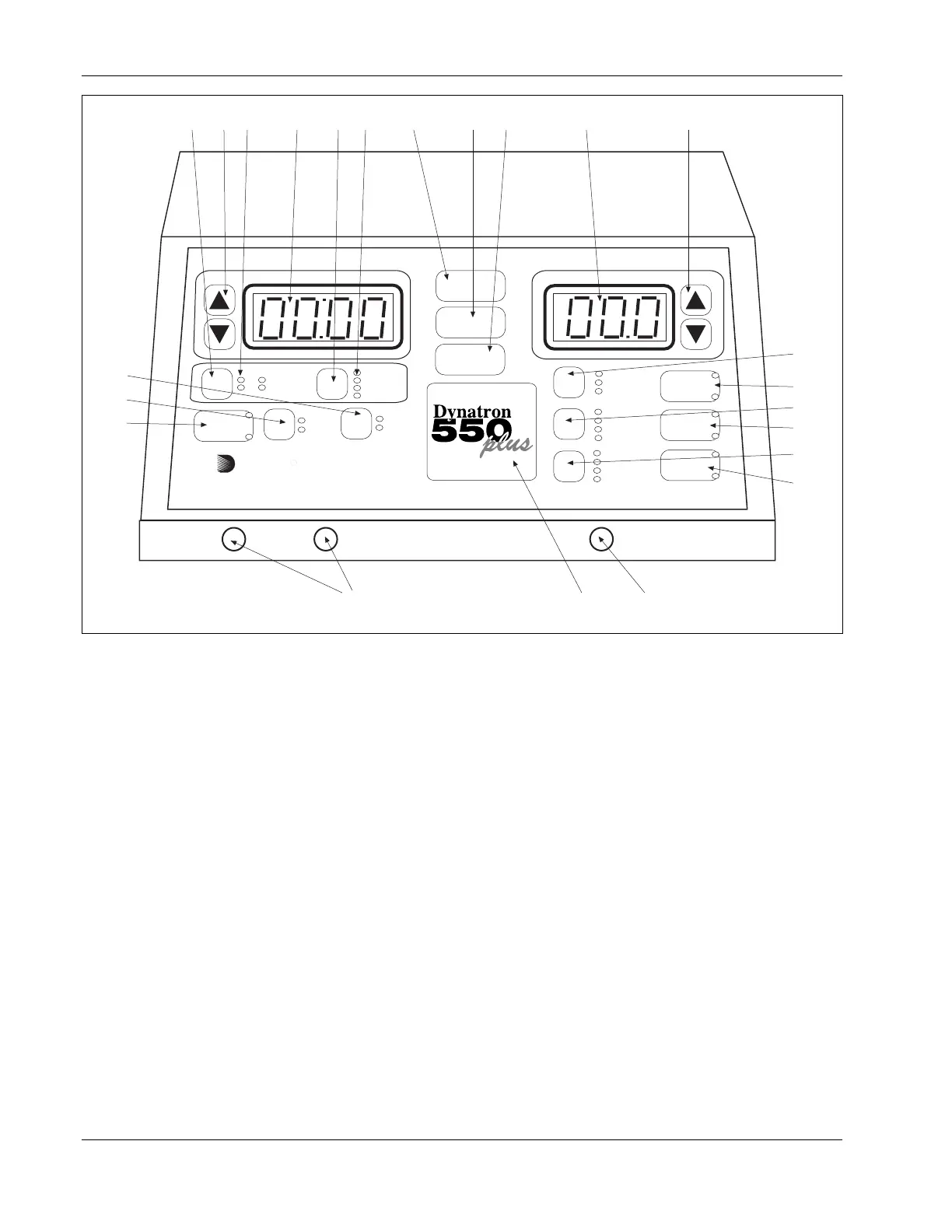
Dynatron® 850plus & 550plus
Installation & Features
8
POWER-INTENSITY
TIME
START
STOP
HI VOLT
+
-
PREMOD
IFC
BIPHASIC
CO-CONT
NORMAL
RECIP
.5 RAMP
1.0 RAMP
1.5 RAMP
2.0 RAMP
HIGH
LOW
TARGET
SWEEP
CH 1 CH 2
MICRO
+
-
RUSSIAN
10/10
10/30
10/50
CONT
HV
TARGET
WIDTH
RATE
FREQ
TIME
MICRO
HV
2
1
FUNCTION
64
758
9
123 10 11
14
13
12
21
19
22
20
23
24
261525
Dynatronics
CH
Dynatron 550plus Control Panel
key while you press the Stop key, or by reducing that channel’s treatment time to zero.
3. PAUSE/FUNCTION: This key is used in combination with other key presses for
accessing unique features including: select polarity (high volt and microcurrent), audio
volume control (microcurrent), and to stop one treatment only. Specific instructions for
using this key are provided later in this manual.
For Dynatron 850plus only: This key is also used to pause an ultrasound treatment. First
press the channel toggle (CH) to select SOUND, then press PAUSE/FUNCTION; the
ultrasound output is stopped, the treatment time is paused, and the light on the Pause key
is on. When this key is pressed again, the ultrasound treatment resumes and the light on
the Pause key is off. The PAUSE option is not available with the Dynatron 550plus since
that model does not offer ultrasound. NOTE: During a Combo treatment, only the
ultrasound output and the treatment timer are stopped when you press Pause; the stim
output continues.
4. TIME ARROW KEYS: These UP/DOWN arrow keys are used to increase/decrease the
treatment time or other parameter that is displayed in the Time display.
5. TIME DISPLAY: This display is used to show the treatment time for one treatment at a
time; the display shows treatment time for the selected channel (the selected channel is
indicated by the green LED—all other channels in use at the








 To Next Page