Quick Start: Introducing DynaVox Series 4
Part # 400023
59
The Skeleton Pages
The skeleton pages are blank pages and popups that can be modified to create unique page sets. Each
skeleton page set is a group of pages and popups that are already linked together, providing a consistent
navigational strategy. Skeleton pages are like templates in that they provide a platform for pages of
uniquely customized vocabulary. The pages and buttons have already been created, organized and
assigned a navigational strategy. The only remaining task is assigning vocabulary and behaviors to the
buttons. Unlike templates, which must be copied and saved as pages before being customized, the
original skeleton pages will be permanently changed when they are customized.
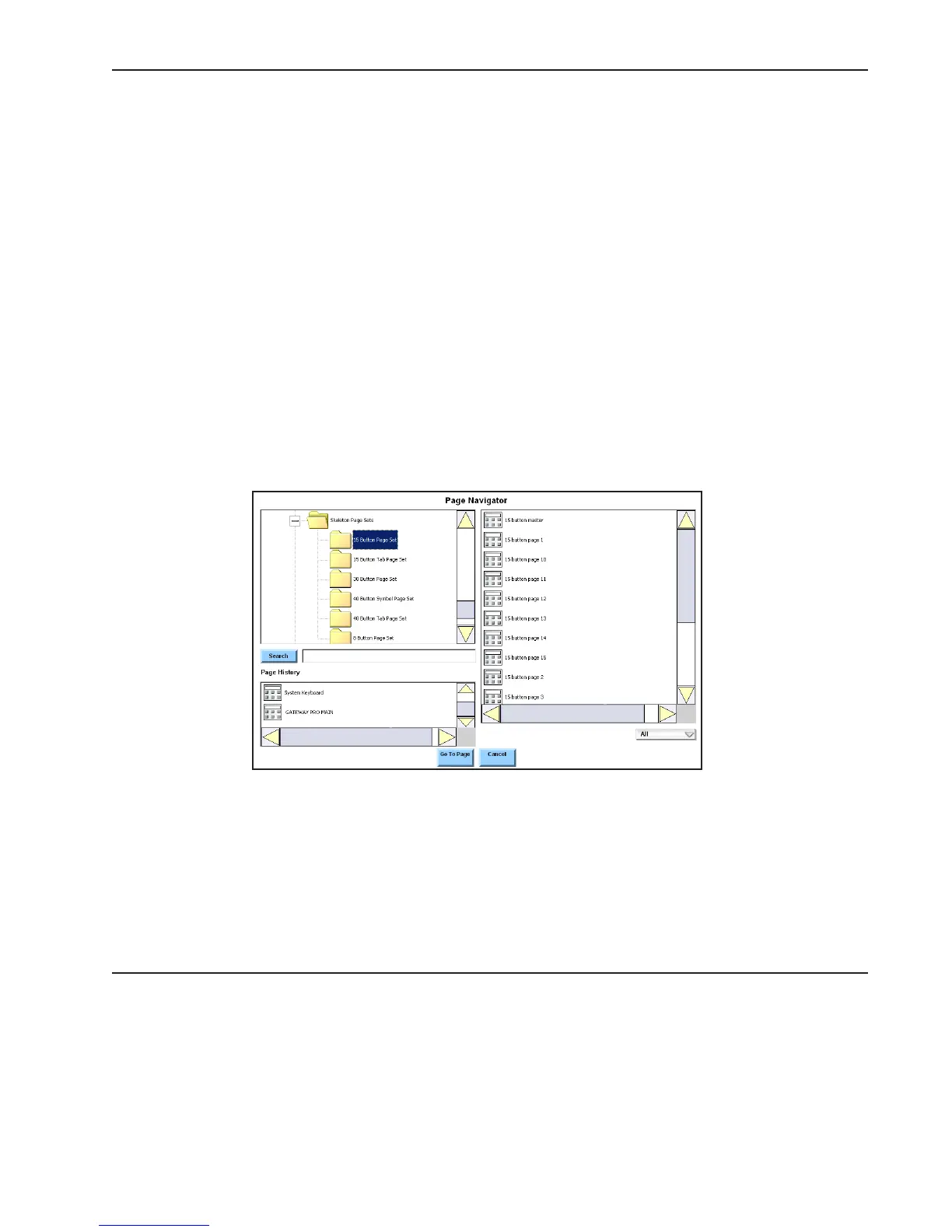
Opening a Skeleton Page Set
To open a skeleton page set, follow these steps:
1. Select the pull-down menu button in the title bar at the top of the touch screen.
2. Select Setup in the main pull-down menu. The Setup menu will open.
3. Select Page Navigator in the second pull-down menu. The Page Navigator menu will open.
4. Select the down arrow button for the left viewport to scroll down to the Skeleton Page Sets
folder.
5. Select the expansion box beside the Skeleton Page Sets folder to see all the skeleton page
sets.
6. Select the folder for the skeleton page set you want to use. The right viewport will display
the names of all the pages in the chosen set.



 To Next Page