EasyManua.ls Logo

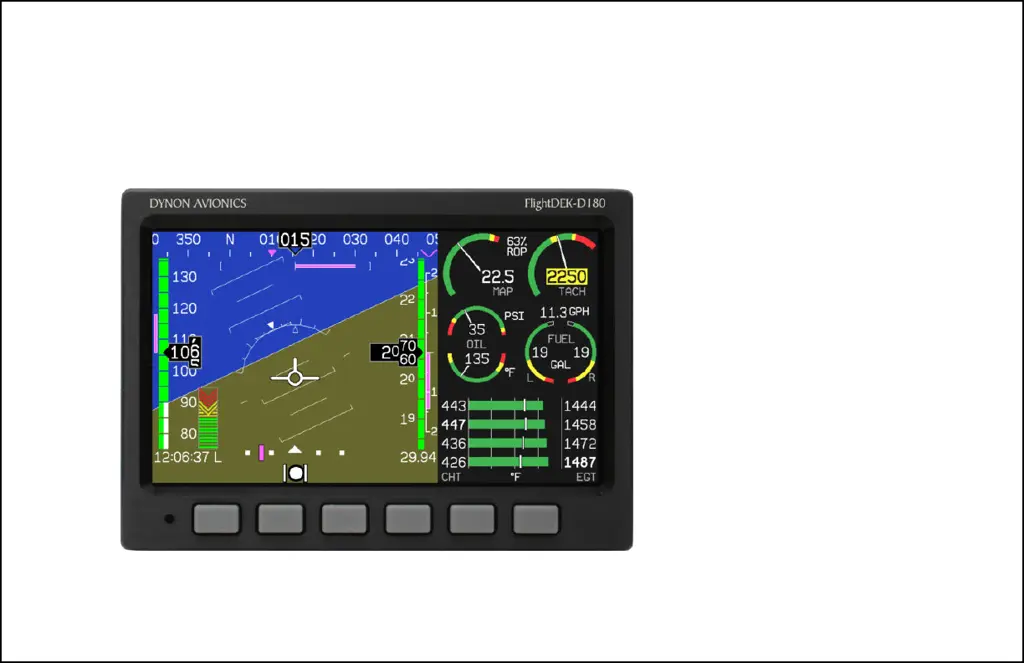
Dynon Avionics FlightDEK-D180 - User Manual

Dynon Avionics FlightDEK-D180
116 pages
Print Icon
To Next Page IconTo Next Page
Loading...
FlightDEK-D180
Combined EFIS and EMS
Pilot’s User Guide
P/N 100601-000, Revision F
For use with firmware version 5.1
May, 2009
Dynon Avionics
This product is not approved for
installation in type certificated aircraft

Table of Contents

Other manuals for Dynon Avionics FlightDEK-D180

Questions and Answers

  • D
    debbienelsonAug 18, 2025
    Why does my Dynon Avionics FlightDEK-D180 GPS show the wrong heading after magnetic calibration?
    • U
      ufullerAug 18, 2025
      If the heading on your FlightDEK-D180 is consistently incorrect after a magnetic calibration, orient your plane in a known direction, ideally on a compass rose at the airport. Access the Heading Adjustment menu by pressing SETUP > MORE > MORE > MAGADJ. Adjust the heading value until the FlightDEK-D180 heading matches the direction your plane is pointing.
  • M
    Mary JacksonAug 21, 2025
    What to do if my Dynon Avionics FlightDEK-D180 GPS airspeed is inaccurate at takeoff?
    • B
      Bradley DavisAug 21, 2025
      If your FlightDEK-D180's airspeed reading is off by 1 to 10 knots at takeoff speed, you can recalibrate the zero pressure value. Park your plane in a windless environment like a hangar. Cover both the pitot and static ports with a sock or cloth to minimize airflow without applying pressure. On the FlightDEK-D180, go to the EFIS main menu, then press MORE > SETUP > MORE > MORE > MORE > SPDCAL. Once you're sure there's no pressure on the ports, press either button corresponding to SET ZERO PRESSURE and confirm with YES. After calibration, verify the airspeed on your next flight. To reset to factory defaults, use the SPDCAL menu and press RESET DFLTS.
  • R
    Robert DuncanAug 23, 2025
    What to do if my Dynon Avionics FlightDEK-D180 GPS shows the wrong altitude?
    • I
      iscottAug 23, 2025
      If the altitude displayed on your FlightDEK-D180 is consistently incorrect, set the barometer to the correct value for your location. Note the difference between the displayed and actual altitude. Navigate to the Altitude Adjustment menu by pressing SETUP > MORE > ALTADJ. Adjust the altitude value until the FlightDEK-D180 altitude matches your plane's current location. If the adjustment needed is more than 200 ft or frequent adjustments are needed, contact Dynon Technical Support.
  • J
    Joel LewisAug 25, 2025
    Why does Dynon Avionics FlightDEK-D180 GPS display a continuous or blinking blue screen?
    • B
      brownkeithAug 26, 2025
      If your FlightDEK-D180 displays a continuous or blinking blue screen, make sure your power supply provides at least 2 amps and 10 volts. If the issue persists after confirming these conditions, contact Dynon Avionics.
  • C
    Curtis SnyderAug 27, 2025
    What to do if my Dynon Avionics FlightDEK-D180 GPS screen stays black?
    • R
      Randy WallaceAug 28, 2025
      If the FlightDEK-D180 screen remains black when power is applied, verify that the Master Power is connected and that the Master Power supply is above 10 volts.
  • M
    Monique NorrisAug 30, 2025
    Why does my Dynon Avionics FlightDEK-D180 GPS indicate over temperature condition?
    • A
      alexandershelbyAug 30, 2025
      If your FlightDEK-D180 indicates an over-temperature condition, provide additional cooling to the instrument.
  • T
    Thomas ButlerSep 1, 2025
    Why is my Dynon Avionics GPS FlightDEK-D180 internal battery life too short?
    • S
      Steven WalkerSep 1, 2025
      If the internal battery life of your FlightDEK-D180 is too short, verify it is charged above 16 volts using the FlightDEK-D180 voltmeter. Re-run the capacity test. If the capacity is still insufficient, replace the battery.
  • G
    Gilbert BurnettSep 3, 2025
    Why does my Dynon Avionics FlightDEK-D180 GPS clock setting get lost?
    • A
      Austin Edwards Jr.Sep 3, 2025
      If your FlightDEK-D180 loses its clock setting, verify the internal battery is charged, if present. If there is no internal battery, ensure Keep Alive power is supplied to the unit at all times.
  • M
    maldonadokevinSep 6, 2025
    Why Dynon Avionics FlightDEK-D180 GPS will not boot off battery power?
    • L
      Lisa HollowaySep 6, 2025
      This behavior can be normal for the FlightDEK-D180. While it can continue running on battery power after being booted with master power, it may draw more current than the battery can provide at startup.
  • B
    Brandi BarrettSep 8, 2025
    What to do if Dynon Avionics GPS shows 'TEMPERATURE OUT OF SPEC'?
    • M
      Mrs. Elizabeth NelsonSep 8, 2025
      If your Dynon Avionics GPS shows a 'TEMPERATURE OUT OF SPEC' message, it means the unit's temperature is outside the specified range. This often happens in unventilated panels during hot weather. To resolve this, increase airflow around the FlightDEK-D180. The message should disappear once the temperature returns to the normal range.

Summary

3. Product Operation

5. EFIS Operation

POWER - Power on;off

Procedures for turning the FlightDEK-D180 unit on and off.

BARO - Changing Altimeter Setting

How to adjust the altimeter setting for accurate altitude readings.

BUGS - Setting Bug Markers

Setting heading, airspeed, and altitude bugs on display tapes.

SETUP - Setting Preferences

Configuring system preferences for units, clock, and display settings.

6. HSI Operation

7. Autopilot Operation

EFIS AP Indicators

New indicators and status displays for the Autopilot on the EFIS presentation.

AP Modes

Description of the different operational modes for the Autopilot system.

AP Control Methods

Various ways to control and monitor the Autopilot via menus and panels.

EFIS Autopilot Control

Detailed explanation of controlling the Autopilot through the EFIS menu system.

8. Alerts

Alarm Indicators

How alarms are triggered and indicated visually and audibly.

Multiple Alarms

Handling and acknowledging multiple simultaneous alarm events.

DSAB Alerts

Error messages related to Dynon Smart Avionics Bus (DSAB) network failures.

9. EMS Monitoring Functions

Engine Leaning and Power

Using EMS to monitor and adjust engine mixture for optimal performance.

Detonation Characterization

Understanding and identifying engine detonation based on EGT and CHT.

Pre-ignition Characteristics

Identifying pre-ignition based on high EGT and CHT temperatures.

Ignition Misfire

Diagnosing ignition misfires through engine monitor parameters.

Shock Cooling

Recognizing and managing engine shock cooling to prevent damage.

10. EMS Operation

Engine Leaning

Entering and exiting the engine leaning mode for mixture adjustment.

Dynon Avionics FlightDEK-D180 Specifications

Operating Environment IconOperating Environment
operating temperature-22° to 122° F
operating temperature (celsius)-30° to 50° C
Power IconPower
voltage10 - 30 Vdc
typical power consumption14 watts
maximum power consumption19 watts
Display IconDisplay
display typeAMLCD, TFT
backlight brightness400 nits (or 800 nits for super-bright option)
display size7.0 inches diagonal
display resolution854 x 480 color pixels
Weight and Dimensions IconWeight and Dimensions
width6.95 inches
height4.90 inches
depth4.51 inches

Related product manuals