HSI Operation
6-4 FlightDEK-D180 Pilot’s User Guide
5. True Airspeed Indicator. If it is possible to calculate true airspeed on the device then it is displayed here. In
order to do this the device must have access to an outside air
temperature from an EFIS or an EMS.
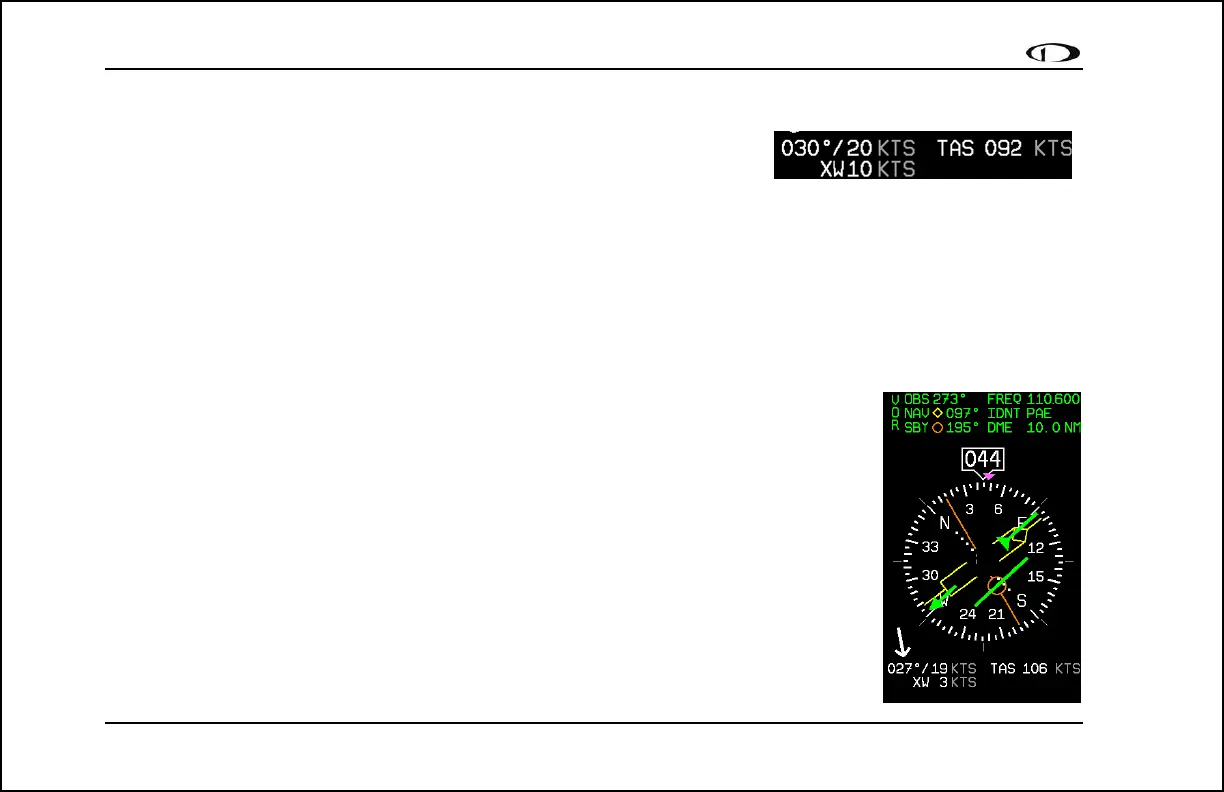
6. Winds aloft. This indicator, located at the bottom of the HSI page,
appears only when you have GPS data and true airspeed available to the instrument. The arrow is the wind
direction relative to your aircraft. It is always the same size and only indicates wind direction. The numbers
below are absolute wind direction (magnetic) and absolute wind speed. Below that, labeled as “XW” is the
crosswind component of the wind. Wind data is calculated while in stable flight with very little turn rate. It uses
the GPS ground speed and track to compare to the magnetic heading and the true airspeed that the EFIS
calculates. In order for winds to be correct, the airspeed, OAT, and compass on the EFIS must all be accurate.
Navigation Radio Overlay
The figure at right shows an HSI page with information sourced from a navigation radio. This
data could be a VOR or a localizer. The various elements are described below.
1. Text displays. The text displays (located at the top of the HSI Page) provide a variety
of information. Displayed here is the course/OBS setting, the active frequency that
the SL-30 is tuned to, the identifier for the tuned frequency, and the bearing to the
active and secondary frequencies. When the data is not available or is not valid, the
various data fields in this area are replaced by dashes.
2. Course indicator. The green course indicator (shown pointing to 273º at right) has an
arrow at its end which points to the currently selected course (OBS) on your NAV
radio. This setting is also shown in the text area as “OBS.” When tuned to a VOR,
this is the radial that you wish to fly. When tuned to an ILS, this is set to the runway
heading. In a situation with no winds, keeping the course indicator pointed straight



 To Next Page