Autopilot Operation
FlightDEK-D180 Pilot’s User Guide 7-5
• If, while flying in HDG mode and compass data is lost, the AP fails over to TRK mode (if valid GPS data is
present).
• If, while flying in NAV or TRK mode and GPS data is lost, the AP fails over to HDG mode (if valid compass data is
present).
BUGS DISPLAY (LOWER RIGHT CORNER)
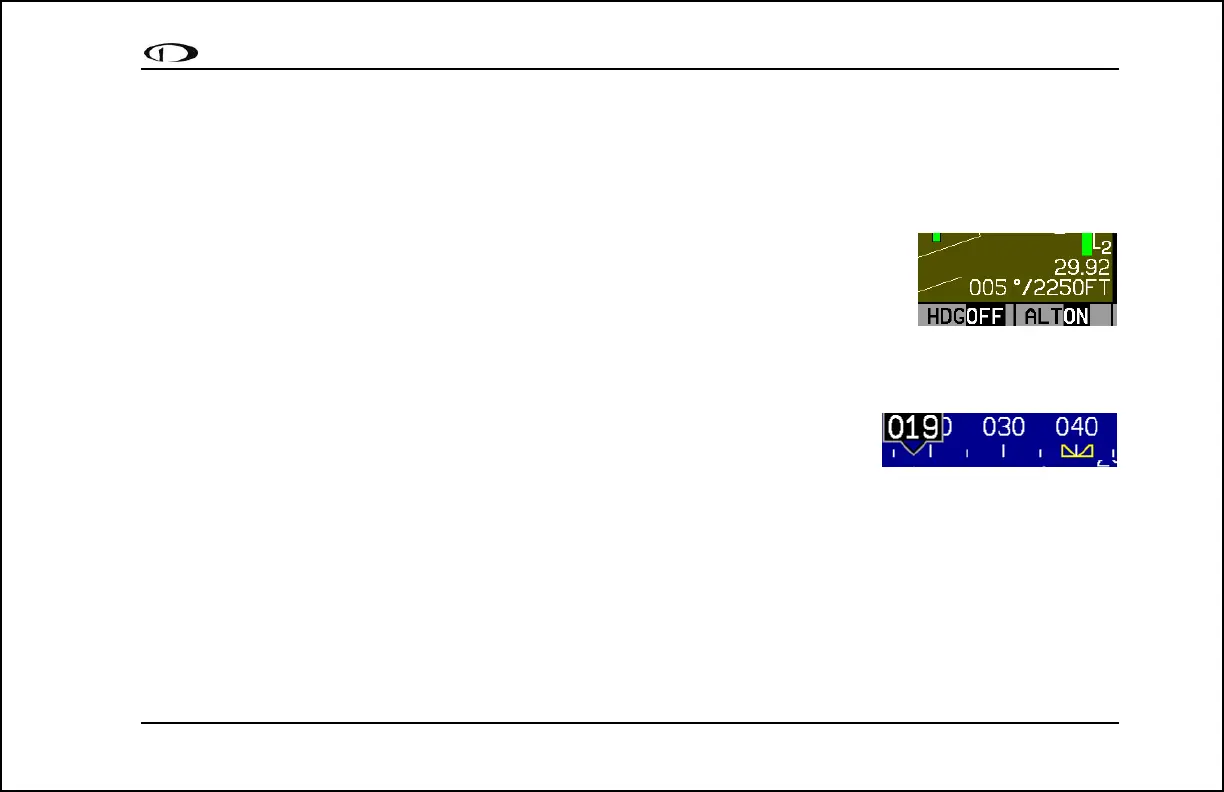
Whenever either the heading or altitude Bug is toggled ON (via the BUGS menu or the AP74)
its current value is displayed in the lower right corner of the EFIS page.
Example: 005°/2250FT (HDG bug toggled ON, set to 005° and ALT bug toggled ON, set to
2250 Feet). In the example at right, the heading bug is toggled on (i.e., displayed on the
heading tape), but the AP HDG mode is currently disengaged.
BUGS GRAPHICAL APPEARANCE
When an AP is installed and configured, the appearance of the IAS, HDG, and ALT bugs
is changed to reflect AP status. When the Autopilot is not engaged for a given axis, the
respective bug is hollow (as shown at right). When the Autopilot is engaged for a given
axis (HDG, TRK, ALT), the respective bug is solid, or “filled in.” Because the Autopilot does not currently have a
settable airspeed mode, the IAS Bug is always displayed as a hollow outline.
AP Modes
The Autopilot can be engaged in the following modes. During AP-controlled heading/ground track changes, the AP turns
the aircraft at the target turn rate specified in the EFIS > SETUP > AP > ROLL SERVO menu. The AP will not exceed
the maximum bank angle, set in that menu. See the FlightDEK-D180 Installation Guide for detailed information on
configuring these parameters.



 To Next Page