Product Operation
3-6 FlightDEK-D180 Pilot’s User Guide
button to move the selected screen down in the screen list. Likewise, press the MV UP▲ button to move the selected
screen up in the screen list.
Menus
All interaction with the FlightDEK-D180 is accomplished through the use of its
menu system. The menu system is accessed and navigated via the six buttons located
on the front of the unit.
PAGE-SENSITIVE MENUS
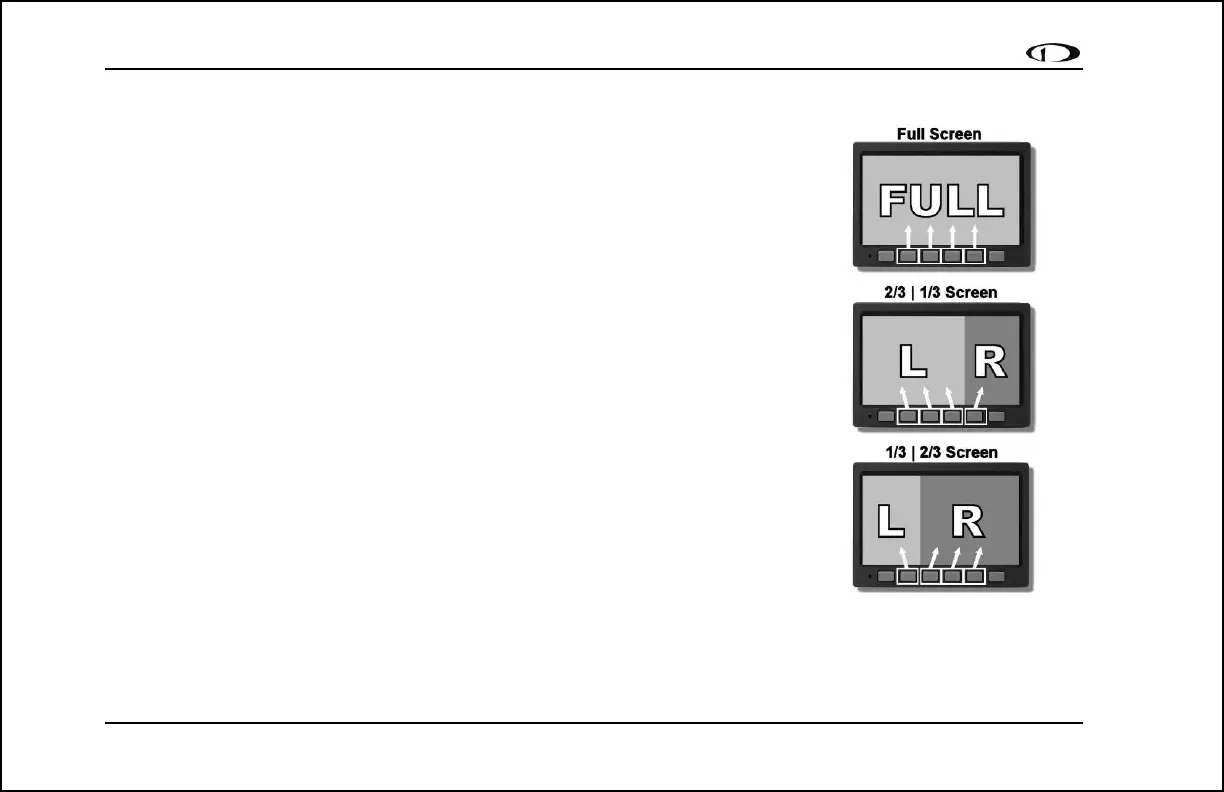
On a screen where no menu is already present, buttons two through five are used to
display a menu. With no menu displayed, pressing any one of these buttons causes
the menu for the page above it to show at the bottom of the screen. For example, if a
screen is divided into two pages with the left page occupying 2/3 of the screen and
the right page occupying 1/3 of the screen, then pressing FlightDEK-D180 buttons
two, three, or four (all below the left 2/3 of the screen) displays the main menu for
the left page and pressing button five (below the right 1/3 of the screen) displays the
main menu for the right page (see the figure to the right).
FUNCTIONALITY
A menu consists of two rows of gray boxes containing text. The upper row contains
one tab that denotes the currently displayed menu. The lower row contains six labels
that denote the function of the button below it. Many of the onscreen elements move
up to avoid the menu. This prevents the menu from obscuring useful data while it is
up. Upon exiting the menu, the screen returns to its normal appearance.
Pressing a button either displays another menu or adjusts a parameter. If there is no
The configuration of the pages on
the screen determines which
buttons are used to display a
page’s menu.



 To Next Page