41
User manual reference -
Page 16
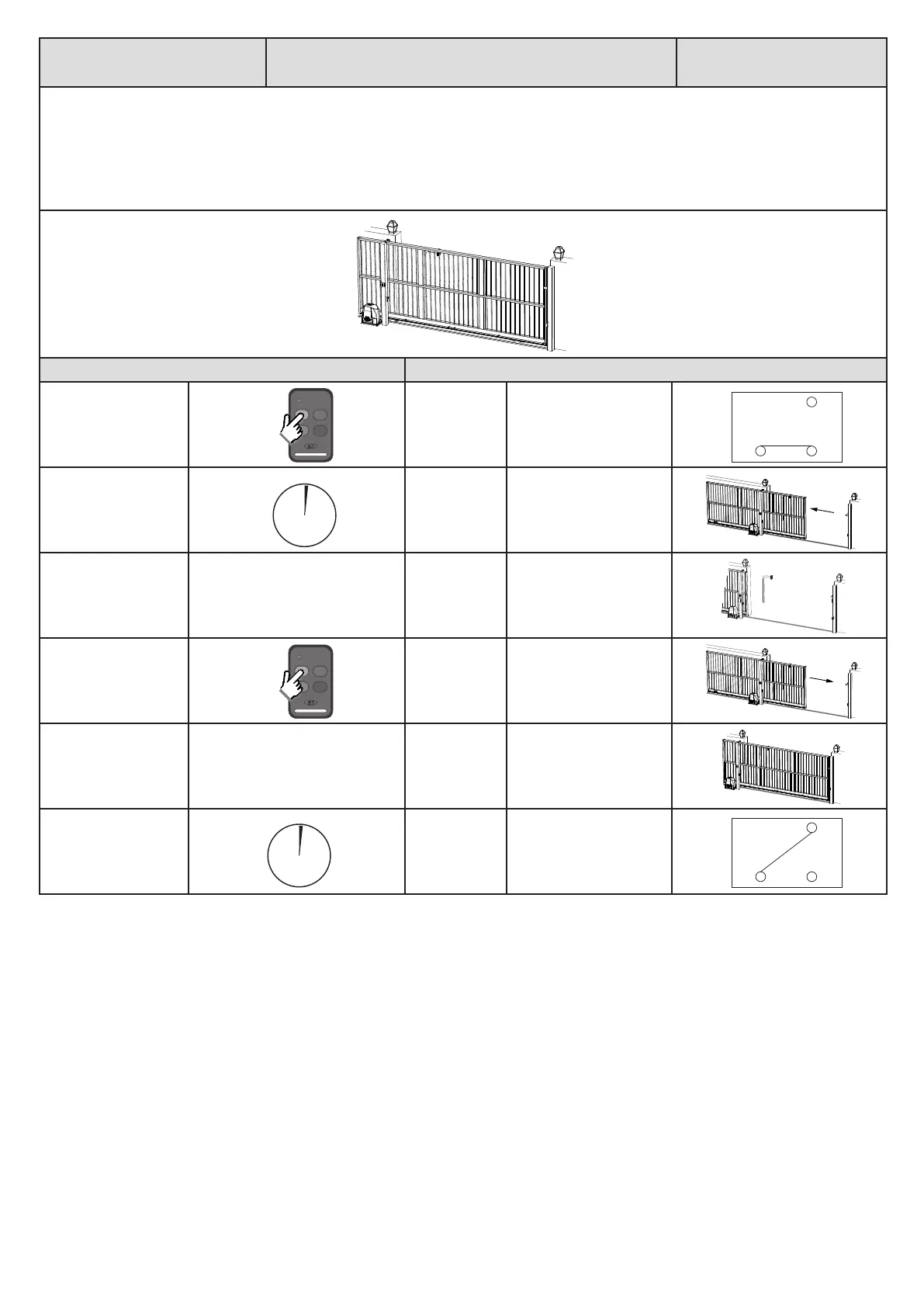
Auxiliary relay modes.
Magnec lock mode.
Basic operang
features
With Magnec lock mode selected, the auxiliary relay will acvate, half a second before the gate opens and remain acve unl half a second aer
the gate has closed again.
Whenever a lock is installed with the system, a separate baery backed up power supply matching the lock load must be installed. Failure to do
this can damage the charger and baery of the control unit.
Below is an example of magnec lock mode when standard BT mode is acve.
Acon Response
Momentary BT trigger.
Auxiliary relay
acvates.
No buzzer tone.
Half a second aer
the auxiliary relay has
acvated.
Gate begins
opening.
No buzzer tone.
Gate reaches open
posion.
Gate stops. No buzzer tone.
Momentary BT trigger.
Gate begins
closing.
No buzzer tone.
At full closed posion. Gate stops. No buzzer tone.
Half a second aer gate
has reached the full
closed posion.
Auxiliary relay
deacvates.
No buzzer tone.
ON
Com N/O
N/C
0.5 sec.
0.5 sec.
OFF
Com N/O
N/C


 To Next Page