IMPORTANT INFORMATION
1-3
CHECKING THE CONNECTIONS
GEN
INFO
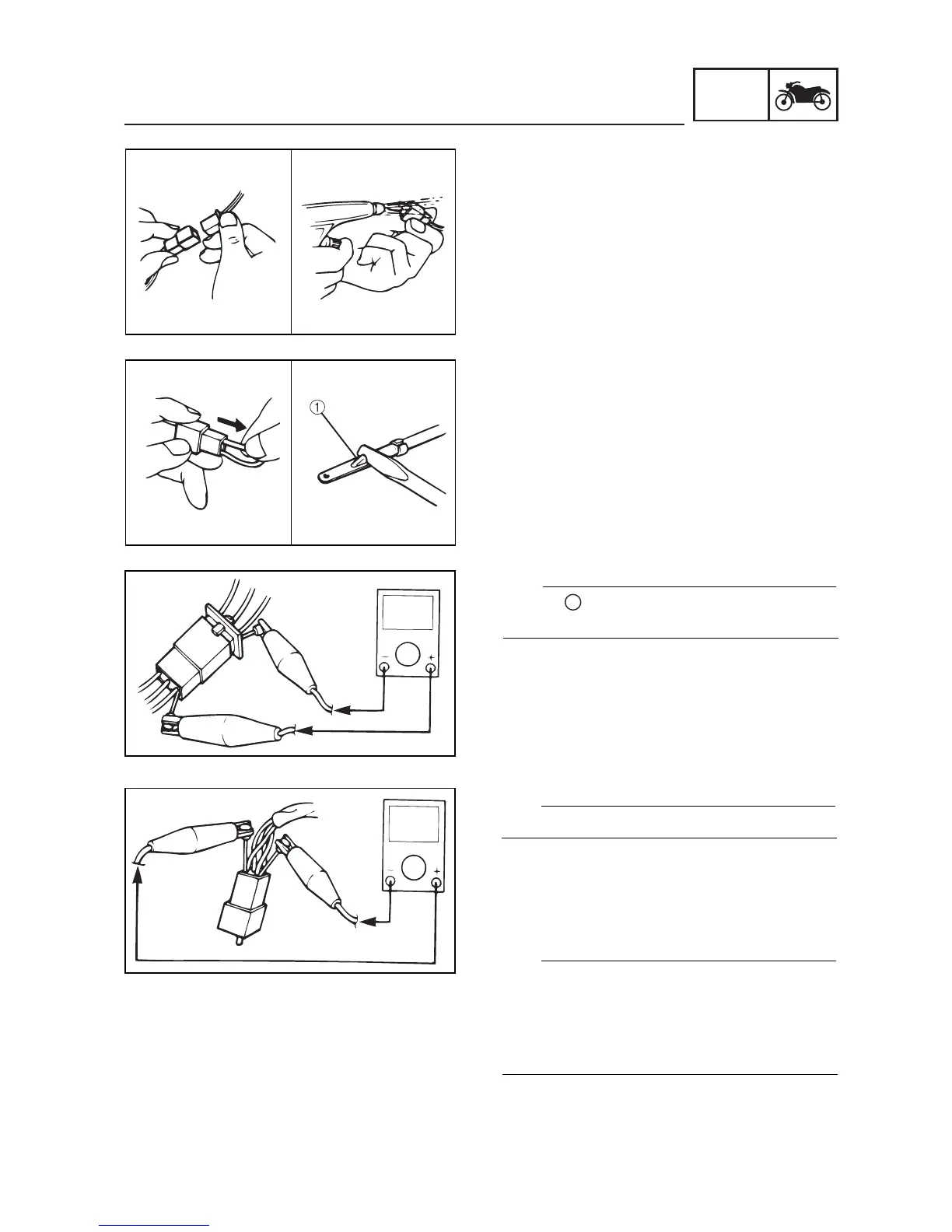
Check the leads, couplers, and connectors for
stains, rust, moisture, etc.
1. Disconnect:
•lead
•coupler
• connector
2. Check:
•lead
•coupler
• connector
Moisture Dry with an air blower.
Rust/stains Connect and disconnect sev-
eral times.
3. Check:
• all connections
Loose connection
ĺ
ĺ
ĺ
Connect properly.
TIP
If the pin
1
on the terminal is flattened, bend it
up.
4. Connect:
•lead
•coupler
• connector
TIP
Make sure all connections are tight.
5. Check:
• continuity (with the pocket tester)
TIP
• If there is no continuity, clean the terminals.
• When checking the wire harness, perform
steps 1 to 3.
• As a quick remedy, use a contact revitalizer
available at most part stores.


 To Next Page