59
Delete a Route
1. From the
N
AVIGATION
P
AGE
, press
MENU
|
ENT
or from the
M
AP
P
AGE
press
MENU
|
MENU
|↓ to
R
OUTE
P
LANNING
|
ENT
.
2. Press ↓ to route name|
ENT
.
3. Press ↓ to
N
AVIGATE
|
ENT
|→ to
D
ELETE
|
ENT
|← to
Y
ES
|
ENT
.
Tip:
You can also delete all routes at once:
1. From the
N
AVIGATION
P
AGE
, press
MENU
|
ENT
or from the
M
AP
P
AGE
press
MENU
|
MENU
|↓ to
R
OUTE
P
LANNING
|
ENT
.
2. Press → to
D
ELETE
A
LL
|
ENT
|← to
Y
ES
|
ENT
.
Edit a Route
You can edit the route name if you wish.
1. From the
N
AVIGATION
P
AGE
, press
MENU
|
ENT
or from the
M
AP
P
AGE
press
MENU
|
MENU
|↓ to
R
OUTE
P
LANNING
|
ENT
.
2. Press ↓ to route name|
ENT
|
ENT
.
3. Press ↑ or ↓ to change the first character, then press → to move the
cursor to the next character and repeat until the name is correct, then
press
ENT
. Return to the previous page by pressing
EXIT
|
EXIT
|
EXIT
|
EXIT
.
You can edit the route by adding and removing waypoints.
1. From the
N
AVIGATION
P
AGE
, press
MENU
|
ENT
or from the
M
AP
P
AGE
press
MENU
|
MENU
|↓ to
R
OUTE
P
LANNING
|
ENT
.
2. Press ↓ to route name|
ENT
|↓ to
R
OUTE
W
AYPOINTS
L
IST
. Use ↓ and ↑ to
select a waypoint, then press
ENT
.
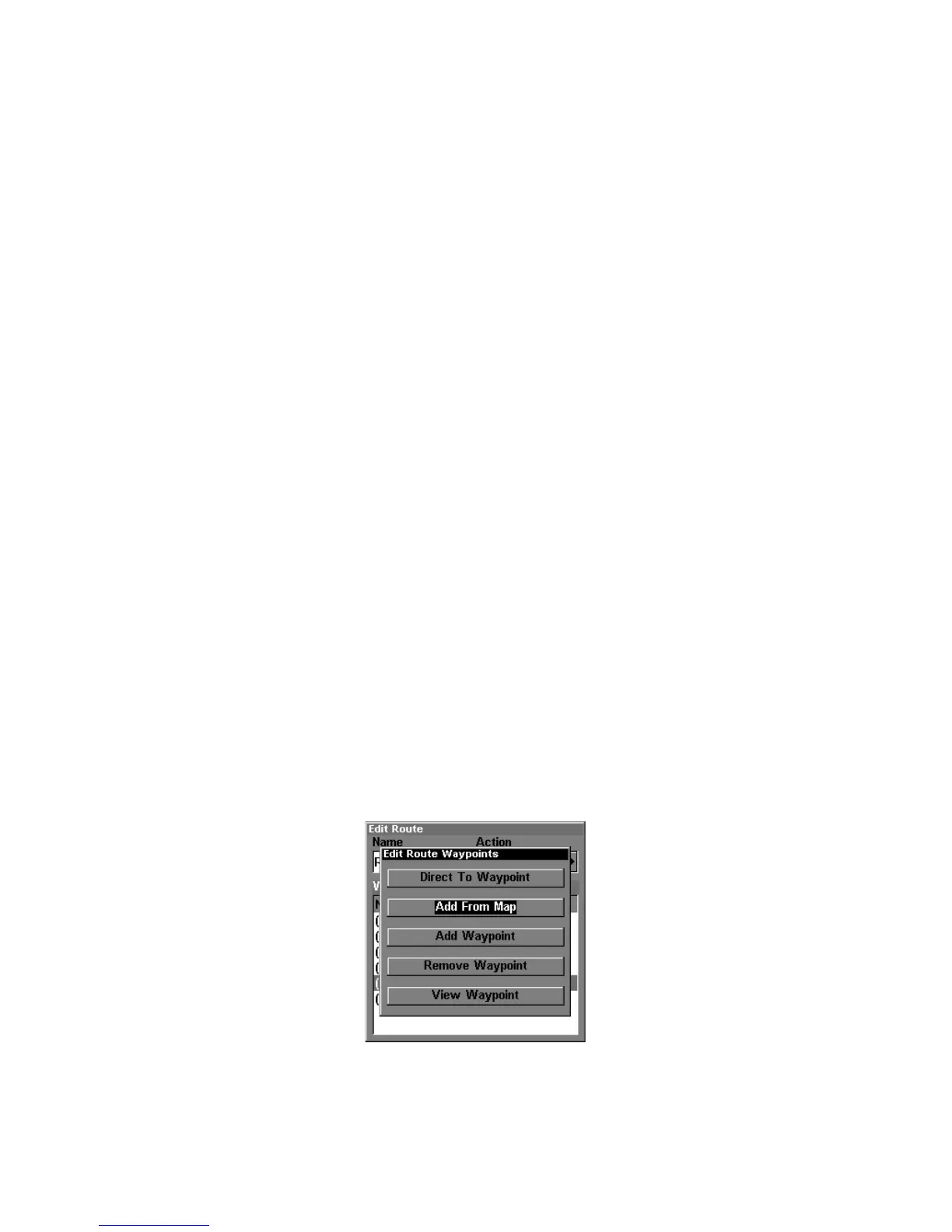
Edit Route Waypoints menu.
3. Use ↓ and ↑ to select a command from the Edit Route Waypoints
menu and press
ENT
. Add From Map lets you insert a waypoint in the



 To Next Page