92
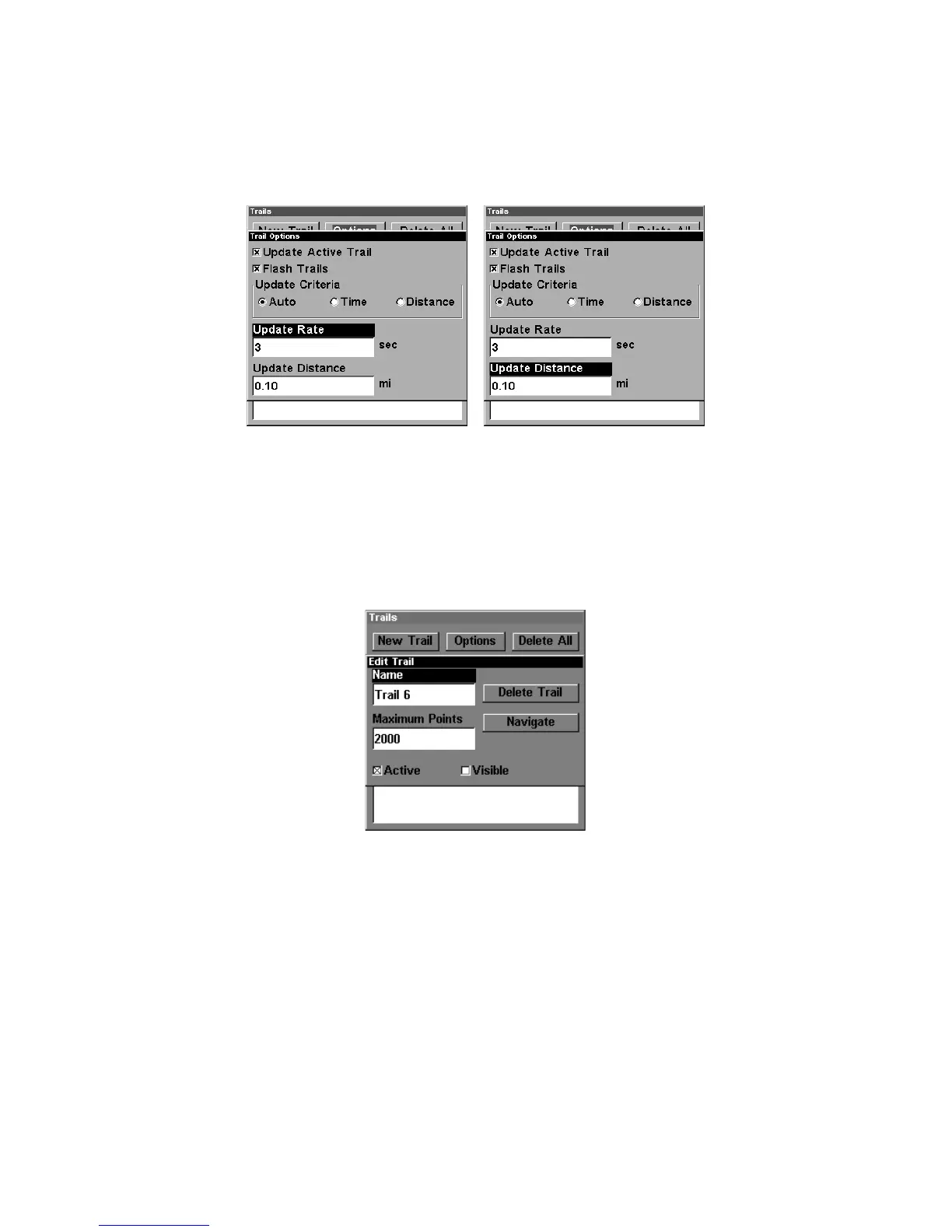
With one of the Update Criteria selected, use the cursor arrows to
highlight either the
U
PDATE
R
ATE
or
U
PDATE
D
ISTANCE
data entry boxes and
press
ENT
. Press ↑ or ↓ to change the first character, then press → to
the next character and repeat until the entry is correct. Press
EXIT
to
return to the Trail Options Menu.
Trail Options menu: Update Time Rate setting, left, and Update Dis-
tance setting, right.
Specific Trail Options
Delete Trail
To delete a specific trail: From the Trails Menu, press ↓ to Trail
Name|
ENT
. The Edit Trail menu appears as seen in the following fig-
ure. Press → to
D
ELETE
T
RAIL
|
ENT
|← to
Y
ES
|
ENT
.
Edit Trail menu.
New Trail
To manually start a new trail, in the Trails Menu, make sure
N
EW
T
RAIL
is highlighted and press
ENT
.
Trail Visible/Invisible and Other Trail Options
The name, maximum number of points in the trail, activity, and visibility
are all changed on the Edit Trail menu screen. The Active setting deter-
mines whether or not the unit is recording new points for a particular trail.
On the Edit Trail menu, press ↓ or ↑ to highlight the section you wish
to change, then press
ENT
. Make your changes, then press
EXIT
to erase
this menu.



 To Next Page