67
Section 5:
System & GPS Setup Options
Alarms
This unit has several GPS alarms. The factory default setting has all
the alarms turned on. You can turn the alarms off and on and change
their distance settings.
You can set an arrival alarm to flash a warning message and sound a
tone when you cross a preset distance from a waypoint. For example, if
you have the arrival alarm set to .1 mile, then the alarm will flash a
message when you come within .1 mile of the recalled waypoint.
The off course alarm warns you when your track drifts too far to the
right or left of the course line to the waypoint. For example, if the
alarm is set to .1 mile, then the alarm flashes a message if you drift .1
of a mile or more to the right or left of the line to the waypoint.
The anchor alarm is triggered when you drift outside of a preset radius.
Again, using the .1 mile as an example, if you're anchored and your
boat moves more than .1 of a mile, the alarm will flash a message and
sound a tone.
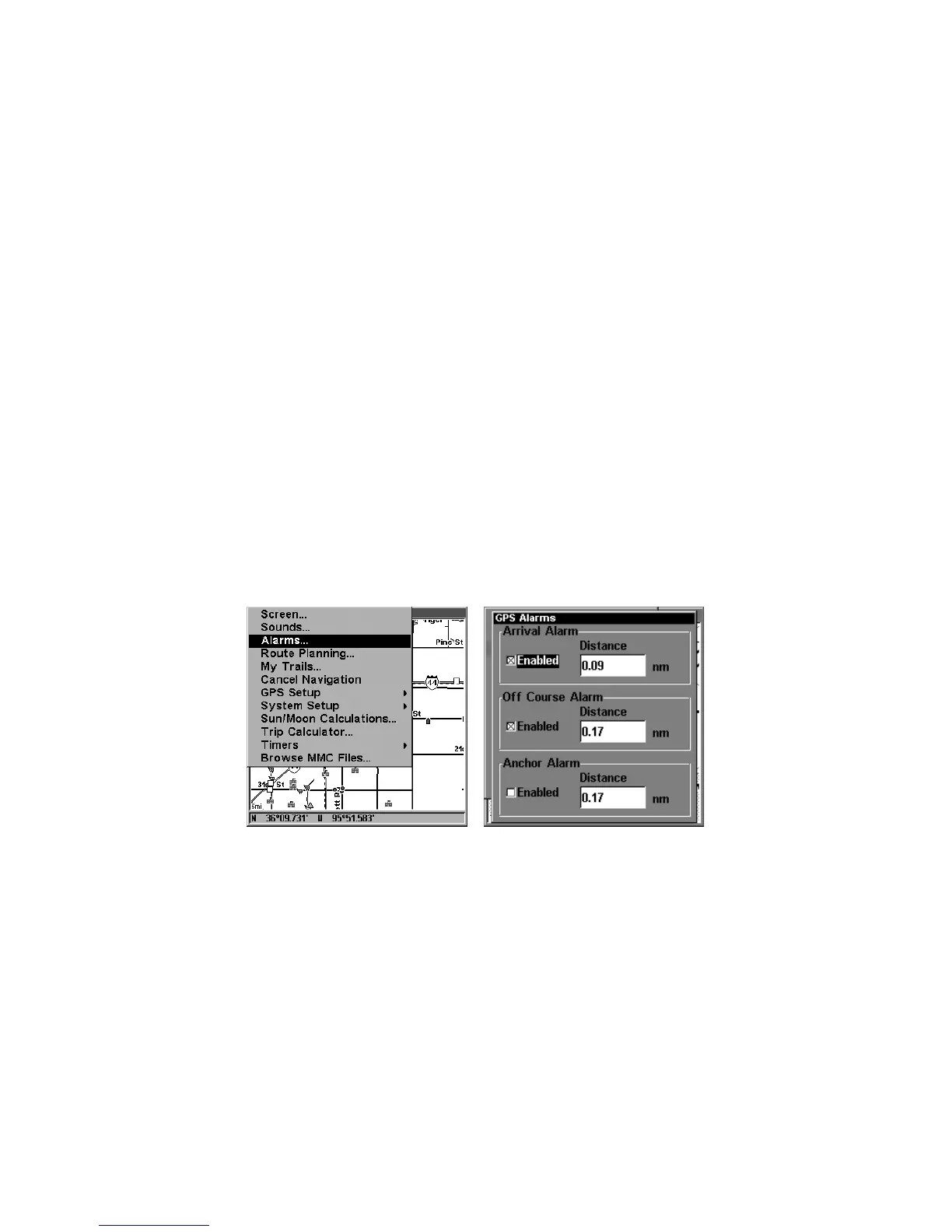
Alarms command, left; Alarm menu, right.
To change alarm settings:
1. Press
MENU
|
MENU
|↓ to
A
LARMS
|
ENT
.
2. Scroll ↓ or ↑ to select the desired category, then press
ENT
to check or clear
the Enabled box. This turns the alarm on (checked) or off (unchecked).
3. To change distance settings, scroll ↓ or ↑ to select the desired cate-
gory, then press → |
ENT
to activate the distance dialog box. Press ↑ or
↓ to change the first character, then press → to the next character and
repeat until the name is correct.
4. When your adjustments are finished, return to the last page dis-
played by repeatedly pressing
EXIT
.



 To Next Page