P.35
PM10U
EBARA
CORPORATION
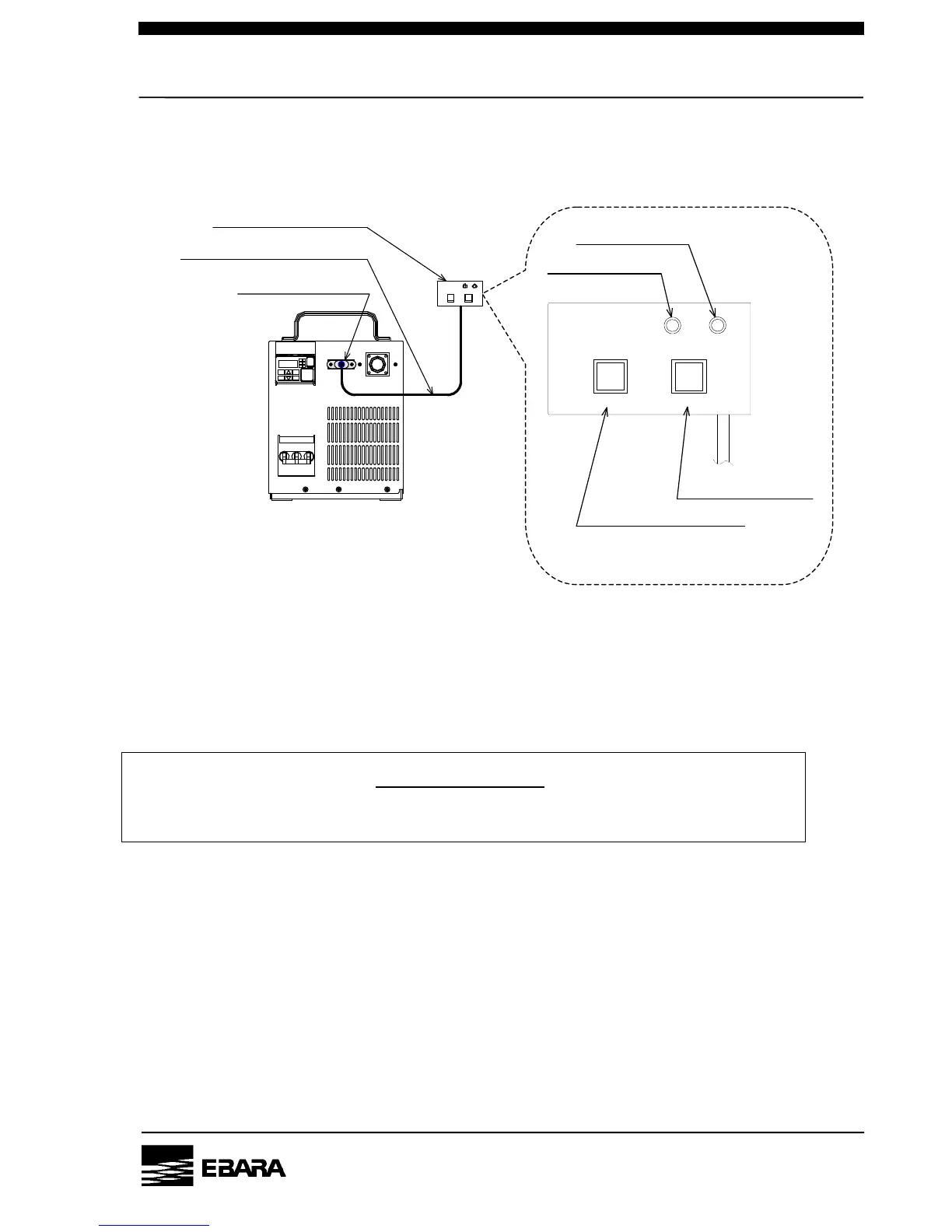
6-2-4. Operation by the handheld controller
Note) The handheld controller is an option.
<Please connect the handheld controller attachment cable with the I/O connector (CN2) >
START
1) Supply power to the pump.
Turn on the MAIN POWER switch on the pump.
(The POWER Lamp on the operation panel will come on.)
2) Press the RUN/STOP switch on the handheld controller.
The pump will be started and the RUN Lamp on the handheld controller will come on.
(The RUN Lamp on the operation panel will come on.)
3) Make sure that abnormality (unusual noise and/or vibration) is not found after the pump starts.
STOP
1) Press the RUN/STOP switch on the handheld controller.
The pump operation will stop and the RUN Lamp on the handheld controller will go out.
CONFIRMATION
Do not detach the handheld controller during the operation. The pump stops when the handheld
controller is removed.
RUN/STOP RESET
RUN ALARM
KASHIYAMA
The handheld controller
The attachment cable (1.5m)
I/O Connector CN2
RUN/STOP RESET
RUN ALARM
RUN Lamp
RUN/STOP Switch
ALARM Lamp
RESET Switch
Handheld controller
(Closeup)


 To Next Page