P.30
PM10U
EBARA
CORPORATION
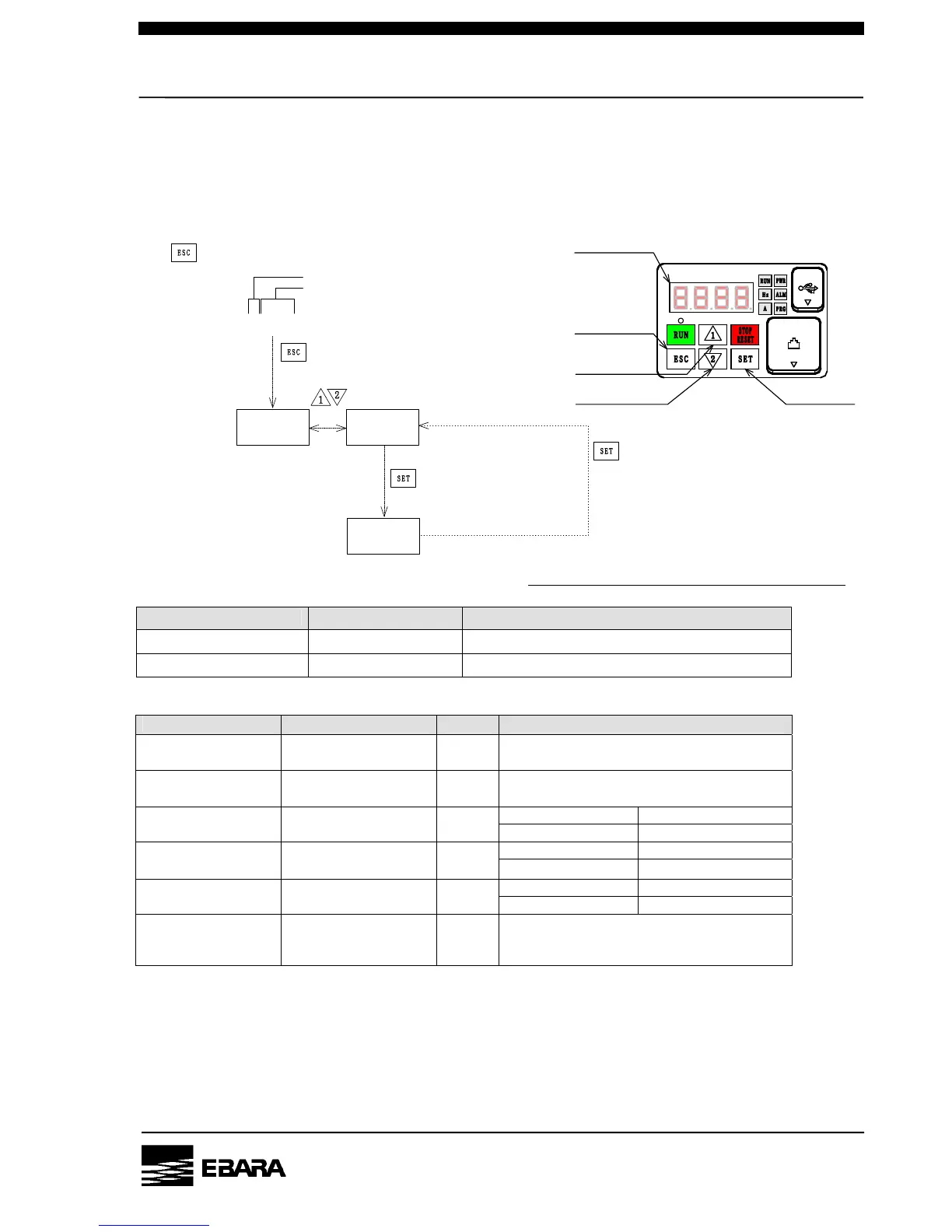
5.2 How to switch LED display
Pump conditions and control settings can be checked on the LED display. Display shows 4 digits and
the first letter from the left is group code.
1) How to switch display
Note)When the pump turns on, LED display shows run hour.
2) Group Code
Group Code LED display How to control
d000
Monitors run data Only this group code(d) can be switched
b000
Inverter setting This group code (b) can not be controlled
3) Contents of LED display
LED display code Display data Unit Note
Run frequency
Hz
Monitor lamp (Hz) lights up when it is
displayed.
Secondary current
A
Monitor lamp (A) lights up when it is
displayed.
Data range Content
Total run hour
hrs
*1 0.0 – 9999. Indicated by hour
*2 1000 – 9999 Indicated by 10 hr
Total electrified hour
hrs
*3 「100 - 「999
Indicated by 1000 hr
*4 0. – 9999. Indicated by time
Error count monitor
Time
*5 1000 - 6553 Indicated by 10 time
d081 – d086
Error monitor
-
Last 6 errors available.
See P.46 how to use LED monitor section
- indicated when there is no error
d002
d016
d001
d000
d000
Group code
switches LED display code
d016
③Running data monitor
(It only shows this function)
②Press ESC button,
changes LED display
①Press ESC button, switches LED display
④Press Up & Down button,
changes LED display
⑤Press SET button
shows display data
1585.
⑥Press SET button again,
switches LED display
LED display code
d017
d080
LED Display
ESC Switch
UP Switch
SET Switch
DOWN Switch


 To Next Page