P.28
PM10U
EBARA
CORPORATION
5. OPERATION PANEL
There are four different modes to run and stop the pump, “Direct power input”, “Operation by operation-
panel”, “Operation by external signal” and “Operation by the handheld controller”.
If “Direct power input” is selected, set driving connector, that is standard accessory, onto “I/O connector
(CN2)”.
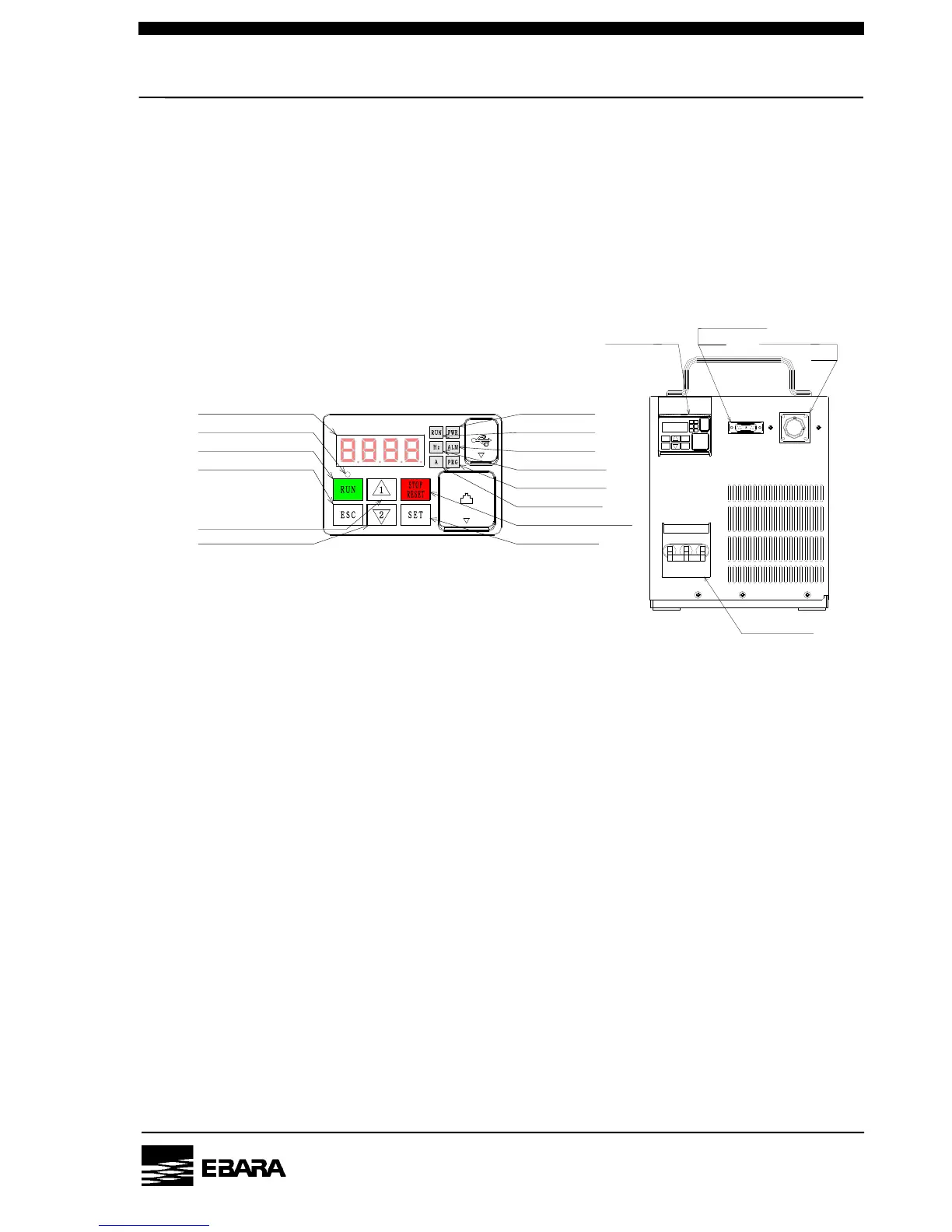
5.1 Operation Panel
Running status can be checked by LED display on operation-panel.
Fig. 5.1 Operation panel
Fig. 5.2 Pump operation side
I/O Connector
CN2
Power connector
CN1
Main switch
Operation panel
(4) RUN Lamp
(5)Monitor Lamp(Hz)
(6) Monitor Lamp(A)
(8) LED Display
(7) LOCAL/REMOTE Lamp
(9) RUN Switch
(11) ESC Switch
(12) UP Switch
(13) DOWN Switch
(1)POWER Lamp
(2)ALARM Lamp
(3)PROGRAM Lamp
(10) STOP/RESET Switch
(14) SET Switch


 To Next Page