EC-PM-80320 User's Manual
- 4 -
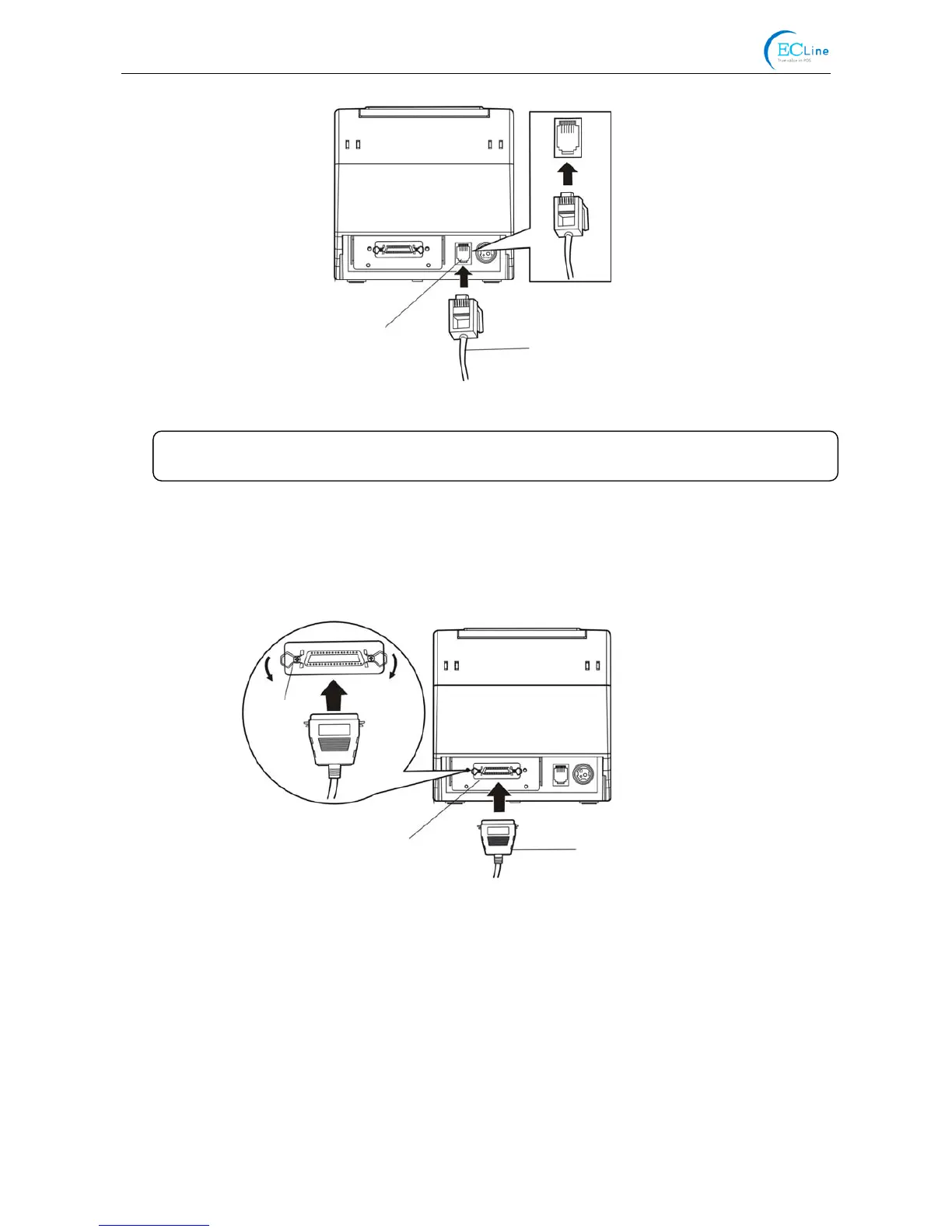
2.3.2 Connecting the Parallel Interface Cable
1. Make sure the computer and the printer are both turned off, connect the parallel interface cable to
the connector of the printer. Squeeze the wire clips on both sides and make the cable fixed. As
shown in Figure 2-3.
2. Connect the other end of the cable to the computer. Tighten the screws on both sides and make
the cable fixed.
2.3.3 Connecting the USB Interface Cable
1. Plug the USB cable A end (flat shape) into the computer's USB interface.
2. Plug the USB cable B end (square shape) into the printer's USB interface as shown in Figure 2-4.
Figure 2-3 Connecting the parallel interface cable
Parallel Interface Parallel Interface Cable
Wire Clips
Figure 2-2 Connecting the cash drawer cable
Cash Drawer Cable
Cash Drawer Interface
Caution: Please use the appropriate cash drawer. Manufacturer will not honor warranty
when usin



 To Next Page